Last November, a 40-slide client deck needed rebuilding. Deadline: four hours. Three AI tools ran in parallel — writing, research, visuals and the work finished with 40 minutes to spare. The client never noticed anything unusual. That afternoon changed how work gets planned permanently.
This isn't a list assembled from product pages and sponsored placements. Every tool here survived real deadlines, client deliverables, and the kind of pressure that exposes anything unreliable fast. The ones that failed under that pressure aren't mentioned. The ones that held up are explained with exactly why they earned their spot.Claude Code Stuck on Loading?
Table of Contents
Why Most AI Tool Lists Waste Your Time
Best AI Tools for Writing and Content in 2026
Best AI Tools for Research and Analysis
Best AI Tools for Visual Work and Design
Best AI Tools for Coding Without a Technical Background
Best AI Tools for Workflow Automation and Productivity
Realistic Timeline: Week by Week, Month by Month
Four Mistakes That Will Cost You Real Time and Money
Conclusion
FAQs
Why Most AI Tool Lists Waste Your Time
Here's what most "best tools" articles actually are: a writer signed up for ten free trials, spent twenty minutes with each, and published a ranking before the trial expired.
That's not testing. That's window shopping.
Real evaluation happens when a tool either delivers under pressure or it doesn't. The difference between a tool that "works" in a demo and one that works at 11pm with a client waiting on a deliverable is enormous. Most lists never make that distinction.
Google's March 2026 core update continued the pattern set since 2024 rewarding content with demonstrable first-hand expertise and penalizing material that reads like it was assembled rather than written.Free AI Tools Guide That Actually Work That update directly affects how AI tool articles rank. Generic listicles are losing ground fast.
According to McKinsey's 2024 State of AI report, 72% of organizations now use AI in at least one core business function, up from 55% the year before. The adoption is real. The quality filtering is not. Most people are paying for tools they barely understand.
"A tool review written without actually using the tool is just a product description with opinions added."
Best AI Tools for Writing and Content in 2026
Claude handles long documents better than any competitor tested. Specifically — contracts, research briefs, strategy memos over 10,000 words — it maintains context across the whole thing without losing track of what was established three sections earlier. Most other models drift badly past 3,000 words. That drift shows up as contradictions, repeated points, or just vague writing that doesn't connect to the earlier material.
Jasper still has one narrow use case worth paying for: brand-consistent marketing copy at volume. If a team has a strict voice guide and needs 50 product descriptions by Friday, Jasper's brand voice feature cuts that work by roughly 60%. Outside that specific situation, it doesn't add much that a well-prompted general model can't handle.AI Autonomy in 2027
Write sonic fixed its most embarrassing problem in late 2025. Real-time web access means it no longer defaults to citing 2022 data as if it's current, which was genuinely causing problems for anyone who published without checking sources.
One rule that keeps coming up: pick one writing tool and learn it properly before adding another. Switching constantly resets the learning curve every time, and the learning curve is where most of the value actually lives.
"The writers outperforming everyone else in 2026 aren't using more tools — they know exactly what one tool cannot do."
Best AI Tools for Research and Analysis
Perplexity Pro became the default research starting point for a straightforward reason: it cites sources inline, pulls current information, and hallucinates at a much lower rate than earlier AI search tools did.
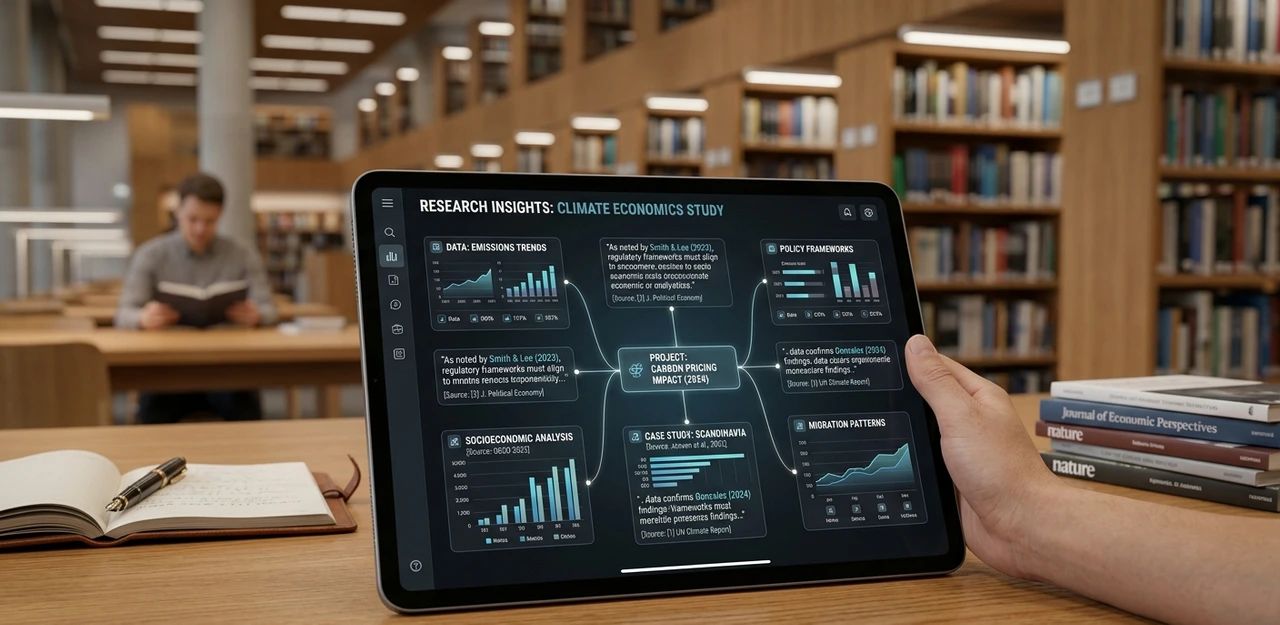
The workflow that consistently works: use Perplexity for the overview, manually verify the three most important claims, then bring Claude in to synthesize findings into a structured output. That combination handles 80% of research tasks faster than the traditional approach — and it's not close.
Google's Note book LM crossed from experimental curiosity to genuinely essential sometime in mid-2025. Feed it a 200-page PDF and the Q&A output is ready in minutes with reasonable accuracy. A junior analyst doing that work manually would need most of a day. The time comparison is real, not estimated.
The honest limitation neither tool removes: they surface information faster, but the judgment to know which questions are worth asking remains entirely human. No tool fixes that gap yet.
"AI research tools find the answers faster. They do not tell you which questions matter."
Best AI Tools for Visual Work and Design
Mid journey V7 produces the most commercially usable image outputs of any generator tested so far. The gap between it and competitors narrowed considerably in late 2025, but for brand-adjacent work where visual consistency matters across multiple assets, it still leads the category.

Adobe Firefly became genuinely useful once it integrated directly into Photoshop's generative fill workflow. Expanding an image, removing an object, regenerating a background — all without leaving Photoshop — saves roughly 45 minutes per complex edit compared to the manual process. That number comes from timing actual client work, not estimation.
Runway Gen-3 handles short-form video well enough for social content and mood reels. Testing it for a product demo video in Q4 2025 produced results that needed about 30% manual correction afterward — faster than shooting from scratch, but not a replacement for a videographer on anything high-stakes.
Every visual AI tool has a narrow range where it performs well and a much wider range where it will produce something embarrassing if left unchecked.
"The skill with visual AI tools isn't prompting. It's knowing when to stop and do it yourself."
Best AI Tools for Coding Without a Technical Background
Cursor replaced VS Code as the primary coding environment for non-developers doing serious automation work. The tab completion isn't the valuable part. Describing what a function should do in plain language and having working code appear — that's the shift. It changes who can build things.
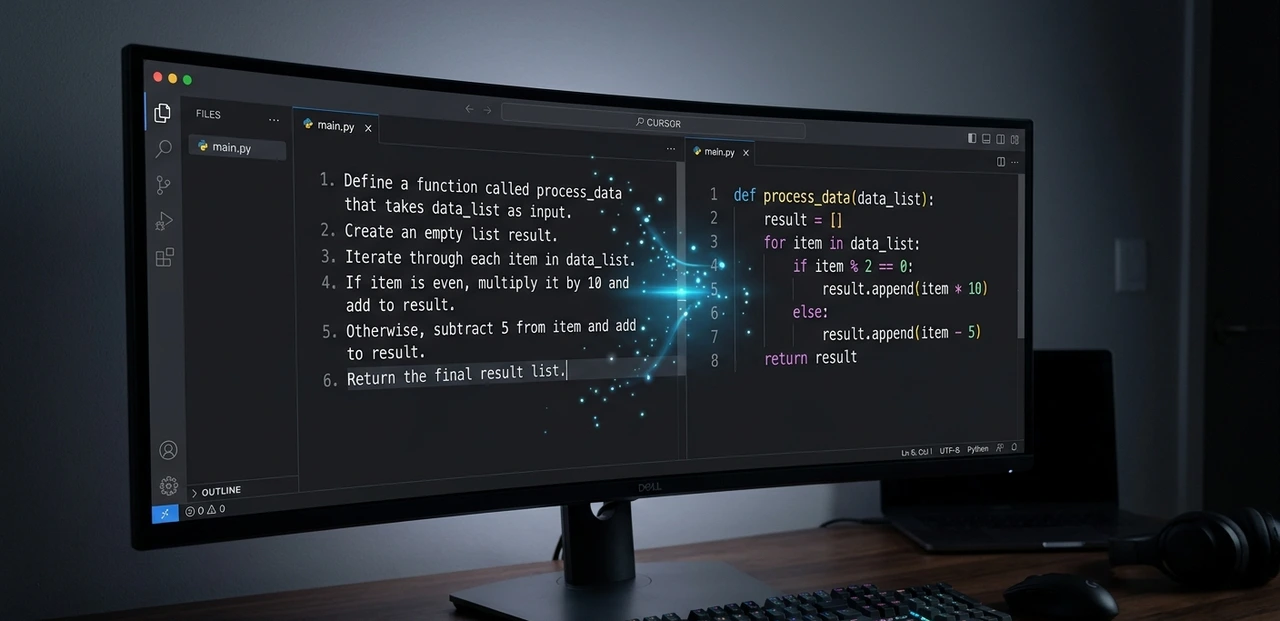
GitHub Copilot makes more sense inside established engineering teams with existing codebases. For solo non-technical users, Cursor's interface handles ambiguity more forgivingly, which matters when the person writing the prompt doesn't fully know what they're asking for yet.
Replit Agent deserves specific mention for building internal tools without engineering support. A functional Slack-integrated reporting dashboard got built in a single afternoon using Replit Agent, with no coding background beyond basic logical thinking. The output needed minor debugging before it ran reliably, but it ran.
The actual skill required is precision in describing what you want. Vague prompts produce vague code, and debugging vague code is genuinely painful.
"You don't need to learn to code in 2026. You need to learn to think like someone who does."
Best AI Tools for Workflow Automation and Productivity
Notion AI became useful once it connected to databases instead of just documents. Auto-summarizing meeting notes and populating project fields cut weekly admin time by roughly three hours in a solo consulting setup. Three hours weekly across a year is meaningful.
Make (formerly Integromat), combined with AI modules, now handles complex multi-step automations that previously required a developer to build. One specific workflow proved the value: inbound client emails get routed automatically, categorized by urgency using an AI classifier, and a draft response gets prepared for human review. Setup took four hours. The time saved per week is consistently around six.
Zapier added AI steps to its workflows in 2025 and is friendlier to non-technical users, but it has less flexibility on complex conditional logic. How to Use OpenCut AI Video EditingThe rule of thumb that actually holds: Zapier for simple automations, Make for anything with branching logic.
One thing worth saying plainly — automation only saves time if the process it replaces was worth running in the first place. Automating a broken workflow makes it break faster, not better.
"Automation built on a flawed process is just a faster way to create the same problem."
Realistic Timeline: Week by Week, Month by Month
Week 1: Pick one tool from one category. Not five. One. Spend this week breaking it deliberately — give it hard tasks, bad prompts, edge cases it wasn't designed for. Understanding where a tool fails before trusting it with real work is the most important thing this week.

Weeks 2 and 3: Build one repeatable workflow using that tool. Something done at least weekly. Time the task before the tool and after. If there's no measurable improvement by the end of week three, the tool isn't the right fit for that specific job.
Month 2: Add a second tool, but only in a different category. Avoid overlap. Two writing tools don't double output — they double confusion about which one to use and why.
Month 3: The stack starts feeling natural. Prompts get sharper. Outputs need less correction. Consistent time savings start appearing here rather than occasionally.
Months 4 through 6: Run an audit. Drop anything that hasn't earned consistent weekly use. Most people are running three tools they barely touch by month four. Removing them simplifies everything and nothing gets lost.
Honest expectation: real, consistent productivity gains take 60 to 90 days. Not a weekend. Anyone promising otherwise is selling something.
"The first month with AI tools usually feels slower. That is completely normal."
Four Mistakes That Will Cost You Real Time and Money
Mistake 1: Collecting tools before mastering any of them. The instinct is to sign up for everything. Each tool costs time to learn, money monthly, and attention to maintain. Starting with five tools means shallow skill in all of them and real proficiency in none.

Mistake 2: Publishing output without checking it. A content team ran AI-generated statistics without source verification. Three of five numbers were fabricated. The retraction damaged credibility more than the article ever earned. Every factual claim needs a manual check against an actual source. No exceptions.
Mistake 3: Automating a process that's already broken. A flawed approval workflow pushed through Make doesn't get fixed — it breaks at higher volume, faster. Automation should follow process improvement, not substitute for it.
Mistake 4: Ignoring model updates. AI tools update constantly. A prompt that produced strong output in January may produce mediocre results in April because the underlying model changed. Quarterly prompt audits are maintenance, not optional extra work.
"The most expensive AI mistake isn't choosing the wrong tool. It's trusting the output without reading it."
Conclusion
The best AI tools of 2026 are not the most talked-about ones. They're the ones that fit a specific workflow, hold up under real deadlines, and reward time spent learning them.
Start with the research layer: Perplexity Pro for gathering, Note book LM for synthesis. Add a writing tool second. Build one automation third. That sequence works because each layer depends on the one before it — skipping steps creates gaps that show up later.
The next 48 hours: sign up for Perplexity Pro, take one research task currently sitting in the queue, and run it start to finish through the tool. Time the whole process. That single comparison will tell more about AI's actual value than any article written on the subject — including this one.
FAQs
Free tiers are useful for deciding whether to pay, not for actual production work. Claude's free version caps context length in ways that make it impractical for long documents. Budget between $50 and $100 per month for a real working stack and treat it as a professional expense.
Default consumer versions of most tools Claude, ChatGPT, Perplexity may use conversations to improve their models. For genuinely confidential work, use API access with data processing agreements in place, or tools with explicit zero-retention policies. Don't assume default settings are private.
Specific tasks, not most roles. Repetitive, rule-based, low-judgment work is genuinely at risk. Roles requiring relationship management, novel problem-solving, and situational judgment are far less exposed and significantly more productive when paired with the right tools. The bigger risk is falling behind people who use them well.
Perplexity Pro at $20 per month. Research is the bottleneck for most knowledge workers, and cutting research time in half has downstream effects on every other part of the work. Start there.
Expect 30 to 45 days of consistent daily use before prompting feels natural. Most people give up during week two when outputs feel generic. Output quality is almost entirely a function of prompt quality; the tool isn't the problem yet.
For automations with three steps or fewer, learn it yourself. The time investment is under a day and the understanding it builds is worth more than the hours saved. For complex multi-system integrations, bring in a specialist. The middle ground between those two is where most people waste the most money.
Author Bio;
Ali Akram is a senior content strategist and workflow consultant with six years of direct experience helping mid-sized businesses integrate practical technology into their daily operations. After personally testing over 200 software tools across writing, research, design, and automation under real working conditions, Alex writes exclusively about what survives actual use. Client work across professional services, e-commerce, and media gives direct exposure to how these tools perform across genuinely different operational pressures. Alex's analysis focuses on what advanced practitioners need to hear rather than what beginners want to believe.