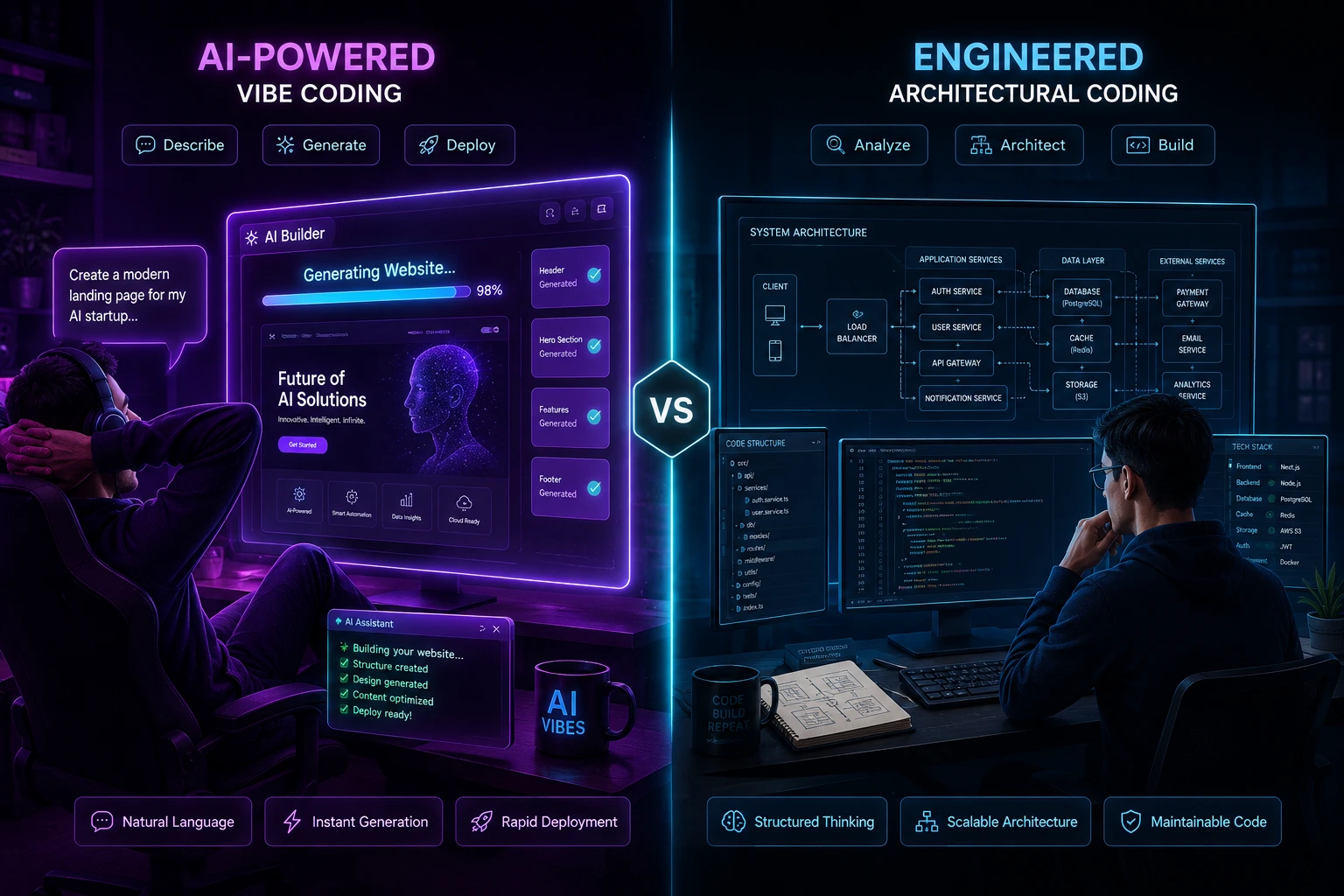
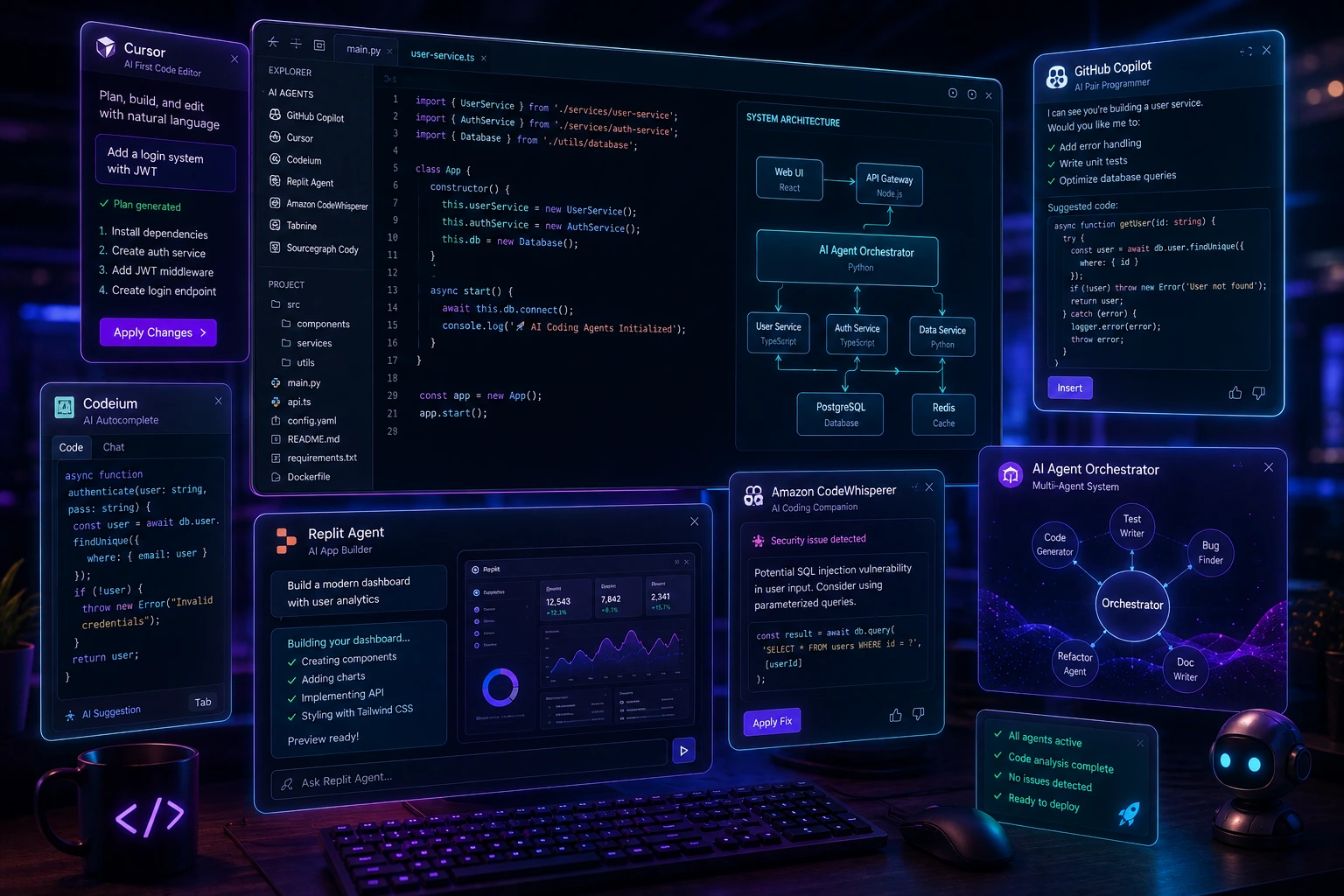
"Vibe coding" building software by prompting an AI and accepting what it generates with little review has gone from niche joke to mainstream workflow. Tools like Cursor, Bolt, Lovable, v0, Replit Agent, and Claude Code have made it possible to ship a working website in an afternoon without writing much code by hand. That's genuinely useful. It's also created a specific, recognizable category of website: fast to build, often functional, but riddled with patterns that give away how it was made.
If you're a developer auditing a codebase, a technical co-founder evaluating a contractor's work, or just someone curious why a site "feels off," knowing how to tell if a website is vibe coded is a practical skill. This article walks through the concrete, technical signs in the UI, the code, the architecture, the search engine visibility, and the metadata that separate a vibe-coded site from one built with deliberate engineering practices, and explains why each signal shows up in the first place.
What Does "Vibe Coding" Actually Mean?
Vibe coding is a term popularized in 2025 (credited to Andrej Karpathy) for a development style where a person describes what they want in natural language, an AI coding agent generates the implementation, and the person accepts the output running it, glancing at the result, and moving on rather than reading the code line by line. The term isn't inherently negative; it describes a workflow, not a quality level. But because the workflow skips the traditional review loop, certain classes of problems slip through consistently.
This matters for detection: you're not looking for "AI wrote this," since AI-assisted coding is now standard practice at most serious engineering shops too. You're looking for signs that no human meaningfully reviewed or understood the output before it shipped. Programmer Simon Willison drew this same line early on, distinguishing a developer who reviews, tests, and understands every generated line from someone using the AI purely as an unsupervised author.
Why Detecting Vibe-Coded Sites Matters
A handful of practical situations make this skill worth having:
Due diligence evaluating a startup's codebase before investing, acquiring, or partnering.
Hiring and contracting verifying that a freelancer or agency actually understands what they delivered. Recruiters increasingly report giving candidates small coding tests specifically to see whether they can explain and defend their own logic rather than only paste AI output.
Security review vibe-coded apps have a well-documented pattern of shipping with exposed API keys, missing auth checks, and unvalidated inputs. Some security researchers now describe this openly as "vulnerability-as-a-service."
Maintainability planning deciding whether a codebase can be safely extended or needs a rewrite.
Marketing and SEO planning a site can look finished and still be functionally invisible to Google, Bing, and AI answer engines (more on this below).
Personal curiosity developers like figuring out how things were built.
None of this requires backend access. Most of the signals below are visible from the browser, the page source, or a few minutes with browser dev tools.
Front-End Signals: What You Can See in the Browser
1. Repetitive, Generic Visual Patterns
AI page generators tend to converge on the same visual vocabulary because they're trained on similar component libraries and design patterns. Watch for:
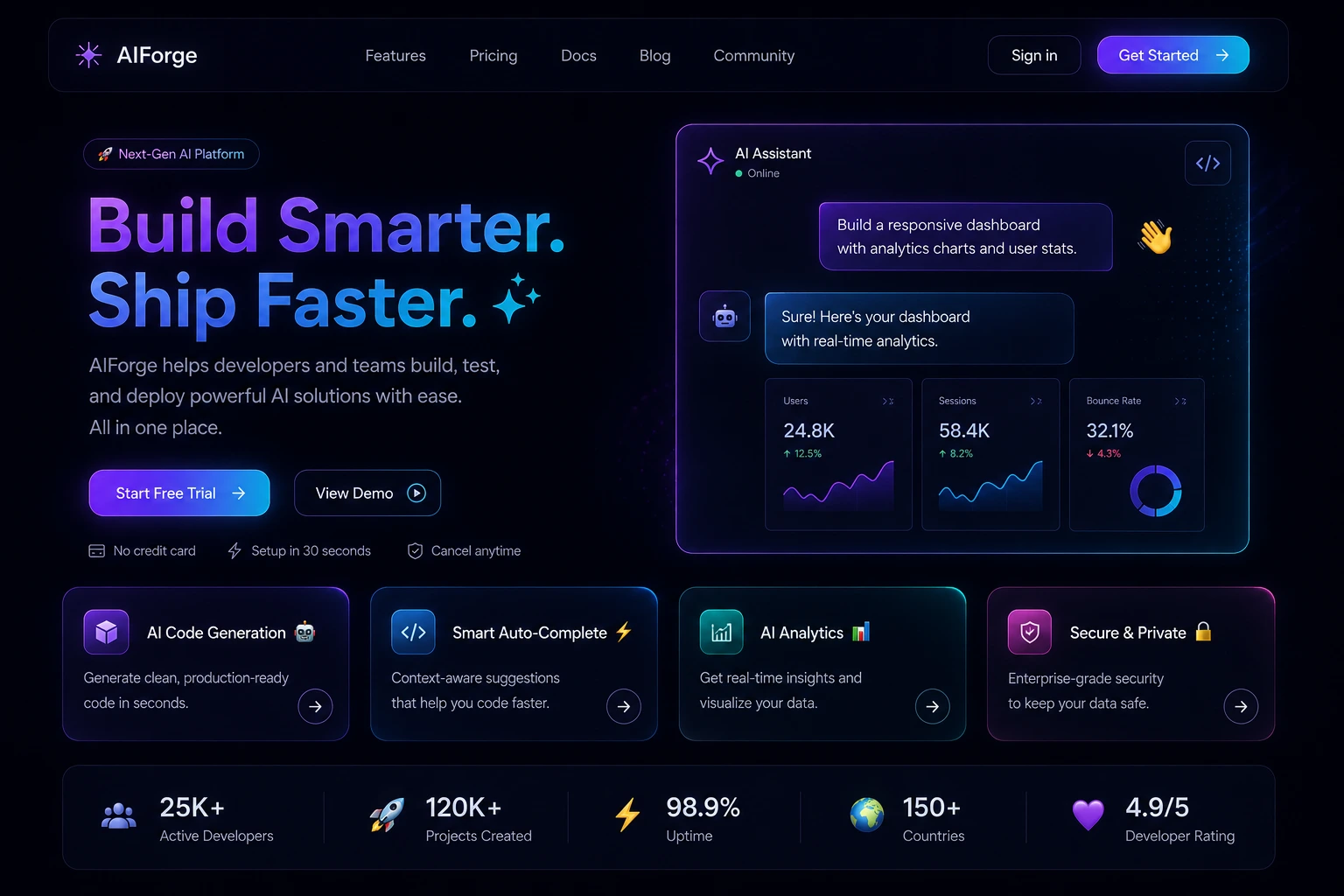
Purple-to-blue (or purple-to-pink-to-cyan) gradient hero sections as a near-default choice, frequently sitting on a near-black background (developers who work with these tools often describe the shade as "gray-900").
Heavy, uniform use of rounded corners, pill-shaped buttons, drop shadows, and glassmorphism effects applied indiscriminately.
Three-column "feature card" grids with an icon, bold title, and one sentence of description repeated for every single section, regardless of whether the content fits that shape.
Emoji used as section icons, in headings, or scattered through the UI as visual flair instead of a proper icon set freelance developers who work with these tools regularly flag this as one of the fastest visual tells, alongside glowing hover effects on nearly every element.
Formulaic, overly upbeat microcopy on buttons and success states phrasing like "Let's Go!" or exclamation-heavy confirmation messages shows up disproportionately often because it matches a common AI default rather than a brand voice someone deliberately chose.
Generic stock-photo-style hero images or AI-generated illustrations that don't relate specifically to the product.
None of these alone is proof. Plenty of hand-built sites use Tailwind's default rounded corners too, and plenty of professional designers like the shadcn/ui aesthetic on its own merits. It's the combination and uniformity that's telling of a site where every section, without exception, follows the identical card-grid-with-icon template, in the identical color palette, usually wasn't designed by a human making section-by-section decisions.
2. Builder Fingerprints Left in the Page
This is often the single strongest signal, because it isn't a style choice at all its infrastructure the platform injects, and most people never think to remove it.
Badges. Free tiers of AI builders frequently stamp their own output: an "Edit with Lovable" tab in a corner, a "Made with Bolt" mark, a "Built with v0" line in the footer. A badge is conclusive on its own, though paid plans usually let owners remove it, so its absence proves nothing.
Default subdomains. Every builder deploys new projects to its own infrastructure. First, I think addresses ending in things like .lovable.app, .bolt.host, .replit.app/.repl.co, or .base44.app. A business running its live site on one of these preview domains hasn't just used an AI tool it hasn't gotten around to leaving the sandbox yet.
Injected runtime scripts. View Page Source and look for platform plumbing loaded from the builder's own CDN, or small internal-looking script paths tucked into the <head> or before </body>. These survive a move to a custom domain because owners rarely dig through raw HTML.
Leftover asset paths and meta tags. Some builders store every uploaded image under a distinctive upload path, or write their own name into a meta tag (either a custom tag or a hijacked generator tag). Owners strip badges far more often than they rehost every image, so an old upload path is one of the most durable tells available.
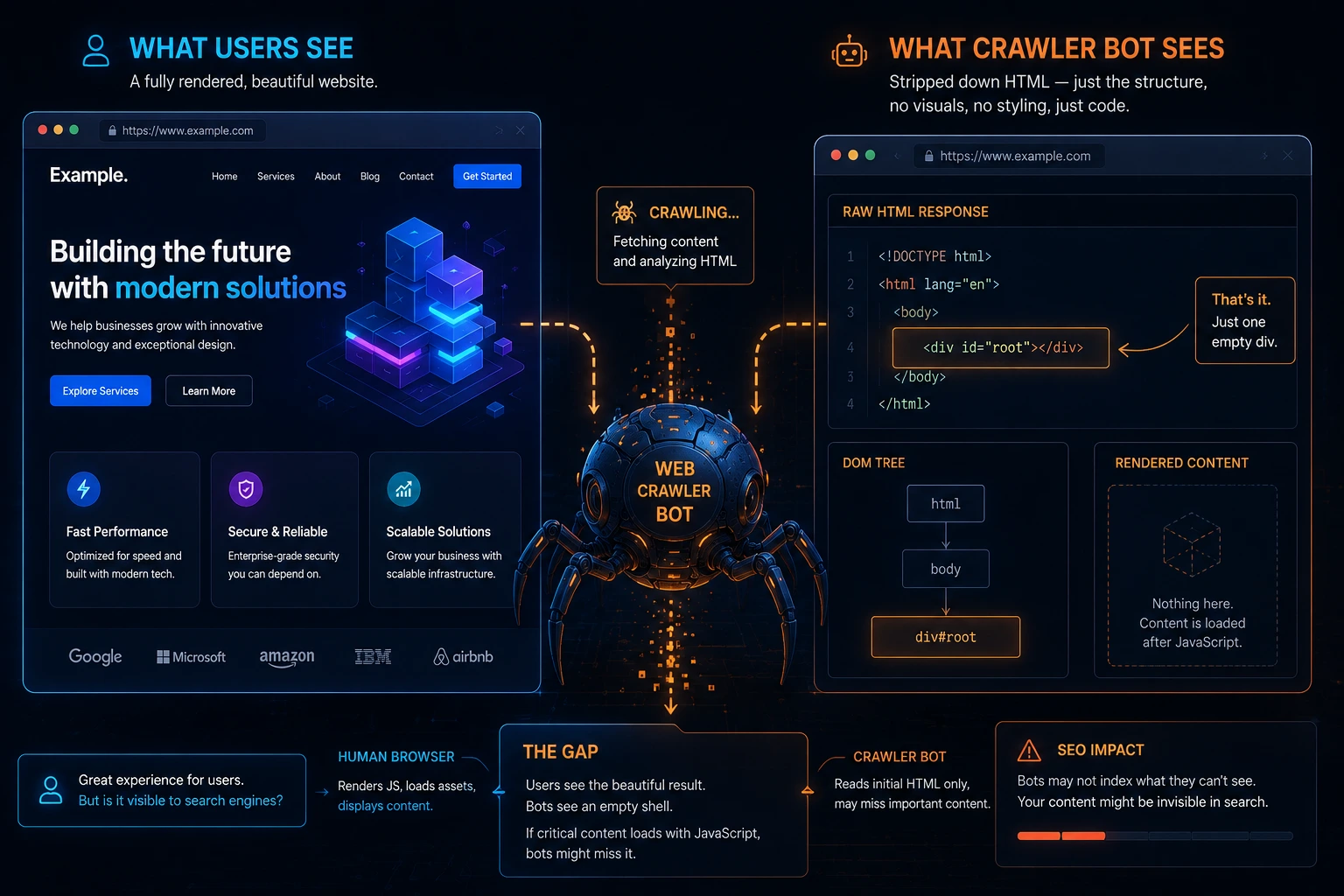
A nearly empty page source. Hand-built business sites that render on the server tend to have page source full of readable text. The default output of most AI builders is a client-rendered single-page app, so the raw HTML is close to empty: a single <div id="root">, a script tag pointing at a hashed bundle file, and little else. This alone isn't proof (plenty of hand-built single-page apps exist too), but combined with the other signals above it's a strong supporting data point.
Comments the build tooling should have stripped. Production builds normally strip HTML comments on the way out. AI-written static pages that someone deployed by hand often still carry section labels like <!-- Hero --> or <!-- Testimonials --> sitting above each block, decorative divider comments, and stray emoji in the markup. A person writing a page by hand doesn't usually leave a trail of self-narrating comments; an AI writes them for its own bookkeeping, and no one who doesn't read code knows to remove them.
Two things are worth naming explicitly here, because they get thrown around as false "gotchas": using React, Vite, or Supabase says nothing on its own these power a huge amount of carefully hand-built software and a website made in a no-code editor like Wix, Squarespace, Webflow, or Shopify is a different category entirely from vibe coding, since no code is generated at all.
The catch with every fingerprint above is that it only works in one direction. Presence of a marker is strong evidence; absence proves nothing. Code written with an IDE-embedded assistant like Cursor, Claude Code, or Windsurf deploys through a completely normal repository and leaves no builder fingerprint at all, and any of the markers above can be manually deleted with a single follow-up prompt.
3. Placeholder and Boilerplate Text Left In
This is one of the strongest and easiest signals. Search the page (Ctrl+F / Cmd+F) for:
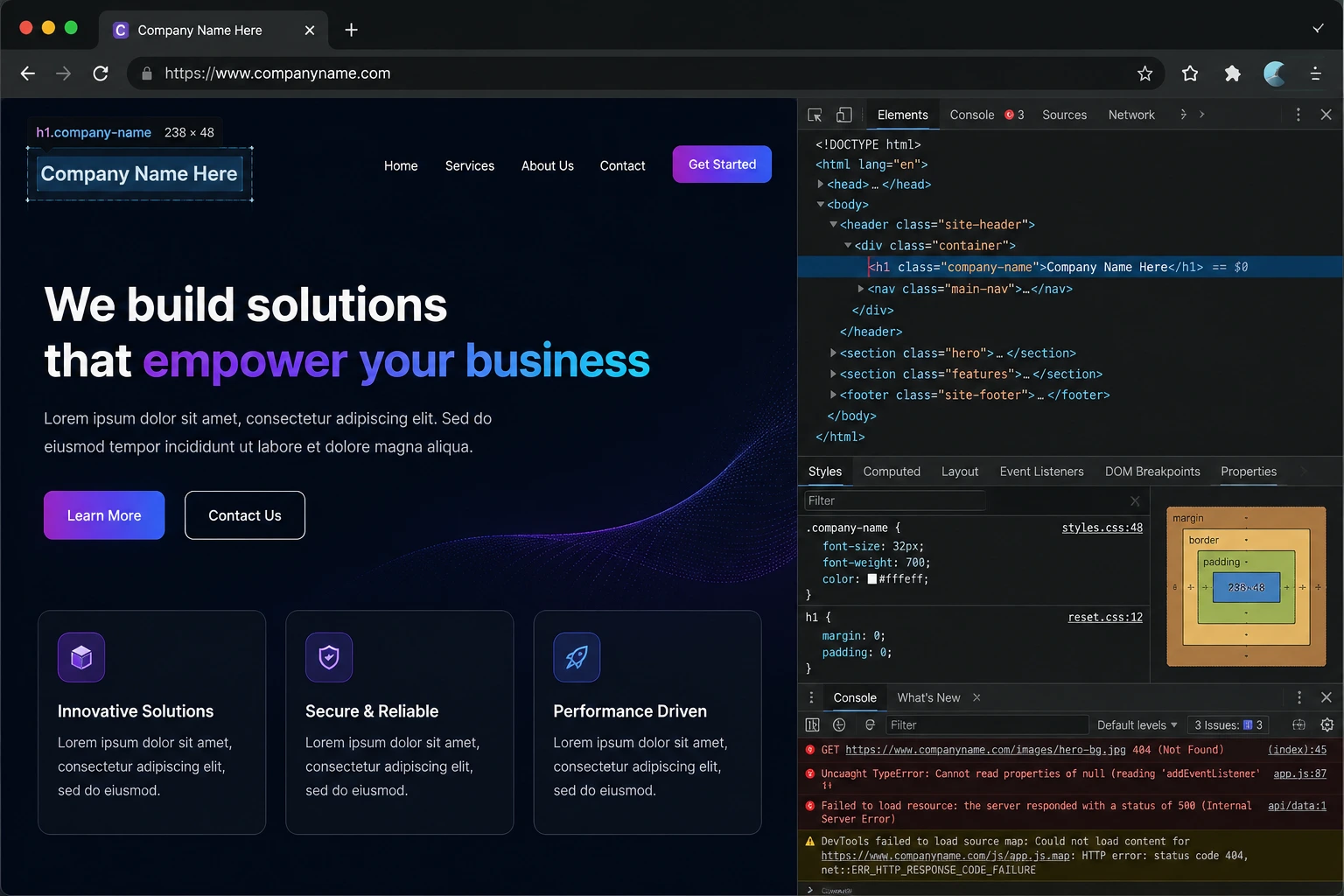
"Lorem ipsum"
"Your Company Name," "Company Name Here"
"[Insert testimonial here]"
Generic testimonials attributed to "John Doe" or "Jane Smith" with stock avatar images
Copyright footers still reading the template's original year or a placeholder brand
AI scaffolding tools generate a full page structure including realistic-looking filler content, and if the person accepts the output without reading it end to end, that filler survives into production.
4. Inconsistent or Non-Functional Interactive Elements
Click everything. Vibe-coded sites frequently have:
Buttons that visually exist but have no onClick handler wired up, or link to #.
Forms that submit but show no success/error state, or console-error on submission because a backend endpoint was never actually connected.
Navigation links that go to pages that don't exist (404s) because the AI scaffolded a multi-page site but only a couple of pages were actually built out.
Inconsistent hover states some buttons have transitions and states, others (added later, or generated in a different session) don't.
5. Accessibility Gaps
AI-generated front ends often look polished but fail basic accessibility checks, because visual correctness is easy to verify by eye while accessibility requires deliberate testing:
Missing alt text on images (View Page Source or inspect element).
Poor color contrast, especially light gray text on white backgrounds is a very common AI-generated default.
No visible focus states when tabbing through the page with the keyboard.
Divs and spans with onClick handlers instead of semantic <button> elements.
Running the page through Lighthouse (built into Chrome DevTools) or axe DevTools gives you a quick accessibility score. A sub-70 score paired with an otherwise polished visual design is a meaningful signal, since real accessibility work requires the kind of manual testing that a pure prompt-and-accept workflow tends to skip.
SEO and Discoverability: The Silent Vibe-Coding Failure
This is a category that's easy to miss because the site can look completely finished while being functionally invisible to search engines and it's become one of the most reported problems with AI-generated sites, precisely because it's invisible from a casual glance.
Client-side rendering with nothing to crawl. Most AI website builders default to shipping a JavaScript-heavy single-page app: the server sends a nearly empty HTML shell, and the browser builds the visible page afterward by running a script bundle. Search engine crawlers fetch the raw HTML first, and if that's empty, that's what gets recorded initially. Full rendering happens later, in a separate queue, sometimes days or weeks later and smaller or newer sites can burn through their crawl budget before that second pass ever happens, leaving large parts of the site effectively unindexed.
Duplicate or missing meta tags. AI-generated pages often reuse the same title and meta description across every page, or auto-generate a description by copying the page's first sentence, which search engines treat as low-quality boilerplate.
Broken heading hierarchy. Because these tools optimize for how a heading looks rather than what it means semantically, it's common to find several <h1> tags on one page (one per section, sized to look prominent) or a page's real title built with a styled <div> instead of a heading tag at all.
Missing canonical tags and structured data. These are rarely part of what gets generated by default, and both matter for how search engines and AI answer engines (ChatGPT, Perplexity, Claude, Google's AI features) decide what a page is actually about.
Real-world consequence. Marketers who've run technical SEO audits across multiple AI-built sites report the same pattern repeatedly: fast, polished, professional-looking sites that Google Search Console shows as essentially unindexed, or that render as a blank card when shared on social platforms. Some site owners have reported pages getting de-indexed and never recovering, even after fixes, which several have described as feeling like search engines "penalize" the platform's default output more harshly than an equivalent hand-built page.
None of this means a vibe-coded site can't rank it can, once someone deliberately fixes server-side or pre-rendering, meta tags, heading structure, and structured data. But by default, most of these tools treat SEO as a non-goal, so a beautiful site with zero organic search visibility is one of the more reliable (if less obvious) indicators that no one reviewed the output with search in mind.
Code-Level Signals: What You Can See in Dev Tools or Source
You don't need repository access to check most of this. Right-click → Inspect, or View Source, gets you a long way.
6. Over-Engineered or Redundant Component Structure
AI coding assistants tend to generate more code than a task strictly needs, because they're optimizing for "produces correct output" rather than "minimal, idiomatic solution." In a React or Vue site where you can view the bundled source (or if you have repo access), look for:
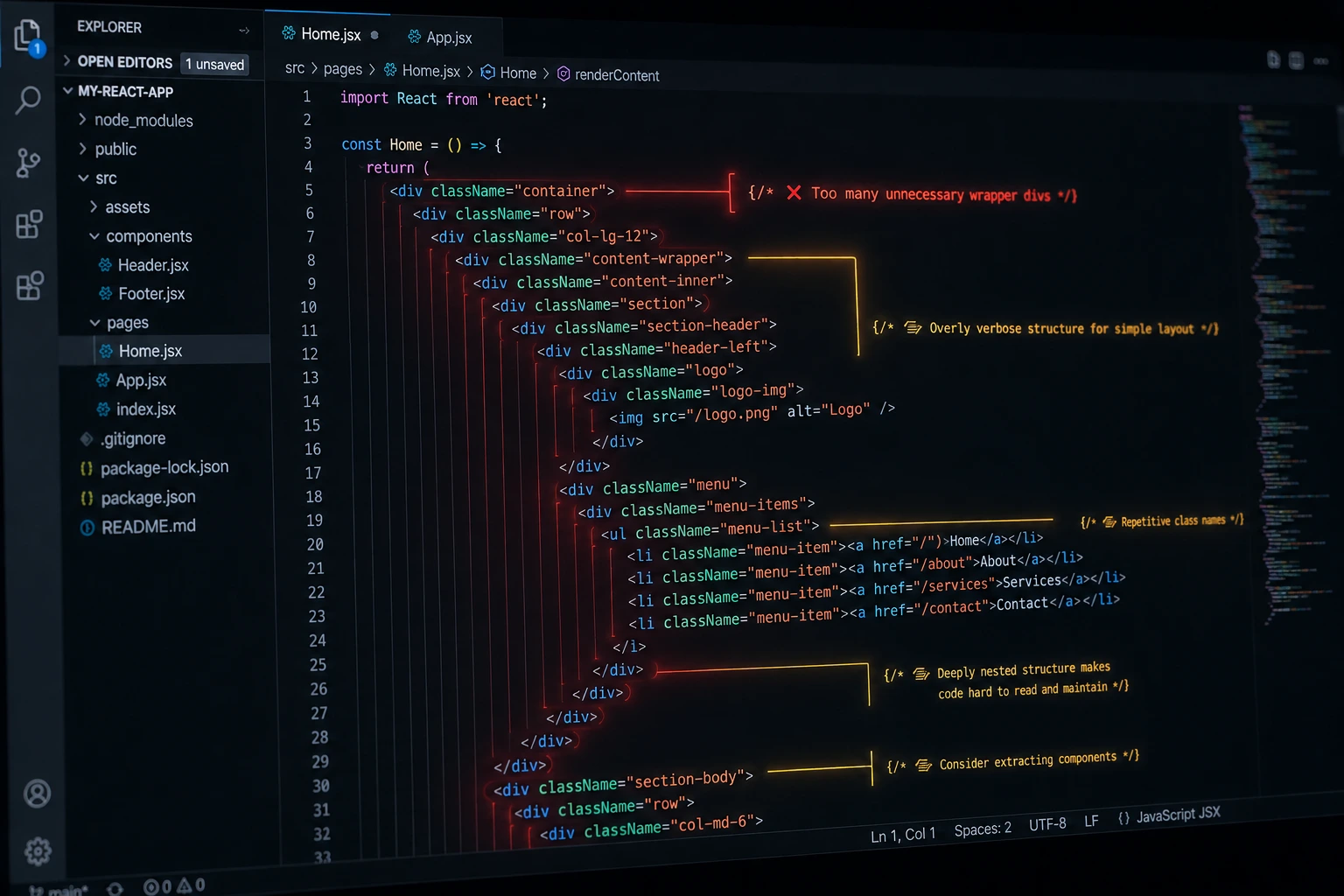
Multiple components doing nearly identical things with slightly different naming (Card.jsx, FeatureCard.jsx, ServiceCard.jsx all near-duplicates).
Deeply nested wrapper divs with no layout purpose a <div> wrapping a <div> wrapping a <div>, each adding a single class.
Inline styles mixed inconsistently with a CSS framework, suggesting styling was patched incrementally by re-prompting rather than refactored.
Unused imports and dead code left in the bundle visible if you inspect an unminified or source-mapped build.
7. Inconsistent Naming and Code Style
A human-maintained codebase tends to converge on one naming convention. AI-generated code, especially across multiple prompting sessions or multiple AI tools, frequently doesn't:
Javascript
// Same file, three different naming conventions for similar things
const user_data = fetchUserData();
const userProfile = getUserProfile();
const UserSettings = loadSettings();
You'll also see camelCase and snake_case mixed within the same file, comment styles that change abruptly, and formatting that isn't consistent with a single Prettier/ESLint config because no one ever ran one project-wide format pass.
8. Suspiciously Verbose or Textbook-Style Comments
AI-generated code often includes comments explaining what the code does at a very basic level rather than why a decision was made the opposite of what experienced engineers write:
Javascript
// Loop through the array of users
for (let i = 0; i < users.length; i++) {
  // Check if the user is active
  if (users[i].isActive) {
    // Add the user to the active users array
    activeUsers.push(users[i]);
  }
}
A human reviewing and internalizing this code would typically either delete comments like these or replace them with something explaining a non-obvious business rule. Their survival, unedited, into a shipped site suggests the code was never actually read.
9. Missing or Fake Error Handling
Because AI models are optimized to produce code that satisfies the prompt, they frequently generate error handling that looks correct but doesn't actually do anything useful:
Javascript
try {
  const response = await fetch('/api/checkout');
  const data = await response.json();
} catch (error) {
  console.log(error); // and nothing else
}
Open the browser console while using the site. Vibe-coded sites frequently throw uncaught errors, failed fetch requests, or React key warnings that were never addressed because no one was watching the console during development.
Architectural and Backend Signals
If you do have deeper access to a GitHub repo, an API you can probe, or a technical interview with whoever built it these signals are much stronger than anything visible in the browser. They're also, by a wide margin, the most consequential ones: independent testing of AI-generated programs has repeatedly found that somewhere around four in ten contain an exploitable flaw, and industry security teams now treat this as an expected baseline rather than a surprise finding.
10. Exposed Secrets and Client-Side API Calls to Paid Services
This is the most consequential vibe-coding failure mode, not just a stylistic tell. Check the page source and network tab for:

API keys for services like OpenAI, Stripe, or Supabase are hard-coded directly in client-side JavaScript, visible to anyone who opens dev tools.
Direct client-to-third-party-API calls that should be proxied through a backend (e.g., a browser making an authenticated call straight to a payment provider or LLM API with a secret key embedded).
.env files or .env.example files accidentally committed to a public repo with real values still in them.
AI assistants will often do exactly what's asked "add Stripe checkout" in the most direct way possible, which is frequently the least secure way, unless the prompt explicitly specifies a secure architecture. This isn't hypothetical: secrets scanning research has tracked tens of millions of new secrets landing in public repositories every year, growing year over year, and repositories where an AI coding assistant is active have been found to leak API keys, passwords, and tokens meaningfully more often than repositories without one.
There are documented cases of solo builders having their API keys leaked from vibe-coded apps and being forced to shut the project down and rebuild from scratch after attackers ran up usage on their account.
11. No Input Validation or Sanitization
Try submitting obviously malformed input into any form: a negative number in a quantity field, HTML tags in a text field, an extremely long string. Vibe-coded backends built by accepting AI output wholesale commonly skip:
Server-side validation (relying only on HTML required attributes or client-side JS checks, which are trivially bypassed).
Sanitization before rendering user input back to the page, opening the door to stored cross-site scripting (XSS).
Protection against SQL injection in any endpoint that builds a database query from user input directly.
Rate limiting on forms, login attempts, or API endpoints.
12. Database and Auth Misconfiguration
If the site uses a backend-as-a-service like Supabase or Firebase (common in AI-assisted stacks because they're fast to scaffold), you can sometimes check:
Whether Row Level Security (Supabase) or security rules (Firebase) are actually enforced, versus left in a permissive default state sometimes checkable by attempting to query the public API endpoint directly and seeing what comes back.
Whether authentication actually gates the routes and API calls it appears to gate, or whether protected pages are only hidden by client-side conditional rendering while the underlying data is still fetchable.
This class of bug is common enough in AI-scaffolded backends that Supabase itself now publishes guidance urging builders to explicitly verify Row Level Security policies and test data isolation between user accounts before calling an app production-ready, rather than assuming secure defaults.
13. Dependency and Supply Chain Red Flags
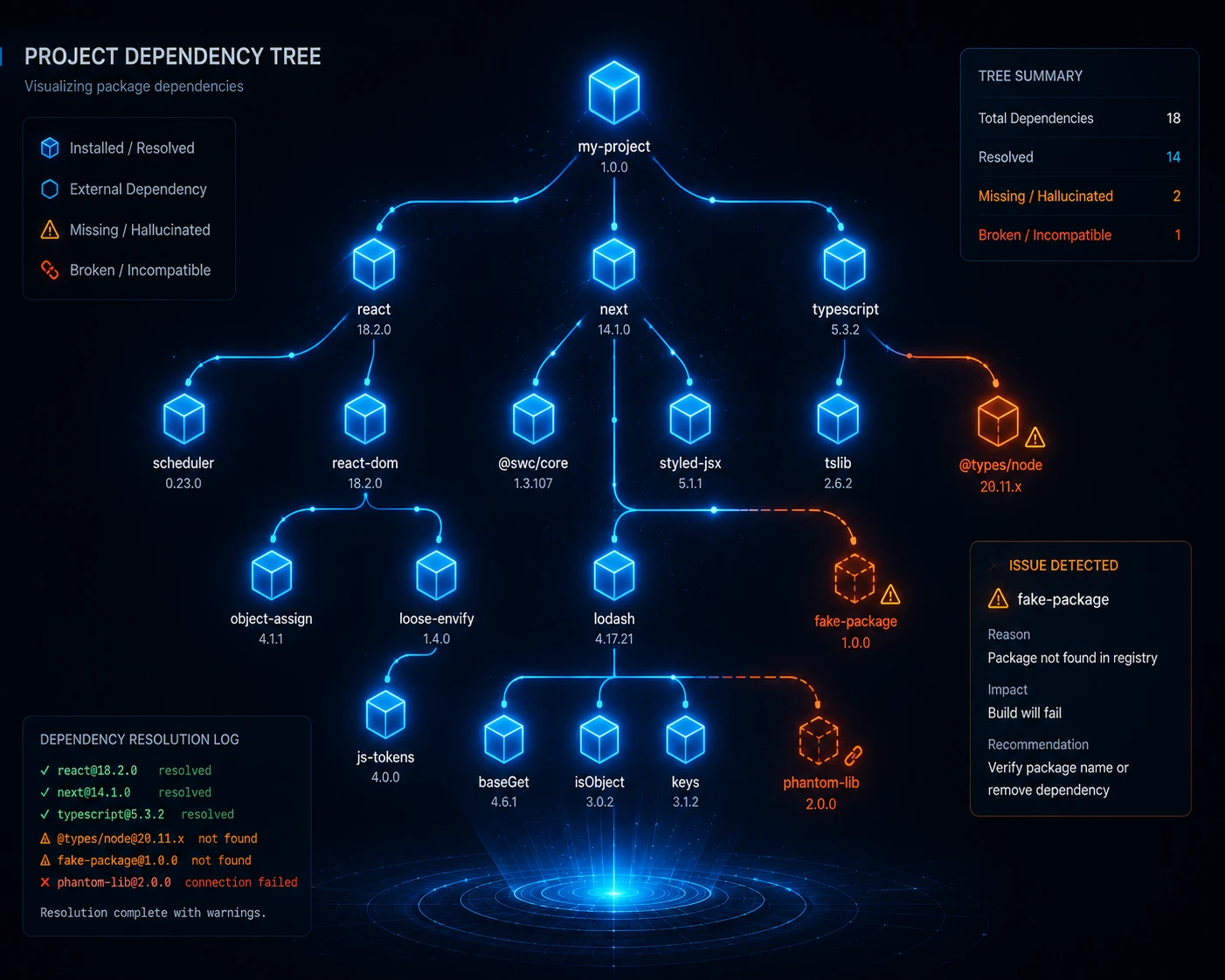
This is a newer, less obvious category, but it's become common enough that security vendors track it as a distinct risk. AI coding assistants sometimes recommend software packages with complete confidence including ones that don't actually exist. Researchers studying this "package hallucination" problem found a meaningful share of AI-suggested dependencies referenced packages that were never published, and that the same invented names tend to reappear consistently across repeated runs of the same prompt.
That predictability matters, because it lets attackers register the invented package name in advance and wait for someone to install it, a technique researchers call "slopsquatting."
What to check if you have repository access:
Whether package.json (or the equivalent manifest) lists an unusually large number of dependencies for how simple the app appears, AI assistants tend to reach for a new library per feature rather than reusing what's already installed.
Whether a lockfile is committed, which pins exact dependency versions and protects against a compromised upstream package silently changing what gets installed.
Whether any listed package looks unfamiliar or has an implausibly small download count for something this project supposedly depends on.
14. Repository History (If Accessible)
If you have access to the Git history, this is often the single clearest signal:
A commit history of huge, single commits ("Initial commit," "added stuff," "fix") rather than incremental, described changes.
No .gitignore covering .env files, log output, or other machine-generated artifacts meaning secrets and clutter have a real chance of having been committed at some point in the project's history, even if removed later.
No tests directory, or a tests directory added once and never touched again.
No CI/CD configuration, no linting config, no pre-commit hooks, and no evidence of separate development/staging/production branches.
A package.json with an unusually large number of dependencies for the app's apparent complexity, echoing the supply-chain concern above.
Vibe Coding Signals: Quick Reference Table
Signal Category | What to Check | Strong Indicator |
|---|---|---|
Visual design | Repetition of card/icon layout, generic gradients, emoji, glow effects | Every section uses the identical template and palette |
Builder fingerprints | Corner badges, default subdomains, injected scripts, leftover upload paths | Any platform-specific marker found in source |
Page content | Search for "lorem ipsum," placeholder names | Any placeholder text found |
Interactivity | Click buttons and submit forms | Dead links, silent form failures |
Accessibility | Run Lighthouse/axe | Score below ~70 with polished visuals |
SEO / indexing | View source for content, check Search Console, count H1 tags | Empty HTML shell, duplicate meta tags, multiple H1s |
Source code | View source, inspect elements | Deep div nesting, mixed naming conventions, HTML comments like <!-- Hero --> |
Console | Open browser dev tools console | Uncaught errors, failed requests |
Network tab | Check API calls | Client-side calls with exposed keys |
Forms | Submit invalid data | No server-side validation |
Repo (if available) | Commit history, package.json, lockfile | Single huge commits, no tests, no CI, no lockfile |
Traditional Development vs. AI-Assisted (Vibe-Coded) Development
Aspect | Traditional / Reviewed Workflow | Pure Vibe-Coded Workflow |
|---|---|---|
Code review | Every change reviewed by a human or peer | Output accepted if it "looks right" |
Testing | Unit/integration tests written alongside features | Often skipped entirely |
Error handling | Deliberate, specific to failure modes | Generic try/catch, often silent |
Security | Reviewed against known threat models | Frequently overlooked until exploited |
Dependencies | Vetted, pinned with a lockfile | Added freely per feature, sometimes hallucinated |
SEO | Planned as part of the build | Rarely considered by default tooling |
Naming/style | Enforced via linting and convention | Drifts across prompting sessions |
Comments | Explain "why," sparse | Explain "what," verbose and generic |
Architecture | Planned before implementation | Emerges from incremental prompts |
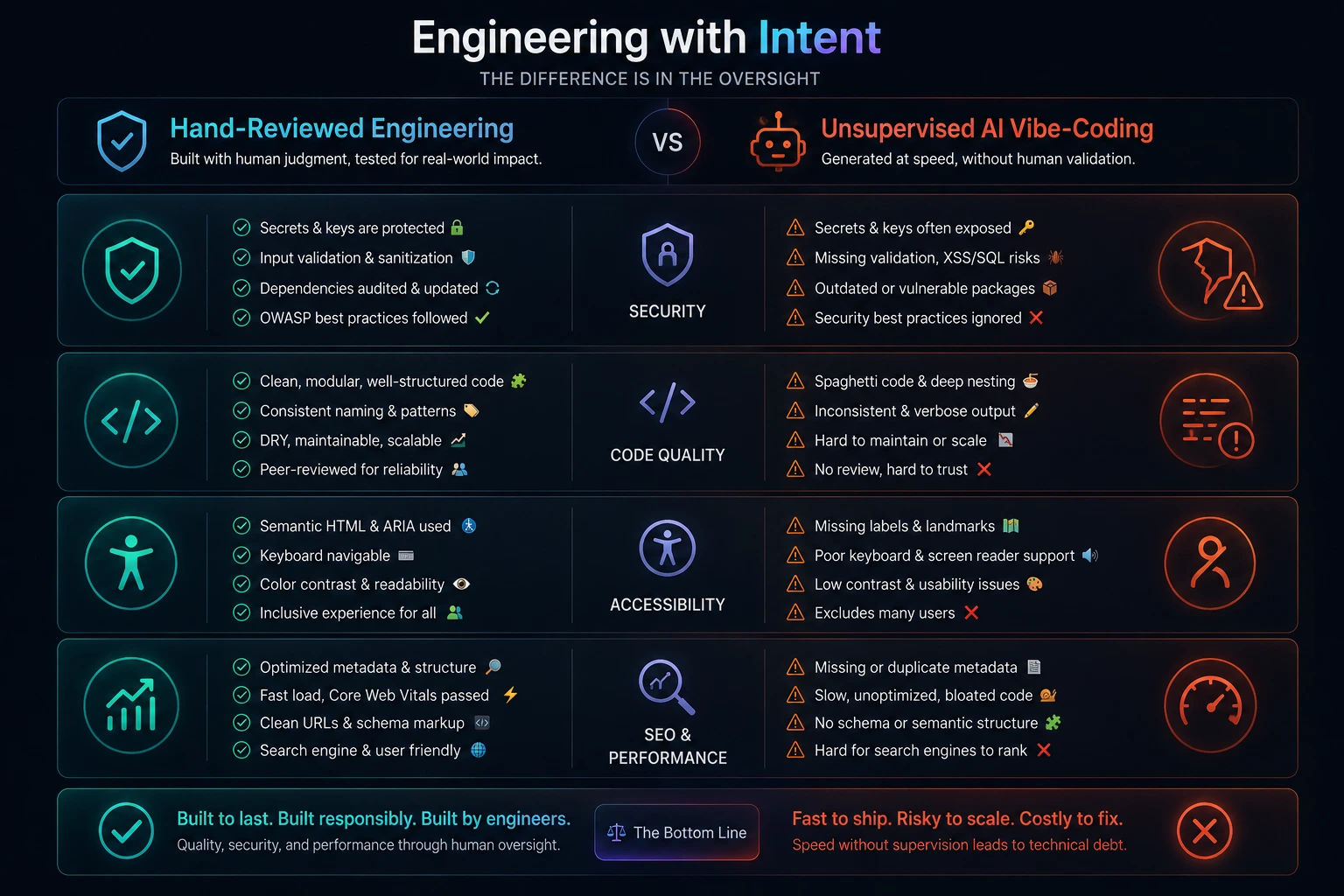
This isn't a claim that AI-assisted code is inherently worse; plenty of teams use AI coding agents with rigorous review, testing, and security practices, and that code is indistinguishable from traditionally written code by most of these signals. The table describes the difference between reviewed and unreviewed output, not between human-written and AI-written code.
How to Spot a "Vibe Coder" in an Interview or Code Test
Detecting vibe-coded output isn't only about auditing finished websites hiring managers and technical co-founders increasingly need to evaluate whether a candidate or contractor actually understands the code they're submitting. A few practical approaches that experienced interviewers report using:
Ask them to explain a specific decision, not just describe the feature. Someone who understands their own code can walk through why a particular approach was chosen and what the trade-offs were. Someone who only accepts AI output tends to describe what the code does at a surface level and struggles once you ask "why this way and not another way."
Watch how they debug. Ask a candidate to fix a deliberately broken piece of code live. A developer who understands the codebase breaks the problem down and reasons through it; someone leaning entirely on AI often pastes the whole error into a chat tool and waits for a suggestion without evaluating whether it's actually the right fix.
Look for a coherent problem-solving process, not just a working answer. Working code isn't proof of understanding on its own plenty of vibe-coded submissions technically run. The signal is whether the person can iterate on their own reasoning when you change the requirements slightly.
Small tells matter, but treat them as one clue among several. Leftover AI-style comments, inconsistent naming, or emoji sprinkled through variable names or commit messages in a take-home test can be worth a follow-up question rather than an automatic red flag plenty of legitimate AI-assisted work has small tells like this, and the point is to ask, not assume.
Tools You Can Use to Investigate
Browser DevTools (built into Chrome, Firefox, Edge) inspect elements, check the console for errors, view the network tab for exposed API calls.
Lighthouse (Chrome DevTools → Lighthouse tab) scores performance, accessibility, best practices, and SEO in one report.
axe DevTools (browser extension) deeper accessibility auditing than Lighthouse alone.
Google Search Console the clearest way to check whether a site's pages are actually indexed, and whether Google is seeing the rendered content or an empty shell.
View Page Source / "View Frame Source" fastest way to catch leftover placeholder text, exposed keys, and builder-injected scripts or comments.
WhatCMS or Wappalyzer (browser extensions) identify the frameworks and libraries a site is built on, useful context for what patterns to expect.
Automated vibe-coding checkers a small category of purpose-built tools has emerged that fingerprints builder-specific markers (badges, default domains, injected scripts, leftover paths) automatically and shows its evidence tier by tier, which is a faster starting point than manually working through page source.
GitHub (if the repo is public or shared) commit history, dependency list, lockfile presence, and presence or absence of tests and CI config.
Common Mistakes When Trying to Judge a Site
Treating any single signal as proof. A missing alt tag or a purple gradient alone means nothing plenty of professionally built sites have both. Look for a cluster of signals pointing the same direction.
Assuming "AI-assisted" equals "bad." Many well-engineered products are built with heavy AI assistance and thorough human review. The tell isn't AI use it's absence of review.
Assuming a modern-looking tech stack is itself evidence. React, Vite, and Supabase power a large amount of carefully hand-built software; naming the stack proves nothing about whether it was reviewed.
Confusing no-code website builders with vibe coding. Wix, Squarespace, Webflow, and Shopify sites are assembled visually in an editor and involve no generated source code at all a different category that predates AI entirely.
Ignoring that some vibe-coded sites work fine for their purpose. A landing page or portfolio site doesn't need the same rigor as a system handling payments or user data. Judge the site against what it actually needs to do securely and reliably.
Assuming absence of builder fingerprints means the site wasn't AI-built. Anything built with an IDE-embedded tool like Cursor, Claude Code, or Windsurf deploys through a normal repository and leaves no platform trace at all. Markers prove presence; they never prove absence.
Does a Human Still Need to Review AI-Generated Code?
Yes. AI coding tools can produce functional code quickly, but they don't reliably catch security gaps, inconsistent architecture, or logic errors specific to a product's actual requirements. A developer should still read, test, and understand generated code before shipping it particularly anything touching authentication, payments, or user data because the AI has no way to verify the code matches intent it can't fully see.
Best Practices If You're the One Building With AI Assistance
If this article has you looking at your own project rather than someone else's, the fix isn't to avoid AI tools it's to close the review gap:

Read every file the AI generates before running it, especially anything involving auth, payments, or data storage.
Never hard-code API keys or secrets in client-side code. Route sensitive calls through a backend or serverless function, and make sure .env files are covered by .gitignore from the very first commit.
Add server-side validation on every form and API endpoint, even if client-side validation already exists.
Check your database and auth security rules explicitly. Enable Row Level Security (or the equivalent) and test that one user genuinely cannot see another user's data don't assume defaults are safe.
Don't build authentication or cryptography yourself. Use an established provider or library rather than asking an AI tool to hand-roll login, session handling, or encryption from scratch.
Run Lighthouse and axe before launch, not after a user reports a problem and check Google Search Console to confirm your pages are actually being indexed with real content, not an empty shell.
Set up basic tests for critical paths (checkout, sign-up, data submission) even if you skip full coverage elsewhere, and put the project behind a CI pipeline with at least basic static analysis and secrets scanning.
Use a linter and formatter (ESLint + Prettier, or equivalents) and run it across the whole project once before shipping.
Check your dependencies, not just your own code. Confirm every package your AI tool added actually exists, is maintained, and is free of known vulnerabilities before you rely on it, and commit a lockfile so builds stay reproducible.
Explicitly ask your AI tool to secure what it just built. Simply adding "and make it secure" to a prompt, or asking the model to review its own output for hardcoded secrets, missing validation, and public data exposure, measurably reduces the number of issues that ship though it should supplement human review and real scanning tools, not replace them.
FAQ
Check for a builder's badge or default subdomain, leftover placeholder text, broken or dead links, repetitive template-like design across every section, browser console errors, and a low Lighthouse accessibility score. Checking whether the site is actually indexed in Google is another strong, easy signal. These are all visible without any backend or repo access.
No. Vibe coding is a workflow, not a quality guarantee. It becomes a problem specifically when output is shipped without review, testing, and security checks which is common, but not universal.
Exposed API keys and secrets in client-side code, along with missing server-side validation and misconfigured database security rules (like disabled Row Level Security in Supabase), are the most consequential and most commonly reported issues. Solo builders have lost access to their own projects, or been forced to rebuild from scratch, after leaked keys were abused.
Most AI website builders default to a client-side-rendered single-page app, meaning the server sends a nearly empty HTML page and JavaScript builds the visible content afterward. Search engine crawlers see the empty shell first, and full indexing of the rendered content can be delayed or, for smaller sites, may not happen reliably at all on top of default issues like duplicate meta tags and broken heading structure.
Yes, when a knowledgeable developer reviews, tests, and refines it. The distinguishing factor isn't whether AI wrote the first draft, it's whether a human verified correctness, security, and maintainability afterward.
Browser DevTools, Lighthouse, axe DevTools, Google Search Console, and Wappalyzer cover most front-end and discoverability checks. Purpose-built fingerprinting tools that check for builder badges, default subdomains, and injected platform scripts can automate much of the manual page-source hunting. For deeper analysis, reviewing Git commit history, lockfiles, and dependency lists in the repository (if accessible) is the most reliable method.
Not necessarily bugs and performance issues happen in hand-written code too. But a cluster of the signals in this article (placeholder text, console errors, exposed keys, inconsistent styling, poor search visibility) together strongly suggests unreviewed AI output rather than an isolated one-off issue.
Final Recommendations
No single detail proves a website was vibe coded. The reliable method is layering signals: start with what's visible in the browser (placeholder text, dead buttons, console errors, accessibility score, builder badges or default subdomains), check whether the site is actually indexed and readable to search engines, then go deeper if you have access to source or a repository (naming consistency, error handling, exposed secrets, dependency hygiene, commit history, test coverage). A site with two or three isolated quirks is probably just imperfect, like most software. A site where every signal points the same direction generic design, unreviewed content, silent failures, exposed keys, invisible to search, no tests was very likely shipped without a human ever reading the code carefully. Whether that matters depends entirely on what the site does; a portfolio page can get away with it, a checkout flow can't.