The wake-up call was a Saturday. Sitting at a laptop at 11 PM, writing the same 'here's your download link' email for the fourteenth time that month. Not because the business was complicated. Because nothing had been automated yet. That night, one workflow got built. It took 80 minutes and now runs every single day without being touched.

That's the actual promise of AI automation - not passive income while you sleep on a beach, but boring, reliable time recovery. For anyone selling digital products, that time is the difference between building and just maintaining.
This guide covers what actually works, step by step, with honest numbers and zero motivational filler.
IN THIS ARTICLE 01. Why Most People Automate the Wrong Thing First 02. The Time Audit That Changes Everything 03. Which AI Tools Actually Matter for Digital Product Selling 04. Your First Automation, Built in 90 Minutes 05. An Honest Week-by-Week Timeline 06. Putting Customer Messages on Autopilot 07. Four Mistakes That Quietly Break Everything 08. How to Scale Once the Basics Are Solid 09. FAQs 10. Author Bio |
Why Most People Automate the Wrong Thing First
The typical move is to Google "best AI tools for business," pick the one with the most YouTube videos, and start connecting it to everything. By day three, there's a half-built Zapier workflow, three open browser tabs of documentation, and nothing actually working.
The mistake isn't the tool - it's that most people start with the tool before knowing what problem it's solving. AI automation only delivers results when it's pointed at the right target, which means the planning step has to come before the building step. Every time.
Automation works best on tasks that repeat often, follow a predictable pattern, and don't need a human judgment call every time. "Where's my download link?" is a perfect automation candidate. "Should we change the pricing on this product?" is not.
60% occupations have at least 30% of their activities that could be automated with current AI, according to McKinsey's 2023 analysis of workforce tasks globally. SOURCE: McKinsey Global Institute - The Economic Potential of Generative AI, 2023 |
"Pick the target before picking the tool. Not the other way around."
The Time Audit That Changes Everything
Take a blank spreadsheet and log every task done during the workday in 15-minute blocks for one full week. Not a rough mental estimate - an actual log, updated as you go. This sounds like busywork. It isn't.

After five days, sort the entries. Put "changes every time" in one column and "roughly the same every time" in another. That second column is the automation hit list. When this exercise was run on a solo digital template store, 9 out of 14 recurring task types turned out to be identical week to week - product tagging, FAQ replies, order follow-ups, social captions, affiliate outreach templates. Nine tasks that could be handed off.
The audit also reveals something uncomfortable: most people dramatically underestimate how much repetitive work they're doing. Seeing it in a spreadsheet makes it impossible to ignore.
"You can't automate what you haven't measured. The log isn't optional - it's the foundation."
Which AI Tools Actually Matter for Digital Product Selling
For a solo digital product business, three tool categories handle roughly 90% of automation needs. Don't add a fourth until all three are working smoothly.

For writing and drafting - product descriptions, email copy, FAQ responses, social content - use either Claude or ChatGPT. Both work well for this. The honest difference between them is smaller than the influencer wars suggest. Pick one, stay with it for 60 days, and learn its quirks.
For connecting apps and triggering actions - a new sale fires an email, a form submission creates a record, a review triggers a thank-you message - Zapier is the easiest starting point. Make (formerly Integromat) is cheaper once monthly task volume climbs past a few hundred. Start with Zapier; migrate to Make when the pricing ceiling hurts.
For scheduling content, the specific tool barely matters - Buffer, Metricool, or a shared Google Sheet. The habit of batching matters far more than the platform you batch inside.
"Three tools. One per category. Resist adding a fourth until the first three are running without you."
Your First Automation, Built in 90 Minutes
Go to your time audit. Find the single task that appears most often. For most digital product sellers, it's the post-purchase email - the one confirming the order, delivering the download, and answering the top three support questions before they get asked.
Open Claude's free tier (or whichever AI you picked). Type this exact prompt structure: "Write a post-purchase confirmation email for someone who just bought [product name]. Confirm the order, include the download link placeholder, answer these three questions: [Q1], [Q2], [Q3]. Keep the tone warm and direct. No filler sentences." Read the draft. Edit the first paragraph and the closing line to match your voice. That's it.
Now load that edited email into an automation trigger in your email platform - ConvertKit, Mailchimp, or similar - tied to a purchase event. Test it by placing a real test order. The first time this takes about 90 minutes. After that, it runs without any further input.
"The best first automation is the task you're already doing manually every single week."
An Honest Week-by-Week Timeline
No version of this produces results in 48 hours unless you already have the infrastructure. Anyone promising overnight automation is selling something on the backend. Here's what real progress looks like.
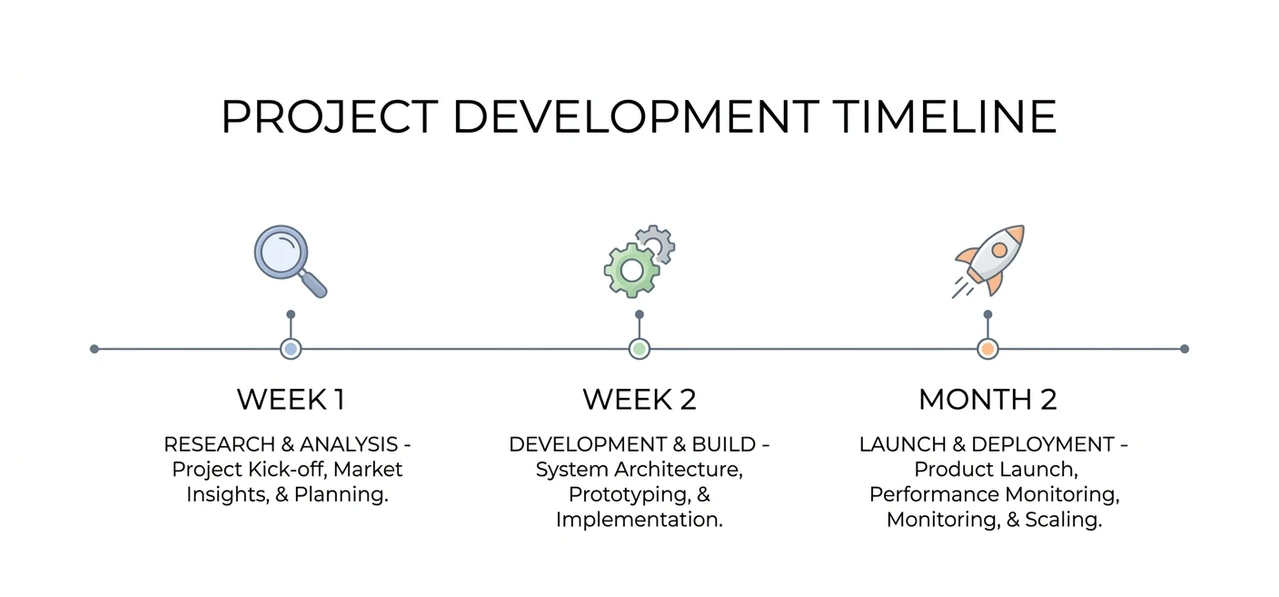
Week 1 : Time audit only. No tools bought, nothing built. The only output is a prioritized task list. That is the correct and complete output for week one. Week 2 : One automation live - the post-purchase sequence or FAQ responder. Budget 3 to 5 hours: drafting, editing, testing, fixing the trigger misconfiguration that almost always happens the first time. Weeks 3-4 : Second and third automation added. Building gets faster once the workflow tool is familiar. Each new setup should take under 2 hours at this point. Month 2 : Six to eight recurring tasks automated. Time recovery starts becoming noticeable - typically 4 to 6 hours per week. That's a half-day returned to actual work. Month 3 : Audit what's actually running. At least one automation will need revision because the business changed. Budget 1 hour per week for maintenance going forward. |
"Ninety days to meaningful time recovery. Not ninety minutes. Treat the timeline with respect and it'll deliver."
Putting Customer Messages on Autopilot
Customer support is the invisible tax on every digital product business. Messages arrive at random, responses need to be fast, and the same six questions rotate forever. The fix most people reach for - a full AI chatbot - is usually the wrong first step.

Build a response library instead. Use AI to draft 20 to 30 template replies covering the scenarios that actually occur: refund policy, download trouble, license questions, update access, file compatibility. Store them in TextExpander, or even a Google Doc with Ctrl+F. When a message arrives, scan the library, pick the right template, personalize the opener with the customer's name and product, and send. What used to take 8 minutes now takes 90 seconds.
Over 40 messages per week, that's more than 4 hours recovered - without removing a human from the loop. Templates first, chatbot later, only after the templates have been tested enough to trust.
"A library of 25 tested templates outperforms any untrained chatbot. Every time, in every category."
Four Mistakes That Quietly Break Everything

MISTAKE 01 Automating before mapping the full process. A Zapier sequence was once built for post-purchase delivery before the full payment flow was understood. In some edge cases, the download link fired before payment cleared. Two customers got files without paying. The loss was small; the habit change wasn't. Always map the full process on paper before touching a workflow tool. |
MISTAKE 02 Publishing raw AI output. Unedited AI copy reads like AI copy. Customers notice - and so do conversion rates. The minimum viable edit: revise the first paragraph and the last sentence of every AI-drafted piece. That intervention alone is enough to make it sound human. |
MISTAKE 03 Building five automations at once. When multiple Zaps break simultaneously on a new account, diagnosing failures becomes a scavenger hunt. Build one. Confirm it runs correctly for two weeks. Then add the next. Sequential is slower at the start and much faster in the long run. |
MISTAKE 04 Skipping the maintenance budget. Automations fail silently when a platform updates its API, a product SKU changes, or a trigger event gets renamed. Schedule 30 to 60 minutes per week to verify active automations are still firing. A silent failure is strictly worse than no automation - it creates customer problems that don't surface until they escalate. |
"An automation nobody monitors will eventually produce the worst support ticket of the month."
How to Scale Once the Basics Are Solid
After month three, with 6 to 8 automations running reliably, the next opportunity is content volume. This is where AI delivers its best return - not in operations, but in generating the marketing content that a solo business can't produce fast enough by hand.
A single digital product legitimately supports 15 or more marketing angles: use cases, audience segments, seasonal contexts, format variations. Writing all of those by hand takes a full day. With a structured AI prompt and two hours of editing, it takes a morning. That's the real leverage point for digital product selling at scale.
The trap to avoid: distributing content before quality is reliable. Forty mediocre pieces per month will erode a brand faster than eight strong ones. Set a quality gate - every AI draft gets human review before it publishes - and only lift that gate once the output is consistently good enough that review becomes rubber-stamping rather than rewriting.
"Scale the volume only after the quality is stable. Volume without standards is just a faster way to damage trust."
The One Action to Take in the Next 48 Hours for AI-Assisted Digital Product Selling
Don't open a new tool. Don't watch a tutorial series. Open a blank spreadsheet, label three columns - Task, Time (minutes), Repeats Weekly - and start logging right now. Everything else builds from that document.
The log shows the real target. Not the one that sounds important, but the one that's actually eating the hours. With that list, the first automation becomes obvious. Without it, the first automation is just a guess wearing a productivity hat.
The path from that spreadsheet to a recovered 5 hours per week is roughly 90 days of one-step-at-a-time work. AI automation for digital product selling is real, practical, and worth the effort - it just doesn't happen on the timeline the headlines suggest.
YOUR 48-HOUR ACTION STEP Open a new spreadsheet. Label three columns: Task · Time (mins) · Repeat Weekly? Log everything for the next two days. That document is the only plan you need to get started. |
FREQUENTLY ASKED QUESTIONS
Not for anything in this guide. Zapier and Make use visual builders - if you've ever set up a recurring calendar event or configured an email filter, the logic is similar. The first trigger-action workflow typically takes 45 to 90 minutes for someone with zero prior experience. The learning curve is real but it's measured in hours, not months.
Most solo digital product sellers land between $40 and $80 per month once they have a working stack. That covers Zapier's Starter plan and one AI subscription (Claude Pro or ChatGPT Plus). Free tiers on both platforms let you test the full setup before paying - just expect limits on task volume and multi-step workflows.
Google's own Search documentation is clear: it evaluates content on helpfulness and quality, not production method. AI-drafted descriptions that are edited for accuracy and specificity perform fine. The ones that don't are the ones nobody reviewed before publishing. The editing step isn't optional if you care about rankings.
Two questions help. First: does this task require a judgment call that changes based on context? If yes, automate only the draft - a human approves before sending. Second: what happens if the automation gets it wrong? If the answer is 'an annoyed customer,' you can automate with monitoring. If it's 'a refund dispute,' keep a human in the loop regardless of volume.
Partially, yes. A properly built stack can cover what might otherwise require 8 to 12 hours of assistant time per week on operational tasks. Where it can't substitute is anything requiring relationship management, contextual judgment, or creative problem-solving. Automation handles repetitive work so a human can focus on things that actually require a brain.
Skipping the time audit. Without knowing exactly which tasks repeat and how much time they take, the automation ends up being a solution in search of a problem. The businesses where this actually works all share one thing: they measured before they built. Everything else is details.
ABOUT THE AUTHOR
The author spent six years building and selling digital products across template, education, and software tool categories through solo-operated storefronts on Gumroad and Teachable. After systematically tracking and automating over 200 hours of recurring operational work using the tools and methods described in this article, the author now writes specifically about the practical mechanics of running AI-assisted digital product businesses. Every workflow documented here was tested on live stores generating real revenue - not in sandbox environments or hypothetical scenarios. No affiliate relationships exist with any platform mentioned in this guide.