Sarah, a support lead at a B2B software company, kept a sticky note on her monitor that said: "Day 847 of answering the same password reset email." Not because she was bitter. Because she'd actually counted.
Her team of five was spending roughly 22 collective hours every week on emails that required zero original thinking. Same questions. Same answers. Slightly different names at the top.
She tried canned responses. She tried filters. She tried begging her manager for more headcount. None of it fixed the core problem: the inbox kept refilling, the team kept triaging, and the actual hard support work kept getting pushed to Friday afternoons when everyone was already fried.
Then she set up a ReAct loop. Within six weeks, 54% of her team's routine email volume was handled without a human touching it. The sticky note came down.
This guide is what she wished she'd had before starting the real setup, the real timeline, the mistakes worth avoiding, and honest numbers with no inflated promises.
Table of Contents
What a ReAct Loop Actually Is (Without the Jargon)
Why Regular Email Automation Always Falls Short for Customer Support Teams
How to Automate Email Replies Using ReAct Loops
Building Your First ReAct Agent — What Week One Actually Looks Like
The Week-by-Week Rollout Timeline
Four Mistakes That'll Cost You Real Time and Real Trust
When the Agent Should Stop and Hand Off to a Human
How to Know If the Whole Thing Is Actually Working
FAQs
Author Bio
What a ReAct Loop Actually Is (Without the Jargon)
Here's the version nobody explains well: a ReAct loop is an AI that thinks before it talks.
Most AI-generated replies work like this email comes in, model reads it, model writes a reply. That's it. One shot. No checking. No looking anything up. Just confident text based on whatever patterns the model was trained on.
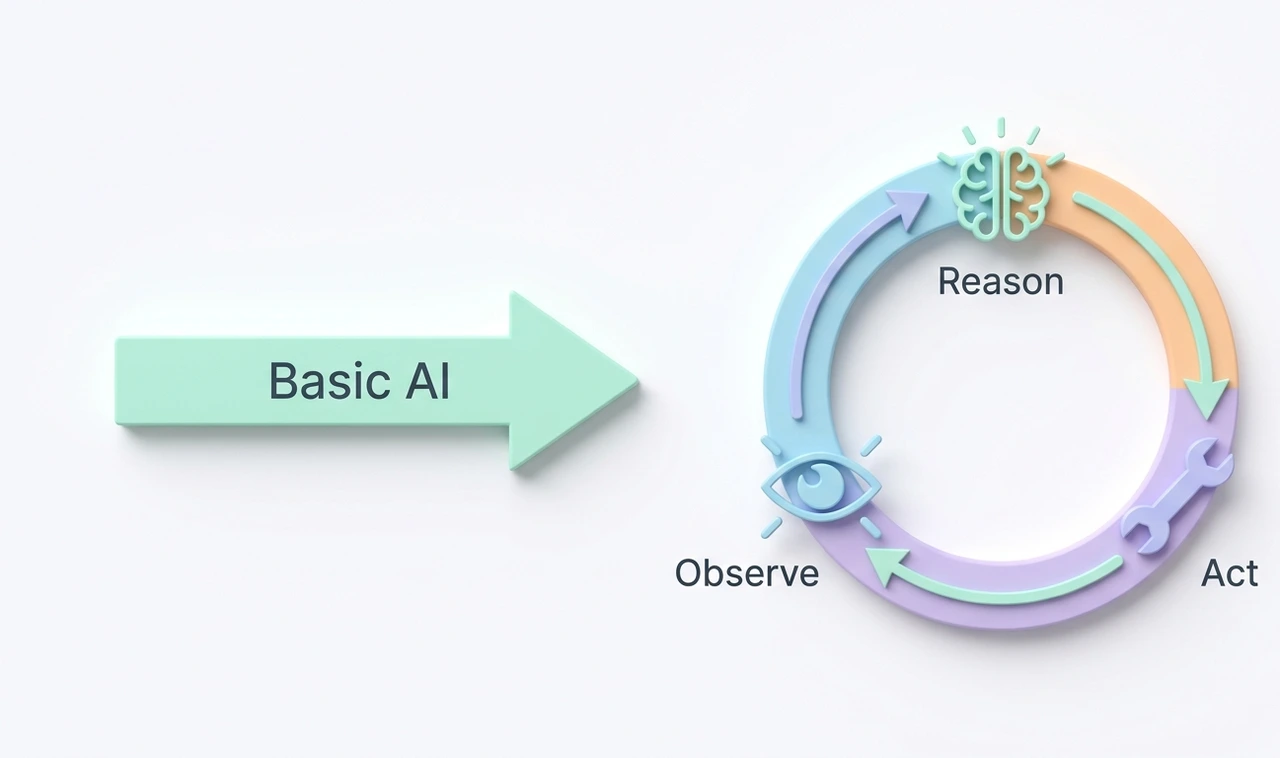
A ReAct loop works differently. The model reads the email, then asks itself: "What do I actually need to know before I can answer this?" Then it goes and gets that information, checks the CRM, searches the knowledge base, pulls the order status, reads what it finds, thinks again, and then writes the reply.
Reason. Act. Observe. Reason again. That's the loop.
The term comes from a 2022 research paper by Yao et al. at Princeton and Google. The idea was simple: language models that could interleave thinking with real-world actions performed dramatically better on complex tasks than models that just generated text in one pass. According to McKinsey's 2024 State of AI report, companies using agentic AI workflows — ReAct being the most common architecture — reported 20 to 40% reductions in routine task time within six months.
The reason it matters for email is simple. A reply that checks your actual account before saying "your subscription renews on March 14th" is useful. A reply that guesses your renewal date is a support ticket waiting to happen.
"A ReAct agent isn't smarter than a regular AI. It's just less willing to wing it."
Why Regular Email Automation Always Falls Short for Customer Support Teams
Every support team has tried the rules-based approach. If the subject line contains "refund" → send Template 4. If the body contains "cancel" → escalate to tier 2. It works fine for maybe the first three weeks, until a customer writes "I don't want to cancel, I just want to understand my options" and the system escalates them anyway.
Keyword matching is brittle. It has no idea what the customer actually wants; it's just pattern-matching on surface text. And customers don't write support emails like support teams write templates.
The deeper issue is that great email replies in customer support require three things happening at once: understanding what the customer is asking, knowing something specific about that customer's account or history, and then writing something that actually addresses both. Rules-based systems can't do step two at all. Basic AI can fake step two but usually gets it wrong.
ReAct loops handle all three because they're designed to pull real data before generating a response. Customer support teams are also sitting on exactly the kind of structured data that makes this work: ticket histories, subscription records, usage logs, billing data. That's not a coincidence. It's why ReAct fits this use case better than almost any other.
"The problem was never that support teams couldn't write fast enough. It was that no tool could think and look things up at the same time."
How to Automate Email Replies Using ReAct Loops
The setup has four parts. None of them are magic, but all four have to work together or the whole thing breaks.
Part one is email ingestion. The agent needs to read incoming emails. Gmail API, Microsoft Graph API, or any standard IMAP connection handles this. The email gets passed to the agent as text, along with the sender's email address so the agent can look them up.

Part two is the ReAct agent itself. This is a language model Claude, GPT-4, which is configured with a system prompt that tells it how to reason through a support email, which tools it can use, and when to escalate instead of reply. The system prompt is doing a lot of heavy lifting here. A weak prompt produces weak results regardless of how good the model is.
Part three is the tool set. These are the things the agent can actually do during its reasoning loop. A typical support setup includes a CRM lookup (takes a customer email, returns account details), a knowledge base search (takes a query, returns the top 3 relevant articles), a ticket history fetch (returns the last 5 interactions with this customer), and maybe an order status API if the product involves shipping or subscriptions.
Part four is the output handler. Once the agent has reasoned through the email and drafted a reply, something needs to decide what happens next, auto-send it, hold it for human review, or route it to a specialist queue. Early on, hold almost everything. As confidence builds, expand auto-send to the lower-risk categories.
The agent's full reasoning loop for a simple "where's my order" email takes about 4 to 6 seconds. It reads the email, identifies it as an order status request, calls the order API with the customer's ID, reads the result, and writes a reply with the actual tracking number and estimated delivery date. No human touched it. The customer gets an accurate answer in under 10 seconds.
"Four moving parts sounds complicated until you realize your current process has about forty."
Building Your First ReAct Agent What Week One Actually Looks Like
Day one is not writing code. Day one is sitting down with whoever knows the inbox best and listing the 10 most common email types from the past 30 days. "Order status" is probably on there. "Password reset" almost certainly. "Billing question" in some form. "Feature request disguised as a complaint" that 's fun.
For each category, write down: what information would a good support person need to answer this correctly? That answer becomes your tool. If they'd need the customer's account status, you need a CRM lookup tool. If they'd need to know the refund policy, you need a knowledge base search.
Day two and three: build the tools. Each one is a function that takes an input, calls an API, and returns structured data. Keep them narrow. A tool that does one thing reliably is better than a tool that tries to do three things and occasionally does all of them wrong.
Day four: write the system prompt. This is the part most people underestimate. The prompt needs to tell the agent what it is, what it can do, how to think through an email step by step, what to do when it doesn't know something, and when to hand it off to a human. Three hundred words is not too long. Vague prompts produce vague agents.
Day five: test with 20 real historical emails that you already know the correct answers to. Score every output manually. The goal isn't a perfect score, it's identifying which email types the agent handles well versus which ones it consistently fumbles. The fumbles go into a "human-only" routing list for now.
"The system prompt is the job description. Write it like you actually want the agent to know what it's doing."
The Week-by-Week Rollout Timeline
Week 1 — Internal Testing Only. No live emails. Use historical tickets from the past 90 days. Target: agent produces accurate, appropriately-toned replies for at least 60% of test cases. Below that, go back to the system prompt and tool set.
Week 2 — Shadow Mode. The agent processes real incoming emails but sends nothing. Every draft gets reviewed by a team member. This is where edge cases show up: the weird customer who writes emails like legal briefs, the product issue that isn't in the knowledge base yet, the billing dispute that looks routine until the third sentence. Expect to refine the prompt and add at least one new routing rule during this week.
Week 3 — Soft Launch on the Easy Stuff. Pick the two or three email categories where the agent performed flawlessly in shadow mode. Auto-send for those. Everything else still routes to humans. Track reply-time, accuracy (by sampling 10 agent emails per day and grading them), and whether any customers reply to the agent's email with "that didn't answer my question."
Week 4 — Expand Based on Data. Add a confidence threshold any email where the agent signals low certainty goes to a human queue with the agent's draft attached. Expand the auto-send list to include any category that cleared a 90% accuracy rate in week 3.
Month 2 — Full Audit. Pull every agent-sent email from the past 30 days. Calculate deflection rate, average response time, and CSAT scores for agent-handled tickets versus human-handled ones. Use actual numbers to decide whether to expand, hold, or pull back.
Month 3 — Stable State. Most teams at this stage are handling 45 to 60% of routine volume automatically. The support team's job has changed to less reply-typing, more exception-handling, escalation management, and working on the cases that actually require human judgment.
"Month three is the one where the team stops asking 'does this work' and starts asking 'what do we automate next.'"
Four Mistakes That'll Cost You Real Time and Real Trust
Mistake 1: Too many tools, too soon.
One team handed their agent 11 tools on day one. The agent spent so many tokens reasoning about which tool to use that its actual replies were slower and worse than if it had used two tools. Fewer tools, used well, consistently outperform a bloated toolkit. Start with three. Add more when the data shows a specific gap, not when it feels like a good idea.
Mistake 2: Skipping shadow mode.
A support team at a subscription software company went straight from internal testing to live deployment. In the first four hours, the agent sent 47 emails with incorrect billing renewal dates because a CRM field wasn't mapped correctly. The fix took two days. The customer apology emails took longer. Shadow mode exists precisely to catch the things testing didn't.
Mistake 3: A system prompt that's basically a vibe.
"Be a helpful support assistant" is not a system prompt. It's a suggestion to a model that will then invent its own process for handling difficult emails. Explicit reasoning instructions "if your tool call returns no result, do not guess; flag for human review" prevent the agent from confidently making things up when it hits a situation it wasn't prepared for.
Mistake 4: Setting it and forgetting it.
Two months after launch, an e-commerce support team stopped reviewing their agent's output. New product lines launched, return policies changed, and the agent kept answering based on outdated knowledge base articles. Customers started complaining about receiving wrong information. A weekly 20-email audit takes 30 minutes. The alternative costs significantly more than that.
"The email your agent confidently got wrong at 11 PM on a Sunday is the one that ends up in a review."
When the Agent Should Stop and Hand Off to a Human
The clearest signal is emotion. When a customer uses words like "furious," "completely unacceptable," "I'm done with your company," or even just a string of exclamation points — that email is not asking for information. It's expressing a feeling, and feelings need a human response.
Build emotional classification into the agent's first reasoning step. Before any tool calls, before any reply drafting, the agent should assess the emotional temperature of the email. High-frustration emails go immediately to a human, with the agent's preliminary research attached so the rep isn't starting cold.

The second signal is when tool calls come back empty. If the agent looks up a customer's account and finds nothing, or searches the knowledge base and gets no relevant results, it's operating outside its training ground. An agent that keeps trying in those situations will eventually improvise and improvisation in support emails is how misinformation spreads. A rule that escalates after two consecutive failed tool calls prevents that.
The third signal is any email touching legal language, threats, or references to regulators. Those go to a human, full stop, every time.
"The best thing an agent can do with a problem it wasn't built for is stop and ask for help."
How to Know If the Whole Thing Is Actually Working
Three numbers, measured consistently from week three onward.
Deflection rate
what percentage of incoming emails get fully resolved without human involvement. A realistic month-one target is 30 to 40%. By month three, healthy teams are at 50 to 65%. Above 70% in month one usually means the confidence thresholds are too low and the agent is sending things it shouldn't.

Average first-response time
Most support teams, before automation, respond within 4 to 24 hours depending on volume and staffing. ReAct agents typically reply within 30 to 90 seconds of receipt. Zendesk's 2024 Customer Experience Trends Report found that 72% of customers ranked response speed as more important than reply length. That one number alone moves the needle on satisfaction.
CSAT on agent-handled tickets versus human-handled tickets
This is the one that actually tells the truth. If agent CSAT is within 5 points of human CSAT after 90 days, the automation is genuinely working. A gap of 10 or more points means customers can tell the difference and they don't prefer it, which is a signal to tighten the routing rules before expanding.
"Deflection rate without CSAT is like a word count without a spell check. Quantity without quality."
Conclusion
Nobody gets ReAct automation right on the first try. The teams that make it work aren't the ones with the best tools or the biggest budgets, they're the ones that test carefully, stay suspicious of their own early results, and treat the agent like a new hire who needs supervision before being trusted with the inbox.
The sticky note on Sarah's monitor came down not because the agent was perfect. It came down because 54% of the repetitive work that was grinding her team down was handled before they got to the office. The remaining 46% the complex, emotional, unusual stuff was exactly the work her team was good at and actually wanted to do.
The one thing to do in the next 48 hours: open your support inbox, pick the last 30 emails, and mark every one that requires no original thinking to answer. Count them. That number is your automation potential. Everything else starts from there.
4. FAQs
Some technical knowledge helps, but it's not mandatory to start. Platforms like n8n, LangChain, and Make (formerly Integromat) offer visual workflows that reduce the coding requirement significantly. A non-developer working with one technical person can have a working prototype running within two weeks. The knowledge base and CRM integrations are usually the biggest lift.
For a team processing 1,000 emails per month, API costs for the language model typically land between $40 and $180 USD depending on model choice and average email length. Add any third-party integration costs on top. For most teams, the first month's API bill is less than what one agent earns in a single day.
Many teams do disclose something like "This is an automated reply from our support system" at the top and see no meaningful drop in satisfaction when the answer is accurate and fast. Others write in full brand voice without disclosure. The honest answer: fast and correct matters more to most customers than who wrote the reply. But disclosure is the more trustworthy long-term choice.
It will happen. The mitigation stack is shadow mode before launch, confidence thresholds that route uncertain cases to humans, and weekly audits after launch. When a wrong reply goes out, a human handles the recovery. The goal isn't eliminating errors entirely, it's having fewer errors than the current process, with much faster average resolution.
No and this is a common misconception. ReAct agents don't self-improve through use. They improve when you improve the prompt, add better tools, or update the knowledge base they search. Think of it less like training a dog and more like managing an employee. They get better when you give them better information and clearer instructions.
Yes, if the model supports multimodal input Claude and GPT-4o both do. The attachment gets passed as part of the message payload alongside the text. This matters most for support teams that regularly receive error screenshots, uploaded invoices, or photo evidence of product issues. Setup is slightly more involved but not dramatically so.
5. Author Bio
Tariq Farouk is a content strategist and automation writer who spent six years working directly inside product and support operations teams before moving to full-time writing. He's personally built and broken enough AI workflows to have strong opinions about what actually works in production versus what sounds good in a demo. His writing focuses on translating real implementation experience into advice that people can act on without a PhD. He lives in Karachi, drinks too much tea, and has a bad habit of stress-testing automation tools on live systems when he should probably be asleep.