Featured Snippet Answer: Claude for developers in 2026 is best suited for autonomous, multi-file coding tasks and deep codebase reasoning. Claude Code Anthropic's terminal-based CLI tool handles refactors, bug fixes, and architecture decisions without leaving your terminal. It requires a Claude Pro ($20/month) or higher subscription and works natively on Windows via a single PowerShell command with Git for Windows installed. Most experienced developers use it alongside Cursor or GitHub Copilot for maximum daily productivity.

Claude for Developers Review: Is It Worth Using in 2026?
You're deep in a refactor. The logic spans eight files, there's a subtle bug hiding in your authentication layer, and you have to ship by morning. You paste some code into your AI assistant and halfway through the response, it loses the thread. The suggestion only fixes half the problem, and now you're back to square one.
If that sounds familiar, you're not alone. It's the exact frustration pushing developers toward more capable, context-aware tools in 2026 and it's why Claude for developers has moved from "interesting side experiment" to a legitimate production tool for thousands of engineers.
But is it actually worth switching especially if you're on Windows, already paying for GitHub Copilot, or unsure whether the $20/month price tag is justified?
I tested Claude Code extensively across real development scenarios: a legacy Python FastAPI codebase, a TypeScript React frontend, and a fresh Node.js service built from scratch. This review reflects what I actually found, not what the product page says. Let's get into it.
What Is Claude for Developers?
Claude is Anthropic's family of large language models, and it shows up for developers in three distinct forms:
Claude.ai (Web/Chat Interface): The browser-based experience where most developers start. It's useful for explaining code, debugging functions, or thinking through architecture decisions in a conversational back-and-forth. Clean UI, zero setup.
Claude API: Direct model access via REST API. Ideal if you're building applications, running automated code review pipelines, or integrating AI into your own toolchain. The default model is currently Claude Sonnet 4.6, with Opus 4.6 available for heavier reasoning tasks.

Claude Code: The terminal-based agentic coding tool that's gotten the most developer attention in 2026. It reads your actual codebase, runs commands, edits files across multiple locations, and executes complex multi-step tasks all through natural language in your terminal.
Developers who have combined Claude with Cursor and Next.js report completing their first deployed SaaS in as little as 14 days compared to 6–8 weeks using traditional methods. That kind of productivity shift doesn't come from better autocomplete. It comes from a fundamentally different way of working.
Why This Matters More in 2026
In 2023, AI coding tools were glorified autocomplete. By 2025, they were genuinely agentic. In 2026, the gap between tools that handle complex work well and those that don't has real consequences for productivity and for your bottom line as a developer.
Claude has quietly become the AI that power users swear by, building a reputation for producing thoughtful, precise output that doesn't feel machine-generated. The question for developers specifically is whether that reputation translates to actual workflow improvements and whether the cost is justified.
Spoiler: it depends heavily on what you're building and how you prefer to work.
Key Features of Claude for Software Development
1. Extended Context Window (200K Tokens)
This is Claude's biggest technical differentiator. A 200,000-token context window means Claude can hold your entire small-to-medium codebase in memory at once. In practice, that means you can ask it to trace a bug from your API layer through your service layer down to your database model without losing context halfway through.
Most developers working on codebases over 20,000 lines start noticing a real difference here compared to tools limited to file-level context.
2. Claude Code: Terminal-Native Delegation
Claude Code is designed around delegation, not suggestion. You describe the outcome you want "add error handling to all API routes" or "migrate this module to TypeScript and update every import" and Claude Code plans the work, edits the relevant files, runs verification steps, and iterates until the task is done. It's a solid AI coding companion for developers who value intelligent code analysis over pure autocomplete, with particularly strong codebase understanding and direct PR generation capabilities.
3. Claude Code Skills: Extending What It Can Do
One underrated feature that's exploded in 2026 is Claude Code's skills system. Skills are reusable instruction files you define once covering your coding standards, preferred libraries, project conventions and Claude picks them up automatically in every session.
The most useful ones include: a Frontend Design skill for production-grade UI work, a Security skill powered by CodeQL and Semgrep, a Superpowers skill for structured multi-agent workflows, a Webapp Testing skill using Playwright, and a Document skill for generating PDFs, DOCX, and spreadsheets. If you're doing serious development with Claude Code, skills are worth spending an afternoon setting up.
4. Strong Reasoning on Architecture and Debugging
In real-world testing, Claude consistently outperforms most tools on tasks that require understanding before writing. Ask why a database query is slow, or why a React component re-renders unnecessarily, and you'll usually get an explanation of the root cause before a suggested fix, not just a code snippet. Its self-editing capabilities and fact-checking tendency make it particularly valuable for developers who need to trust their AI output.
5. MCP (Model Context Protocol) Integration
Claude Code supports MCP servers, which let it connect to your database, issue tracker, cloud provider API, and other external tools. This positions Claude Code less as a single tool and more as a platform and the ecosystem has been growing rapidly through 2026.
6. Multi-Platform Including Native Windows
Claude Code now runs natively on Windows 10 and 11 with no WSL required. More on the exact installation steps below, but the short version is: one PowerShell command, and you're running.
Real-World Testing: What Claude Actually Handles Well
I spent several weeks running Claude Code against different project types. Here's what I actually found:
Greenfield development: Excellent. I described a REST API for a task management service in plain English and got a fully working, sensibly structured FastAPI application in under three minutes with routes, models, tests, and config included. When you're starting fresh, the speed advantage is dramatic.
Legacy code navigation: Strong. I threw Claude Code at a Django codebase I'd never touched before and asked it to explain the authentication flow. The explanation was accurate, well-structured, and flagged two potential security issues I hadn't noticed. This is the scenario where a 200K context window actually earns its keep; it holds the relevant files simultaneously instead of processing them piecemeal.
Large-scale refactors: Where it genuinely shines. A TypeScript migration across 40 files that I estimated at two full days took about four hours with Claude Code handling the mechanical transformation while I reviewed and approved changes in batches.
Simple, repetitive tasks: Less necessary. For banging out boilerplate quickly in your IDE, Copilot's inline autocomplete is more efficient. Claude Code is overkill for generating five utility functions.
Test generation: Good, but requires manual review. Claude writes tests that look correct and often are correct but it consistently favors the happy path over edge cases. Always audit test coverage yourself.
In terms of overall output quality, Claude rates among the best available for reasoning, context handling, and writing precision. Its willingness to say "I'm not sure" rather than confidently hallucinating is a real practical advantage when you're shipping production code.
Claude Code Windows Installation: Step-by-Step
This is the most-searched topic for new Claude Code users on Windows, and the good news: it's genuinely gotten much easier.
As of 2026, Claude Code runs natively on Windows, WSL2 is no longer required, though it's still a valid option if you prefer that environment.
Prerequisites
You'll need:
Windows 10 or Windows 11 (64-bit)
Git for Windows mandatory for the native install. Claude Code uses Git Bash internally. Download from git-scm.com with default settings, ensuring Git is added to your PATH.
A Claude Pro, Max, Team, or Enterprise account. The free plan does not include Claude Code.
Method 1: PowerShell Native Install (Recommended)
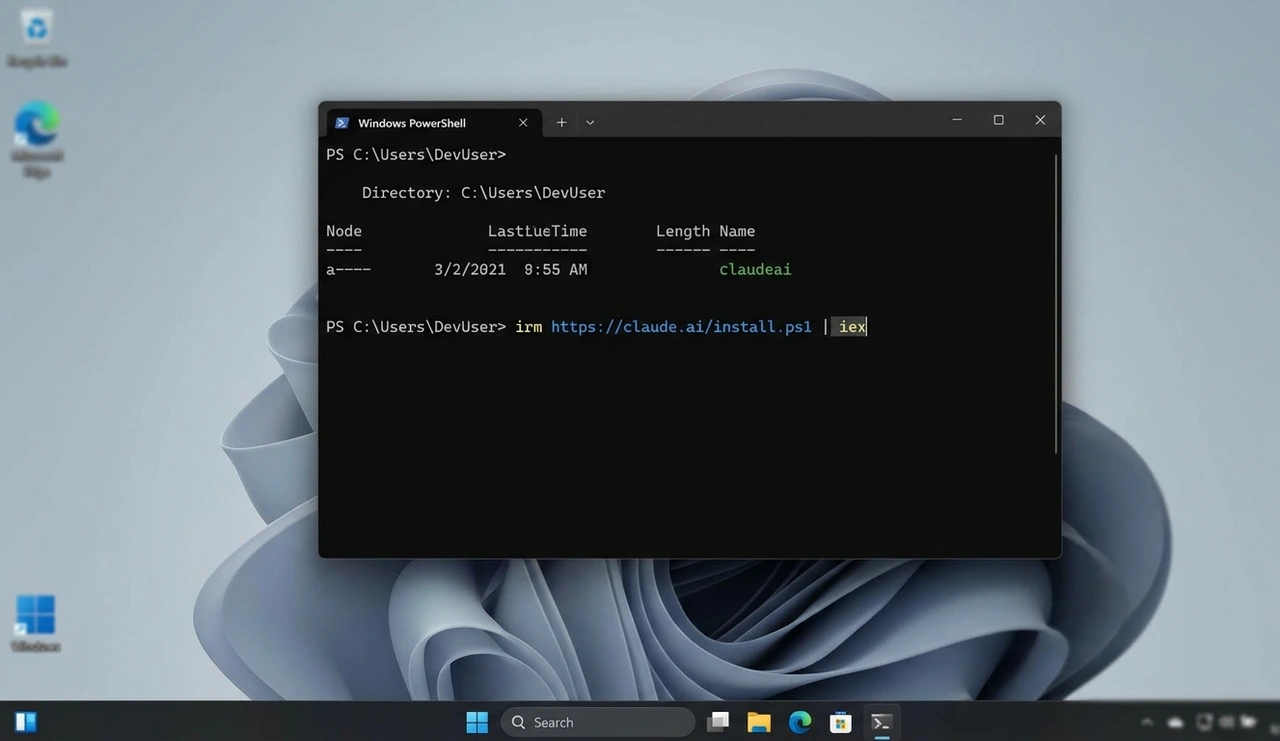
Open PowerShell (no admin rights needed) and run:
irm https://claude.ai/install.ps1 | iex |
The installer downloads the self-contained Claude Code binary, places it at ~/.local/bin/claude, and configures PATH automatically. No Node.js required.
After install completes, close and reopen your terminal, then verify:
claude --version |
Method 2: Windows Command Prompt
curl -fsSL https://claude.ai/install.cmd -o install.cmd && install.cmd && del install.cmd |
Method 3: WinGet
winget install Anthropic.ClaudeCode |
Note: WinGet doesn't auto-update. Run winget upgrade Anthropic.ClaudeCode periodically.
Method 4: WSL2
If you're already in a WSL2 environment and want to stay there, open your Ubuntu terminal:
curl -fsSL https://claude.ai/install.sh | bash |
WSL2 also enables bash sandboxing — WSL1 does not.
First Login
Run claude — a browser window opens for OAuth authentication. No manual API key setup needed. Then run claude doctor to verify your install and catch common config issues.
Windows Troubleshooting
"claude is not recognized as cmdlet" — PATH wasn't updated. Close and reopen your terminal. If that doesn't work, manually add ~/.local/bin to your system PATH.
Git Bash not found — Add this to your settings.json:
"CLAUDE_CODE_GIT_BASH_PATH": "C:\\Program Files\\Git\\bin\\bash.exe" |
Authentication loop Usually strict cookie/tracker blocking. Try a different browser.
WSL2 Error 0x80370102 Virtualization is disabled. Enable Intel VT-x or AMD-V in BIOS.
Is Claude Pro Worth It? A Pricing Reality Check
After a month of comparing the free and paid tiers across speed, logic, coding, and dialogue, the conclusion most developers reach is consistent: the free tier is enough to evaluate Claude, but it hits rate limits quickly during any serious work session.
Here's how the plans break down in practice:
Free ($0/month): Access to Sonnet and Haiku via web, mobile, and desktop. Basic file uploads, code execution, web search, Artifacts. Roughly 10–15 messages per session depending on length. Good for evaluation, not for production workflows.
Pro ($20/month): Full model access including Opus 4.6, significantly higher usage limits, Claude Code, Cowork (desktop automation), Projects, Research mode, cross-conversation memory, and Chrome/Excel integrations. This is the entry point for serious developer use.
Max ($100–200/month): Same feature set as Pro, but 5x or 20x the usage allowance. Makes sense for developers who run heavy Claude Code sessions daily and consistently hit Pro limits.
Team ($25–150/seat/month): Adds admin controls, shared Projects, Slack/Microsoft 365 integration, and ensures your conversations aren't used for model training. Minimum 5 users.
For most professional developers, the $20/month Pro plan is the right starting point. Power users running large daily agentic workflows especially on big codebases should budget for Max and monitor token usage from the start.
Pros and Cons
Pros
200K context window handles large, interconnected codebases where other tools lose track
Genuinely agentic — plans, executes, iterates, rather than just suggesting
Strong debugging and explanation quality — understands why something is broken before suggesting a fix
Native Windows support since 2025 — one PowerShell command to install
Claude Code Skills let you define project conventions once and reuse them every session
MCP integration connects Claude to your external tools
Auto-updates on native installs keep you current without manual intervention
Honest about uncertainty — less likely to confidently hallucinate than some competitors
Cons
Terminal-native — real learning curve if you're primarily a GUI developer
No inline autocomplete — Claude Code is prompt-driven, not suggestion-driven
Cost can scale unexpectedly — some developers report individual sessions costing $15–25 on large codebases via API billing
Requires paid account — $20/month minimum, $100–200/month for heavy users
No BYOM — you can't swap in a different model; you're locked to Anthropic's lineup
Test generation needs review — edge case coverage is typically thin
Editor support limited — VS Code and JetBrains only for native IDE integration
Comparison: Claude Code vs. GitHub Copilot vs. Cursor
These three tools dominate developer conversations in 2026 and they're worth understanding as a system rather than evaluating in isolation.

Feature | Claude Code | GitHub Copilot | Cursor |
Primary use case | Agentic coding, deep refactors | Inline autocomplete, IDE integration | AI-native IDE, daily editing |
Interface | Terminal | IDE extension | Full IDE (VS Code fork) |
Context window | 200K tokens | File-level | Strong local indexing |
Inline suggestions | No | Yes | Yes |
Multi-file autonomy | Excellent | Basic (improving) | Good |
Price/month | $20–200 | $10–39 | $20 |
Windows native | Yes (since 2025) | Yes | Yes |
BYOM support | No | Partial | Yes |
Best for | Complex tasks, large refactors | Fast daily coding | Daily editing + AI assistance |
The workflow pattern most professional developers have settled on: Cursor for daily editing (inline suggestions, visual diffs, fast feature implementation) + Claude Code for complex tasks (large refactors, debugging subtle cross-file issues, onboarding to unfamiliar code). GitHub Copilot fills in for teams already in the GitHub ecosystem who need AI assistance that works across multiple IDEs.
One developer on a 30-day comparison trial put it clearly: Copilot makes daily coding faster. Cursor makes large projects manageable. Claude makes complex problems understandable. The three aren't competing they're complementary.
Common Mistakes When Starting with Claude Code
Treating it like autocomplete. Claude Code is a delegation tool, not a suggestion engine. You won't see inline tab-complete suggestions. The workflow is describing a task clearly and letting Claude execute it. If you approach it like Copilot, you'll be frustrated within an hour.
Skipping the CLAUDE.md file. Claude Code reads your codebase automatically, but a CLAUDE.md at your project root — describing your conventions, preferred libraries, and test requirements — dramatically improves output quality from the first prompt. It's a 15-minute setup that pays off constantly.
Not reviewing before merging. Claude Code's output is usually solid, but "usually" isn't good enough for authentication logic or data handling. Always review the diff before committing, especially on anything touching security or business logic.
Ignoring cost on API billing. If you're using Claude Code via API credits rather than a flat subscription, set spending alerts immediately. Large codebase sessions consume more tokens than you expect, and the surprise invoice is a real thing developers talk about in forums.
Starting too big. Before you ask Claude Code to refactor your entire codebase, ask it to explain one file in your project. Get a feel for how accurately it interprets your code before delegating anything major.
Who Should Use Claude for Development?
Strong fit:
Experienced developers working on complex, multi-file codebases
Backend engineers comfortable in the terminal
Developers onboarding to unfamiliar codebases (Claude's explanations are genuinely excellent here)
Teams doing large-scale refactors — TypeScript migrations, API redesigns, library upgrades
Freelancers and consultants who switch between different tech stacks regularly
Probably not the best fit right now:
Developers who primarily need fast inline autocomplete in their current IDE
Beginners not yet comfortable with terminal-based workflows
Teams with strict data policies where sending code to external APIs is restricted
Developers on tight budgets where $20+/month is a genuine constraint
A Note on Trust and Output Quality
Part of why Claude has earned real developer adoption in 2026 is Anthropic's design philosophy. Claude is more likely to say "I'm not sure about this" than to confidently produce plausible-looking wrong code. That's not a small thing when you're shipping to production.
That said, no AI model is immune to generating plausible but incorrect code especially in edge cases or with unusual library versions. The right mental model: treat Claude Code as a highly capable collaborator whose output you review, not a perfect automation that you deploy blindly.
Final Verdict: Is Claude Worth It for Developers in 2026?
If you work on complex software and you're comfortable in the terminal, yes, Claude for developers is genuinely worth it in 2026, particularly through Claude Code.
The 200K context window is real and it matters for anything beyond small projects. The agentic execution has matured considerably since the early versions. The claude code windows installation that used to require WSL2 configuration now works with a single PowerShell command. And the reasoning quality especially for debugging, architecture decisions, and navigating unfamiliar codebases is among the strongest available.
The honest caveat: it's not a one-tool replacement for everything in your current workflow. Think of Claude Code as specialized heavy equipment you bring out for the jobs that actually require it (large refactors, deep debugging, new codebase onboarding) while keeping a lighter tool like Cursor or Copilot for daily coding speed.
For most professional developers, the $20/month Pro plan pays for itself within the first week of serious use. Power users running heavy daily sessions should start there, watch their usage, and upgrade to Max if they consistently hit limits.
FAQ:
Yes. Since 2025, Claude Code runs natively on Windows 10 and 11. You need Git for Windows installed, but WSL2 is no longer required. The recommended install is a single PowerShell command: irm https://claude.ai/install.ps1 | iex. Administrator privileges are not required.
They solve fundamentally different problems. GitHub Copilot excels at inline autocomplete and IDE integration; it's excellent for the daily coding grind in VS Code or JetBrains. Claude Code is stronger for complex, multi-file tasks that require deep codebase understanding and autonomous execution. Many professional developers in 2026 use both.
You need at minimum a Claude Pro subscription ($20/month) to use Claude Code; the free tier doesn't include it. Heavy users often upgrade to Claude Max at $100 or $200/month for more usage volume. If you're using Claude via the API directly, costs are token-based and vary with usage.
Claude's context window supports up to 200,000 tokens, which covers most small-to-medium codebases in full. Very large codebases may need to be worked through in logical sections, but Claude Code's traversal capabilities help it navigate intelligently even without loading everything simultaneously.
Claude Code sends your code to Anthropic's servers for processing as do virtually all AI coding tools. For sensitive or regulated codebases, review Anthropic's data handling and privacy policies before use. Enterprise plans offer stronger data privacy guarantees including options for conversations not being used in training. Teams with strict requirements should evaluate this carefully before deploying.
Claude.ai is the web/chat interface good for conversational code help, architecture discussions, and explaining logic. Claude Code is the terminal-based agentic tool that directly reads and edits your local files. They use the same underlying models but serve very different workflows. You don't need to choose, most serious developers use both.
No. The native installer (recommended as of early 2026) is completely self-contained — no Node.js or npm required. The npm installation method (npm install -g @anthropic-ai/claude-code) still works but is now considered a secondary option for specific use cases like version pinning in controlled environments.
Article current as of May 2026. AI tools update frequently — verify installation commands and pricing at docs.anthropic.com and claude.ai.
Want more hands-on guides for building with AI tools in your development workflow? Explore the full resource library at HustleToAI.com.