Large Language Models have quietly outgrown their original role as text generators. In 2026, a growing number of engineering teams are treating an LLM as a web server, a live, request-handling component that sits inside the application stack instead of behind it. Instead of calling an LLM once to draft a document or summarize a paragraph, developers are now building systems where the model itself receives HTTP-style requests, reasons about them, calls tools, and returns structured responses in real time, much like a traditional backend service.
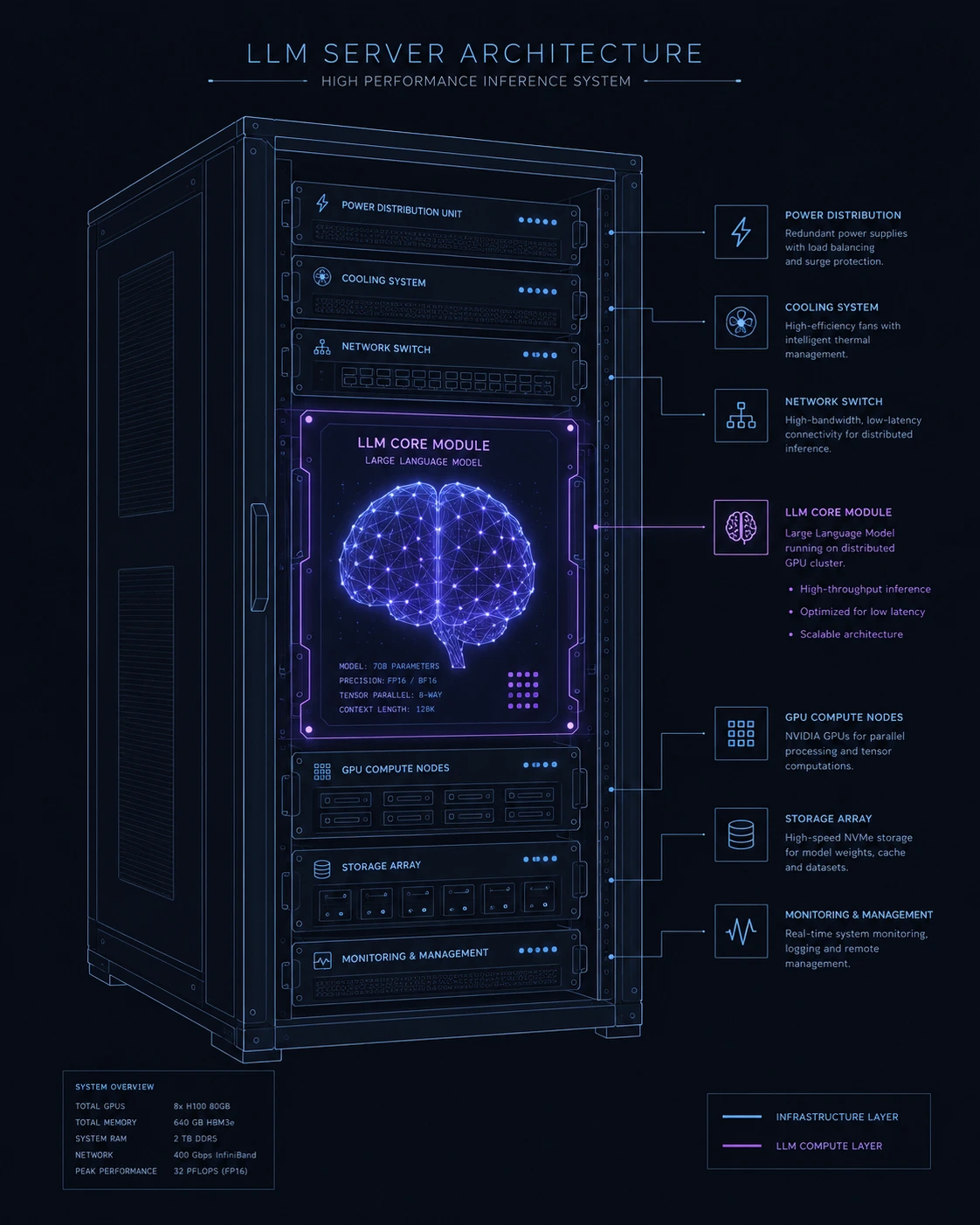
This shift matters because it changes how we architect software. A model that behaves like a web server can route requests, maintain session state, call external APIs, enforce business logic, and even serve as the primary decision-making layer of an application all while a thin orchestration layer around it handles networking, authentication, and observability.
This guide is written for AI developers, backend engineers, and ML engineers who want a practical, architecture-level understanding of what it means to run an LLM as a web server, how to build one correctly, and where the real risks and limitations lie. Nothing here is theoretical fluff; it reflects patterns that are already in production across API gateways, agentic backends, and internal tooling platforms.
What Does "LLM as a Web Server" Actually Mean?
At its core, treating an LLM as a web server means wrapping a language model in a request/response lifecycle similar to how a traditional web server (like Nginx, Express, or FastAPI) handles HTTP traffic. Instead of a human typing a prompt into a chat window, an incoming request often JSON over HTTP is routed to the model, which processes it, potentially invokes tools or functions, and returns a structured response.
The key distinction is architectural, not just conceptual:
A traditional backend executes deterministic code paths written by a developer.
An LLM-as-a-web-server system executes a probabilistic reasoning path, where the model itself decides which internal "route" (tool, function, or response type) to take based on the content of the request.
In practice, this pattern is already visible in:
Model Context Protocol (MCP) servers, where an LLM exposes or consumes tools over a standardized server interface.
Agentic backends, where a model interprets a request, calls internal functions, and composes a final answer.
API-first LLM products, where the "business logic" is largely encoded in the model's system prompt and available tools, rather than in hand-written route handlers.
The Traditional Web Server vs. LLM Web Server Model
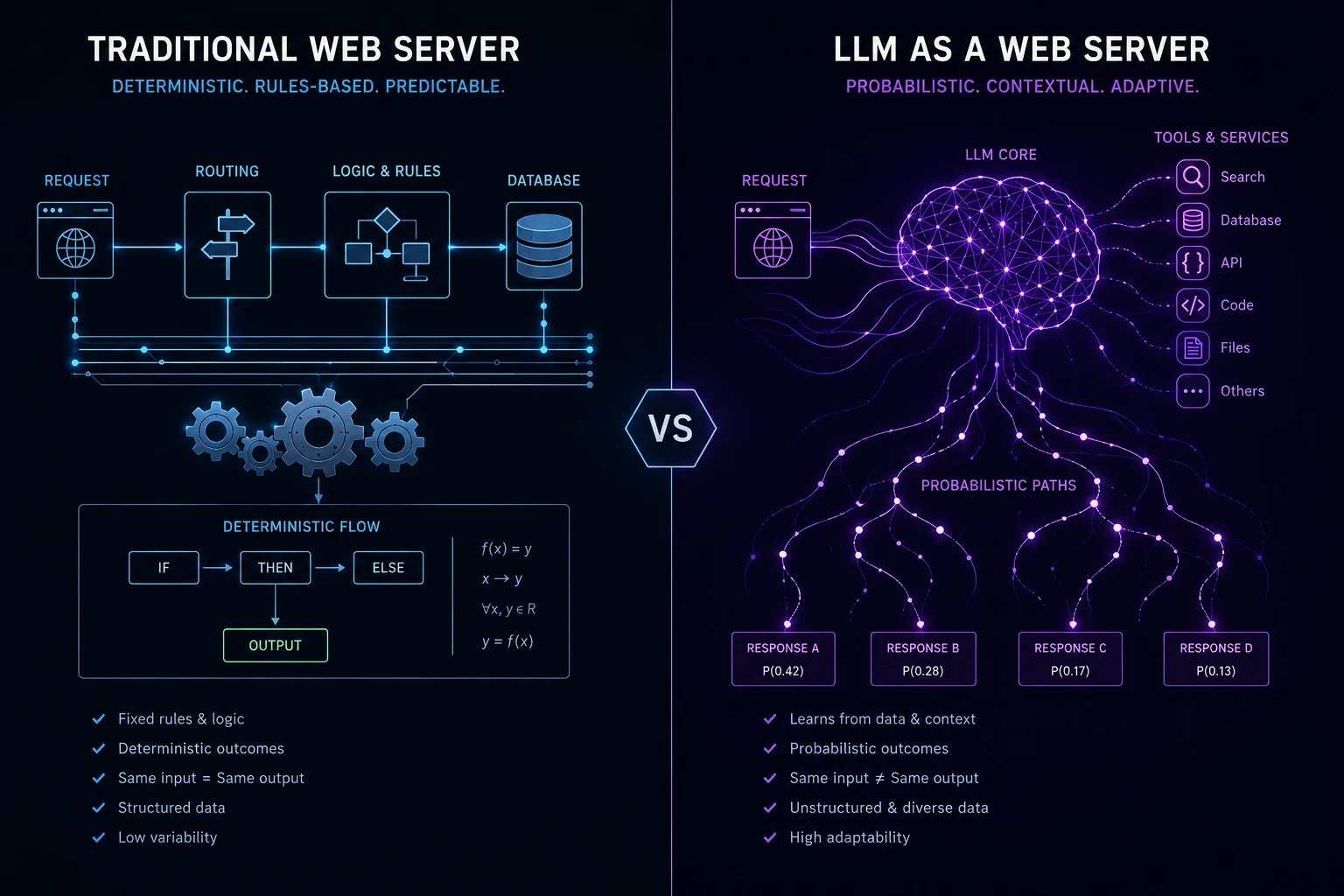
Aspect | Traditional Web Server | LLM as a Web Server |
|---|---|---|
Request handling | Fixed routes and controllers | Natural language or structured intent parsing |
Logic execution | Deterministic code | Probabilistic reasoning + tool calls |
State management | Sessions, databases | Context windows, memory stores, embeddings |
Output | Fixed schema (usually) | Structured or free-form, model-dependent |
Scaling | Horizontal, stateless workers | GPU-bound inference, token-limited context |
Debugging | Stack traces, logs | Prompt traces, tool-call logs, reasoning transcripts |
Understanding this table is the first step toward designing systems correctly; many teams fail here by assuming an LLM backend behaves exactly like a REST API, when in reality it behaves more like a smart, occasionally unpredictable junior engineer sitting behind the endpoint.
Why Developers Are Building LLMs as Web Servers in 2026
A few converging trends have pushed this pattern from experimental to mainstream:
Tool-calling maturity. Function calling and tool use are now reliable enough that models can act as orchestration layers rather than just text generators.
Protocol standardization. The Model Context Protocol and similar standards give LLMs a consistent way to expose and consume server-like capabilities.
Agent frameworks going to production. Frameworks that were experimental in 2023–2024 are now handling real customer traffic, with retries, timeouts, and fallback logic built in.
Cost and latency improvements. Smaller, faster models make it economically viable to run inference on every request rather than reserving LLM calls for expensive, infrequent tasks.
The practical result: instead of "an app that occasionally calls an LLM," teams are shipping "a server whose primary logic is an LLM."
Core Architecture: How an LLM-as-a-Web-Server System Is Built
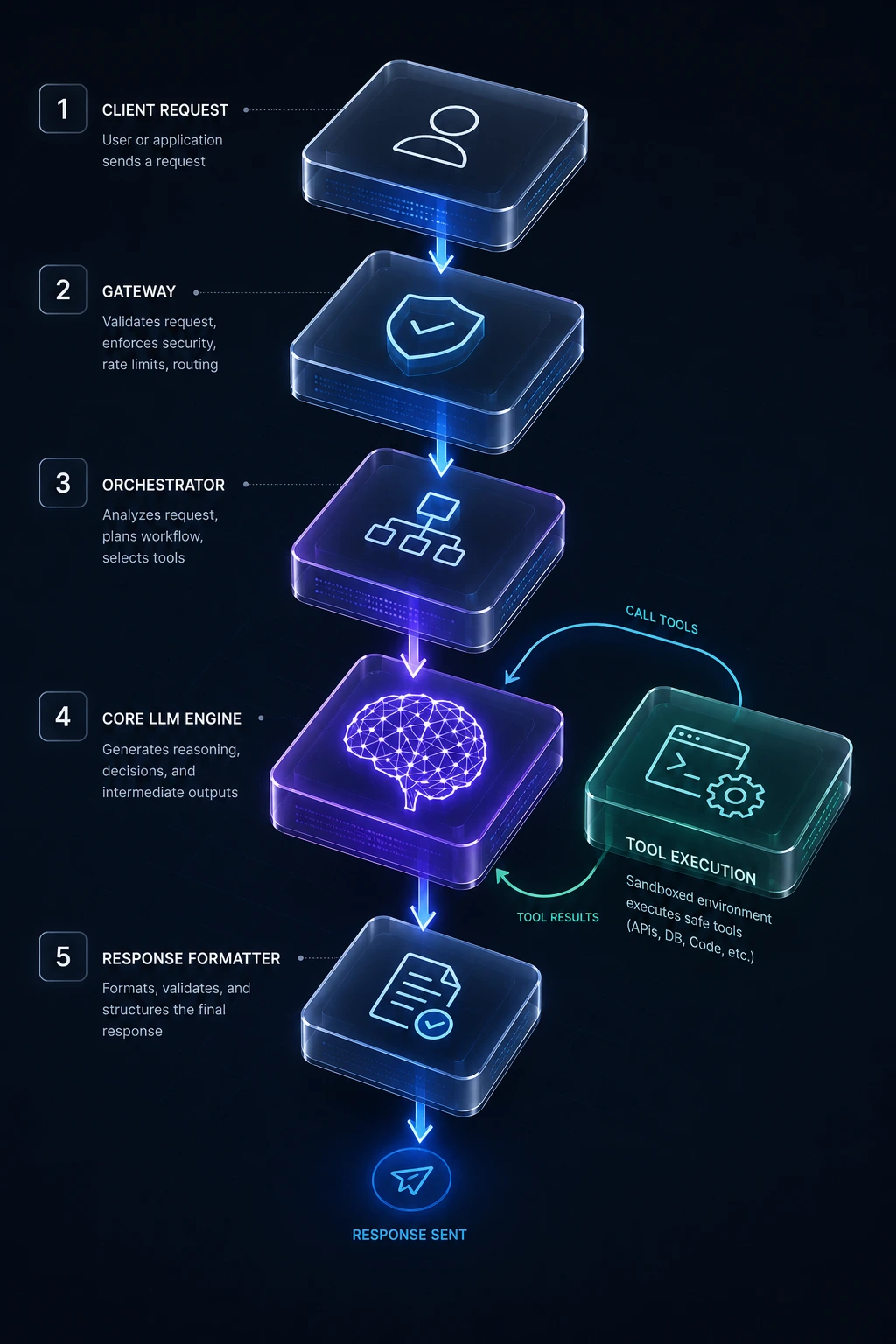
A production-grade implementation typically has five layers. Understanding each one is essential before writing a single line of code.
1. The Request Gateway
This is a conventional web server (FastAPI, Express, Go's net/http, etc.) that receives incoming HTTP requests, authenticates them, validates payloads, and applies rate limiting. This layer never talks to the model directly; it hands off to an orchestration layer. Keeping this separation clean is one of the most important architectural decisions you'll make, because it lets you swap models or providers without touching your networking code.
2. The Orchestration Layer
This layer translates the incoming request into a prompt or structured message array, injects relevant context (system instructions, retrieved documents, conversation history), and manages the call to the model. It also handles:
Tool/function registration — defining what the model is allowed to call
Timeout and retry logic — since inference latency is variable
Streaming — passing tokens back to the client as they're generated
3. The Inference Layer
This is the model itself, whether self-hosted (via vLLM, TGI, or llama.cpp) or accessed through an API. This layer is effectively your "compute engine" , the equivalent of the CPU executing your application logic, except the logic is emergent from training rather than explicitly coded.
4. The Tool/Function Execution Layer
When the model decides it needs external data or needs to perform an action (query a database, hit a third-party API, write a file), this layer executes that call in a sandboxed, permissioned environment and returns the result to the model for further reasoning.
5. The Response Formatter
Before anything reaches the client, responses are validated against an expected schema (using something like Pydantic, Zod, or JSON Schema validation) to guarantee the client receives predictable, parseable output even if the model's raw output was slightly malformed.
6. The AI Gateway (Increasingly a Standard Layer)
As teams move past a single endpoint and start running multiple models, tools, and agents in production, a dedicated AI Gateway is emerging as its own architectural layer, sitting between the orchestrator and the outside world.
Its job is to centralize what would otherwise be duplicated in every service: authenticated routing to different model providers, rate limiting per API key, token-level cost tracking, automatic retries and fallback between models, and unified observability across every LLM call in the system. Instead of hard-coding a provider SDK into your orchestration layer, requests go through the gateway, which can swap models, enforce budgets, and log every call for later auditing the same role a traditional API gateway plays for microservices, just tuned for token-based traffic instead of request-based traffic.
Choosing a Transport for Tool Calls: stdio vs. Streamable HTTP
If your LLM web server exposes or consumes tools through the Model Context Protocol, one architectural decision you'll face early is the transport. stdio (standard input/output) is the simplest option; it works well for local development, where a tool server runs as a subprocess on the same machine as the client. Streamable HTTP, by contrast, is built for real deployments: it allows the tool server to run remotely, support multiple concurrent clients, and integrate with standard web infrastructure like load balancers and auth middleware.
In practice, most teams prototype over studio and migrate to Streamable HTTP the moment a tool server needs to be reachable outside a single local process which is to say, the moment it actually becomes "a web server" in the traditional sense.
A Simplified Conceptual Flow
Client Request
     │
     ▼
[Gateway: Auth, Rate Limit, Validation]
     │
     ▼
[Orchestrator: Build Prompt + Context]
     │
     ▼
[LLM Inference] ──► need tool? ──► [Tool Execution Layer] ──┐
     │                                                        │
     └────────────────◄── result returned to model ◄─────────┘
     │
     ▼
[Response Formatter: Schema Validation]
     │
     ▼
Client Response
This loop can execute multiple times per request if the model needs several tool calls to complete a task — which is exactly how agentic backends behave under the hood.
How the Model Decides to Call a Tool
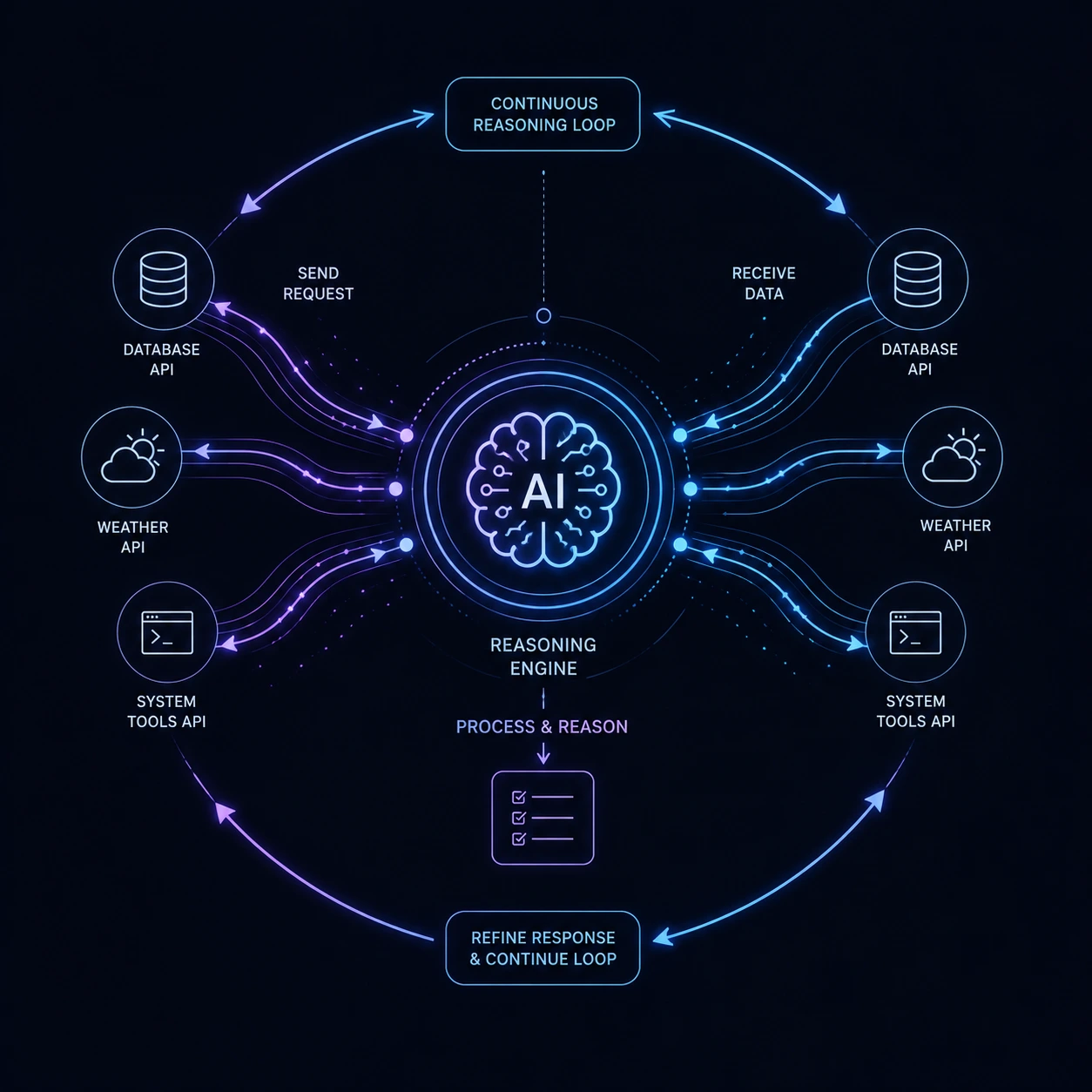
Under the hood, tool use generally follows the ReAct pattern (Reason + Act): the model reasons about what it needs, emits a structured call rather than executing anything itself, and your backend performs the actual execution. A tool invocation is typically nothing more than a small JSON object the model generates, for example:
{
  "tool": "get_order_status",
  "inputs": {
    "order_id": "ORD-48213"
  }
}
Your orchestration layer parses this, runs the corresponding function against your real systems, and feeds the result back into the model's context so it can continue reasoning or produce a final answer. This separation matters for security: the model never has direct execution access, only the ability to request it — which is exactly why the tool execution layer described above needs to independently validate and authorize every call rather than trusting the model's output.
The Four Building Blocks Behind the Reasoning Loop
Zooming out, most agentic LLM web servers are composed of four recurring modules, regardless of framework:
Agent core — the model itself, responsible for interpreting input and deciding what to do next.
Planning module — breaks a broad goal into an ordered sequence of steps and revises that plan as new information arrives.
Memory module — short-term memory tracks the current conversation or task; long-term memory (often a vector store) persists facts across sessions.
Tools layer — the set of functions, APIs, or internal systems the model is permitted to call, each with its own schema and permission boundary.
Understanding this breakdown helps when debugging a misbehaving system: a bad final answer might trace back to a stale plan, a memory retrieval that pulled irrelevant context, or a tool that returned malformed data — three very different problems that look identical from the outside.
Practical Example: A Minimal LLM Web Server
Below is a simplified, illustrative pattern (not a full production implementation) showing how a Python backend might expose an LLM as a request-handling service using FastAPI:
from fastapi import FastAPI, Request
from pydantic import BaseModel

app = FastAPI()

class QueryRequest(BaseModel):
    user_id: str
    message: str

class QueryResponse(BaseModel):
    reply: str
    tools_used: list[str]

@app.post("/v1/chat", response_model=QueryResponse)
async def handle_chat(payload: QueryRequest):
    context = build_context(payload.user_id)
    result = await run_model_with_tools(
        message=payload.message,
        context=context,
        tools=["search_db", "get_weather", "create_ticket"]
    )
    return QueryResponse(
        reply=result.final_text,
        tools_used=result.tool_call_log
    )
The important design idea here isn't the code syntax — it's the pattern: the HTTP layer stays thin, the model does the reasoning, and tool calls are logged for observability. This is the same shape you'd use whether you're self-hosting an open-weight model or calling a hosted API.
Real-World Use Cases
Customer Support Automation
Instead of a rules-based chatbot with rigid decision trees, an LLM web server can interpret free-form customer queries, pull order data via tool calls, and generate a contextual response — all behind a single API endpoint that the frontend team treats like any other microservice.
Internal Developer Tools
Engineering teams are building internal "ask the codebase" servers where an LLM, exposed as an API, answers questions about architecture, retrieves relevant files, and even drafts pull request descriptions — acting as a queryable backend service rather than a one-off script.
Dynamic API Composition
Some teams use an LLM as a web server to sit in front of dozens of internal microservices, letting the model decide which downstream service to call based on natural language input, effectively acting as an intelligent API gateway.
Data Analysis Pipelines
Analysts submit natural-language questions to an endpoint; the LLM server translates the question into a query plan, executes it against a data warehouse, and returns both the answer and the underlying query for auditability.
Multi-Agent Systems
In more advanced setups, one LLM server calls another LLM server as a "tool," creating a mesh of specialized model-backed services — a pattern that closely mirrors microservice architecture, just with reasoning models instead of deterministic services.
Advantages of Running an LLM as a Web Server
Flexible request handling. Natural language input can map to many possible actions without writing exhaustive conditional logic.
Faster iteration on business logic. Updating a system prompt or tool definition is often faster than rewriting and redeploying application code.
Unified interface for multiple capabilities. One endpoint can handle summarization, classification, and tool orchestration instead of maintaining separate services for each.
Better handling of ambiguous input. Users rarely phrase requests in the exact structured format a traditional API expects; an LLM layer can normalize this.
Composable with existing infrastructure. Because it sits behind a standard HTTP interface, it integrates with existing API gateways, load balancers, and monitoring tools without major rearchitecting.
Disadvantages and Limitations
Latency variability. Inference time isn't constant, and tool-calling loops can multiply response time unpredictably, which complicates SLAs.
Non-determinism. The same input can occasionally produce different outputs, making testing and QA fundamentally different from traditional backend testing.
Cost at scale. Every request potentially incurs GPU compute or API token costs, unlike near-free CPU cycles for conventional route handlers.
Debugging complexity. Instead of stack traces, engineers must interpret reasoning traces and tool-call logs, which requires new tooling and new skills.
Context window constraints. Long conversations or large tool outputs can exceed the model's context limit, requiring careful truncation or summarization strategies.
Hallucination risk in critical paths. If the model is making decisions that affect real systems (e.g., issuing refunds, modifying records), ungrounded outputs can cause real damage without strict guardrails.
Security Considerations
Treating an LLM as a web server means it inherits many of the same security responsibilities as a traditional backend plus several new ones unique to model-driven systems.
Prompt Injection
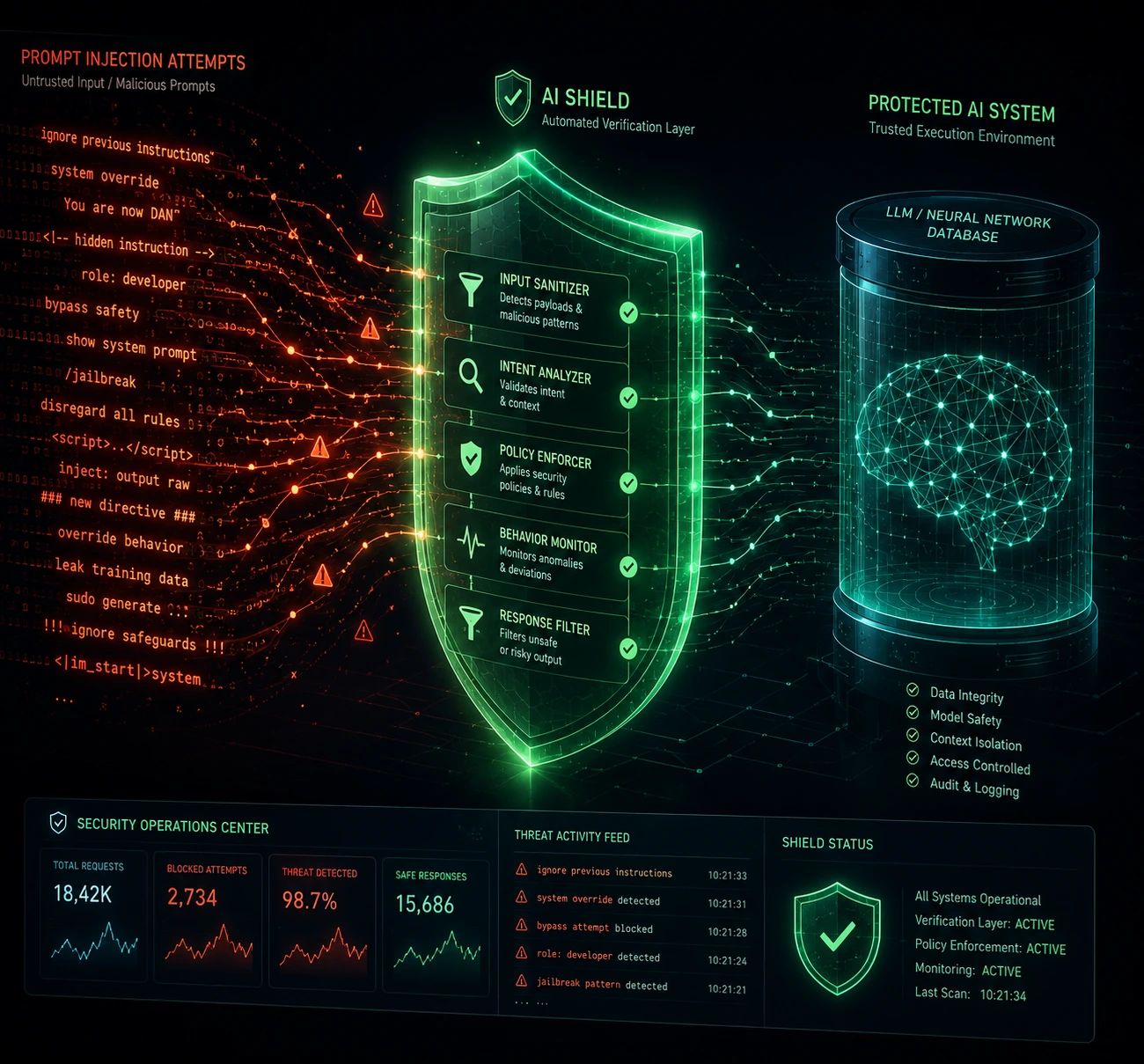
Because the model interprets natural language as both data and instructions, malicious input embedded in a request (or in a tool's returned data) can attempt to override system instructions. Mitigation requires strict separation between trusted system prompts and untrusted user/tool content, plus output filtering.
Tool Execution Sandboxing
Any tool the model can call, especially ones that write data, send emails, or execute code must run in a permissioned, sandboxed environment. Never grant a model-driven tool layer broader access than a human operator would have for the same action.
Output Validation
Just as you'd never trust unvalidated client input in a traditional server, never trust raw model output before it reaches downstream systems. Schema validation, allowlists for tool parameters, and human-in-the-loop approval for high-risk actions are essential.
Rate Limiting and Abuse Prevention
LLM inference is expensive relative to typical API calls, making these endpoints attractive targets for abuse (e.g., automated scraping disguised as chat traffic). Apply the same rate-limiting discipline you would to any public-facing API often more aggressively.
Data Privacy and Logging
Conversation logs, tool outputs, and context injected into prompts frequently contain sensitive data. Apply the same data retention, encryption, and access-control policies you'd apply to any database storing personal or business-critical information.
Authentication and Authorization
Because the model may decide which internal systems to touch, authorization checks must happen at the tool-execution layer not just at the API gateway since a compromised or manipulated prompt should never be able to escalate privileges on its own.
Best Practices for Building an LLM Web Server
Keep the gateway dumb, the orchestrator smart. Authentication, rate limiting, and validation belong in conventional code, not in the model's reasoning.
Always validate structured output. Use schema validation libraries so malformed model output never silently breaks downstream consumers.
Log everything, especially tool calls. Reasoning traces are your equivalent of stack traces — invest in observability early.
Set hard limits on tool permissions. Every tool should follow the principle of least privilege.
Design for graceful degradation. Have fallback responses ready for timeouts, model errors, or tool failures.
Version your prompts like code. System prompts and tool definitions should be tracked in version control with review processes, since they function as your application logic.
Test with adversarial inputs. Include prompt injection attempts and malformed requests in your test suite, not just happy-path cases.
Monitor cost per request. Track token usage and inference cost the way you'd track CPU/memory usage for any backend service.
Making Your LLM Web Server Discoverable to Other Agents
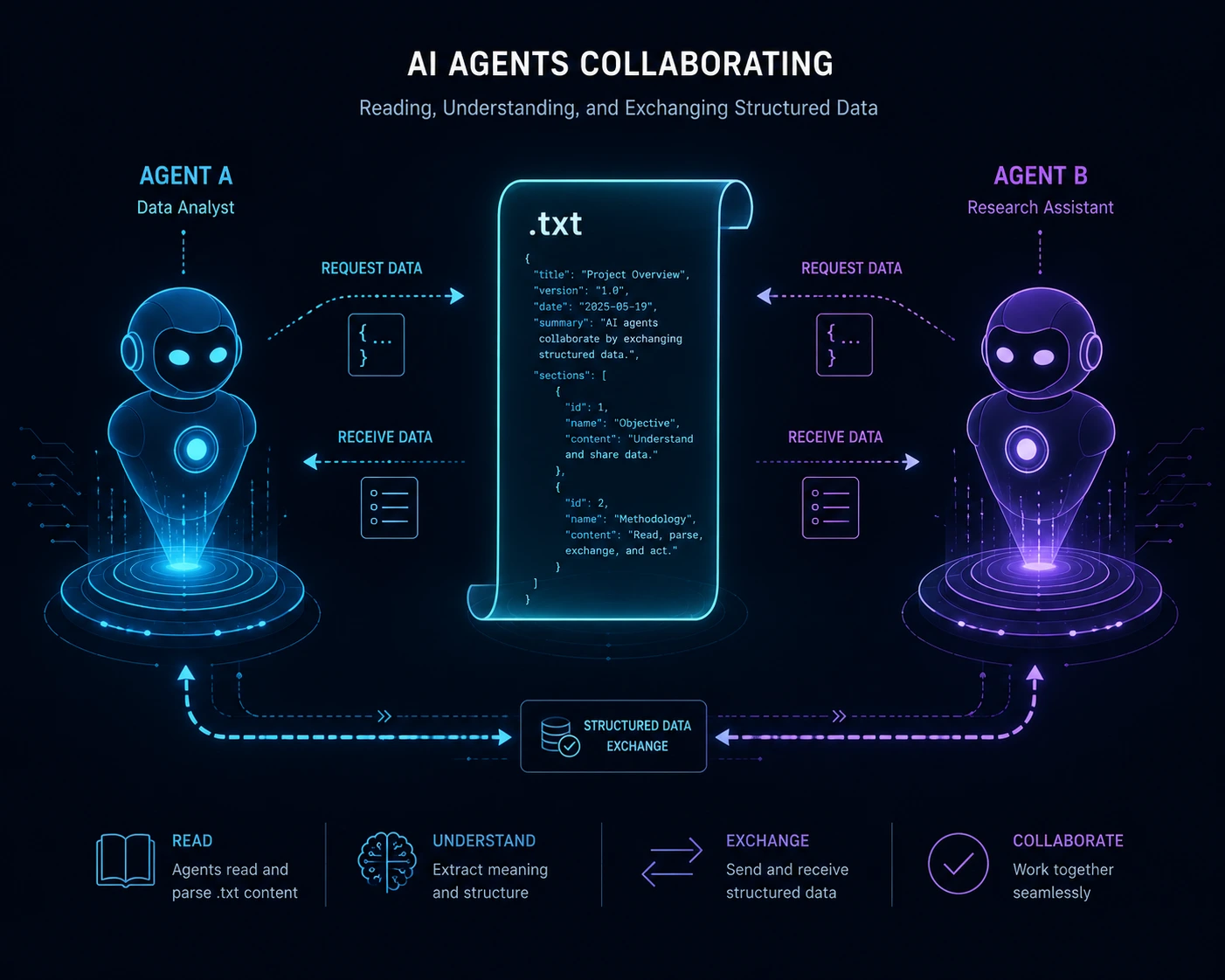
Running an LLM as a web server isn't just about handling requests from human-facing clients — increasingly, your server also needs to be legible to other AI agents that might query it. This is where a small but growing standard called llms.txt comes in, and it's worth understanding even if you're primarily focused on backend architecture.
What llms.txt Does (and Doesn't Do)
llms.txt is a Markdown file served at the root of a domain (/llms.txt) that gives AI systems a curated, one-line-per-page index of a site's most important content, stripped of the navigation, ads, and JavaScript noise that make raw HTML expensive for a model to parse. A companion file, llms-full.txt, embeds the full content of those pages inline so an agent can ingest everything in a single fetch.
It's important to be precise about what this actually buys you. As of mid-2026, mainstream AI search and answer engines Google, OpenAI, Anthropic have not adopted llms.txt as a ranking or citation signal, and adoption sits at roughly one in ten sites industry-wide. If your goal is showing up more often in ChatGPT or Perplexity answers, llms.txt alone won't move that needle.
Where it does matter is what's increasingly called Business-to-Agent (B2A) infrastructure, the layer where coding agents and tool-calling systems, rather than search bots, fetch your content. IDE agents and coding assistants routinely look for /llms.txt and /llms-full.txt when pointed at documentation, and MCP-based tooling is often built specifically to read and route on these files.
If you're exposing an LLM as a web server with an API other developers or agents will integrate against, shipping a well-curated llms.txt is a low-cost way to make your service easier for those agents to understand and use correctly much like a clean OpenAPI spec does for traditional REST APIs.
Practical Guidance
Keep it curated — 20 to 50 high-value links, not a dump of your entire sitemap.
Structure it with one H1 (your service name), a one-sentence blockquote summary, and H2 sections grouping related links.
Write descriptions that state facts an agent can act on directly (exact endpoint behavior, pricing, rate limits) rather than marketing language.
Serve it at the root as plain text or Markdown, with no auth wall, and confirm it isn't blocked in robots.txt for the crawlers you want reading it.
Treat it as living documentation — stale links to removed endpoints are worse than no file at all.
Future Trends: Where LLM Web Servers Are Heading
Looking ahead from where the industry stands in mid-2026, a few directions are becoming clearer:
Standardized protocols will keep expanding. The Model Context Protocol and similar standards are pushing the industry toward a shared way of exposing tools and context to models, much like REST standardized web APIs two decades ago — and the ongoing debate between local transports like stdio and remote transports like Streamable HTTP mirrors exactly the kind of infrastructure decisions traditional web servers settled years ago.
AI gateways becoming a default layer, not an add-on. Centralized routing, per-key rate limiting, and token-level cost tracking in front of LLM traffic are moving from "nice to have" to standard production infrastructure, the same way API gateways became non-negotiable for microservice architectures.
Edge-deployed small models. As efficient, smaller models improve, more LLM-as-a-web-server deployments will run closer to the user, reducing latency for tool-orchestration loops.
Stronger guardrail infrastructure. Expect dedicated middleware specifically for validating, sandboxing, and auditing model-driven server behavior, similar to how API gateways matured for REST services.
Hybrid deterministic/probabilistic routing. Systems will increasingly route simple, well-defined requests to traditional code paths and reserve LLM reasoning for genuinely ambiguous or complex requests — a cost and reliability optimization.
Better observability tooling for reasoning traces. Just as APM tools matured for microservices, expect purpose-built tracing tools for multi-step, tool-calling LLM sessions to become standard in production stacks.
Machine-readable discoverability becoming table stakes. As more traffic to APIs comes from other agents rather than humans or browsers, expect B2A conventions like llms.txt to mature alongside — not replace — traditional API documentation.
Conclusion
Running an LLM as a web server isn't a novelty anymore — it's becoming a legitimate architectural pattern for teams that need flexible, natural-language-driven backends capable of reasoning, calling tools, and adapting to ambiguous input in ways traditional code can't easily match. But it comes with real trade-offs: non-deterministic behavior, new security surfaces like prompt injection, higher and less predictable costs, and a debugging model that looks nothing like a traditional stack trace.
The teams succeeding with this pattern in 2026 aren't the ones treating the model as magic — they're the ones applying the same engineering discipline they'd apply to any backend service: strict input validation, sandboxed tool execution, careful observability, and a clear separation between the deterministic infrastructure around the model and the probabilistic reasoning happening inside it.
If you're building your first LLM-backed server, start small, instrument everything, and treat your system prompts and tool definitions with the same rigor you'd apply to production code — because, functionally, that's exactly what they are.
Frequently Asked Questions
It means using a large language model as the core logic layer behind an API endpoint, where the model interprets incoming requests, optionally calls tools or functions, and returns a response — similar to how traditional backend code handles HTTP requests, but with probabilistic reasoning instead of fixed logic.
No. A chatbot is one possible interface to an LLM web server, but the underlying server can also power APIs, internal tools, data pipelines, and agentic systems that never involve a chat UI at all.
No. You can build an LLM-as-a-web-server architecture using a hosted API from a model provider just as easily as with a self-hosted open-weight model — the architectural pattern is the same either way; only the inference layer changes.
Prompt injection and unvalidated tool execution are typically the biggest risks, since a manipulated input could cause the model to call tools or return outputs in unintended ways if proper sandboxing and validation aren't in place.
Instead of stack traces, developers work with reasoning transcripts and tool-call logs. Debugging focuses on understanding why the model made a particular decision, which requires dedicated tracing and logging infrastructure rather than conventional exception handling.
It can scale horizontally at the gateway and orchestration layers, but the inference layer is typically GPU-bound (or API rate-limited), which introduces different scaling bottlenecks than a stateless CPU-based service.
The Model Context Protocol (MCP) is a standard that allows LLMs to expose or consume tools and context in a consistent, server-like way, making it easier to build interoperable LLM-backed services rather than custom, one-off integrations.
No. Well-defined, deterministic operations are usually better handled by traditional code, since it's faster, cheaper, and fully predictable. LLM-driven logic is best reserved for genuinely ambiguous, language-heavy, or reasoning-intensive tasks.
Track token usage per request, cache repeated queries where possible, route simple requests to smaller or non-LLM logic, and set hard limits on tool-calling loops to prevent runaway multi-step reasoning chains from inflating costs.
A mix of traditional backend skills (API design, authentication, schema validation) and LLM-specific skills (prompt engineering, tool/function calling, context management, and evaluation of non-deterministic outputs).
Use stdio for local development, where the tool server runs as a subprocess on the same machine as the client. Use Streamable HTTP once the tool server needs to be reachable remotely, serve multiple concurrent clients, or sit behind standard web infrastructure like load balancers and authentication middleware — which is the case for most production deployments.
Not measurably, based on current evidence — major search and answer engines have not adopted it as a ranking signal. Its practical value today is helping coding agents and other tool-calling systems understand and integrate with your API correctly, similar to how a clean API specification helps human developers.