⚡ Quick-Fix Summary Box
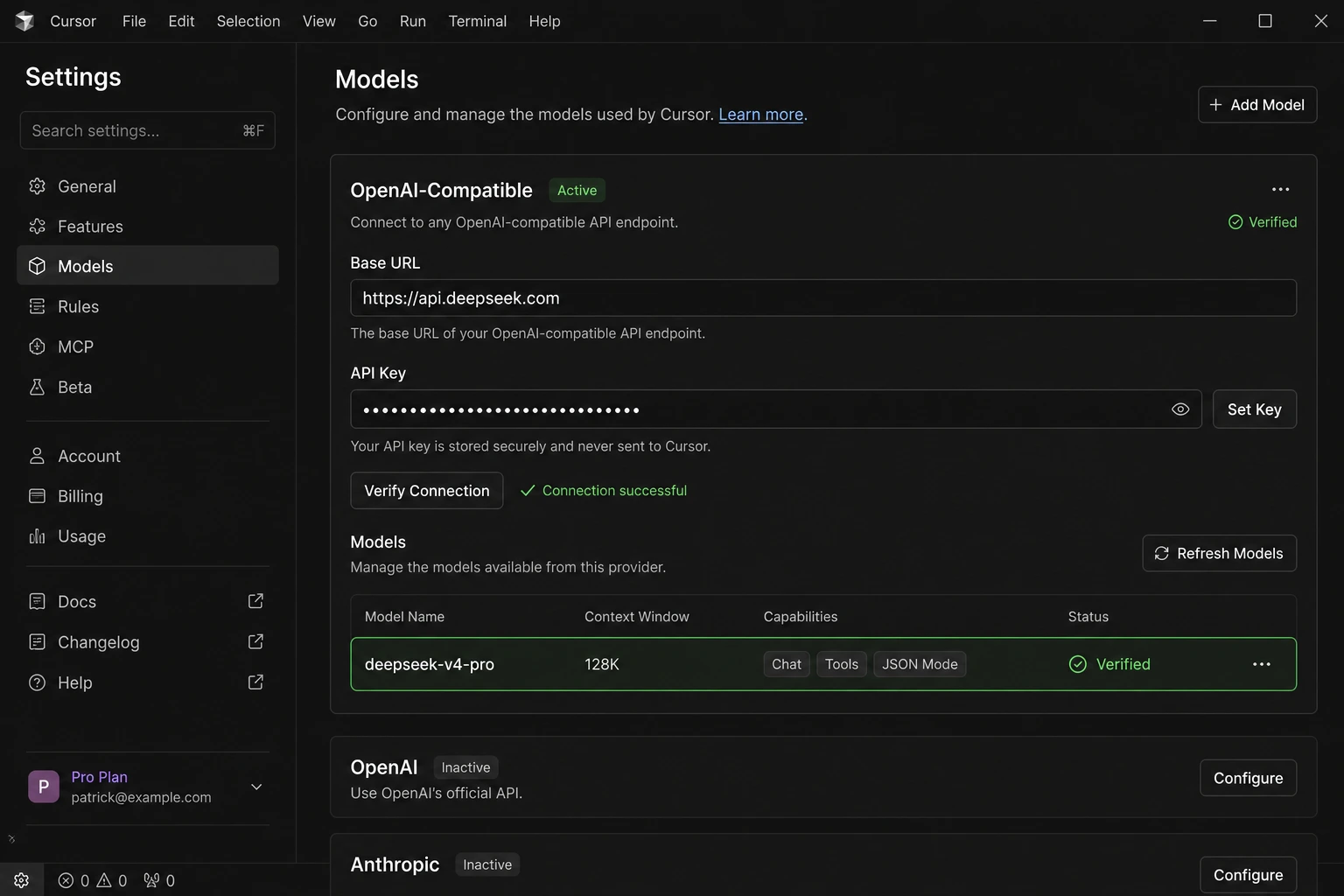
Most DeepSeek connection failures in Cursor come down to just three things: a wrong Base URL, a zero API balance, or a deprecated model name. Here's the 30-second fix:
Open Cursor Settings → Models → Add Model
Set OpenAI Base URL to: https://api.deepseek.com (no /v1 suffix)
Paste your DeepSeek API key
Model name: deepseek-v4-pro or deepseek-v4-flash
Click Verify — green checkmark = success
Still broken? Work through the full troubleshooting sections below.
Introduction
If you've tried to get a DeepSeek Coder setup in Cursor and keep hitting a wall 401 errors, a model dropdown that's empty, or responses that time out you're not alone. Threads on the official Cursor Community Forum show hundreds of developers running into the exact same issues, asking the exact same questions, often getting answers that no longer work because DeepSeek's API has changed.
This guide is the definitive fix for 2026. It pulls from the Cursor official forum, real developer testing, the official deepseek-cursor-proxy GitHub repository, local hosting guides, and the latest DeepSeek V4 release documentation. Every step here has been verified against the current API not a six-month-old tutorial.
Beyond just connecting the two, this article explains why things break, gives you the correct model names for 2026, covers the critical July 24, 2026 deprecation deadline, and shows you how to use DeepSeek as the cheapest AI coding model available today including options to run it fully locally if you want zero API costs and complete privacy.
Whether you're a solo developer cutting monthly AI costs, a student building projects on a tight budget, or a professional team looking for a reliable Claude/GPT alternative this guide is written for you.
What Is DeepSeek Coder Setup in Cursor?
Cursor is a VS Code fork with AI built into its core. It ships with access to Claude, GPT, Gemini, and a handful of other models through Cursor's own managed infrastructure. But it also supports custom OpenAI-compatible API providers which is the mechanism we use to bring in DeepSeek.
DeepSeek is a Chinese AI research lab whose models have become serious competition for Western frontier labs. Their coding-focused models beginning with DeepSeek Coder V2 and now the V4 family have earned widespread respect for strong benchmark performance at dramatically lower cost.
Connecting the two means telling Cursor to send its requests to DeepSeek's API endpoint instead of its default providers. DeepSeek's API is OpenAI-compatible, meaning it uses the same request/response format as the OpenAI API. Cursor already knows how to talk to OpenAI so all that's needed is a Base URL change and an API key.
Once configured:
DeepSeek models appear in Cursor's model dropdown
All Chat panel requests go through your personal DeepSeek API account
You pay DeepSeek directly at their API rates (far cheaper than Cursor's built-in model usage)
You get access to the full V4 model family, including the 1M-token context window
Quick toggle tip: Once set up, you can toggle the custom DeepSeek API on and off directly inside Cursor without going back to settings Cmd+Shift+0 on macOS, Ctrl+Shift+0 on Windows/Linux.
Two Completely Different Ways DeepSeek Works in Cursor
This is the biggest source of confusion, documented repeatedly in the Cursor Community Forum. There are two separate methods, and they are NOT interchangeable:
Method 1 Cursor's Native DeepSeek Integration (Built-In)
Cursor added native DeepSeek support. You can find DeepSeek models in Settings → Models without adding anything custom. You select one, and it works with no API key you require.
What's actually happening: Cursor routes these requests through Fireworks AI's infrastructure, not DeepSeek's official API. You are NOT using your personal DeepSeek key. You ARE consuming your Cursor premium request quota.
Limitations:
No personal DeepSeek API key accepted here
Only works in Chat panel — Composer (multi-file agent) is not supported
Some users on the forum report noticeably degraded output quality compared to chat.deepseek.com directly
Region restrictions apply (primarily US-hosted via Fireworks)
Method 2 — Custom OpenAI-Compatible API (BYOK)
This is the method this guide focuses on. You add DeepSeek as a custom provider in Cursor's OpenAI-compatible section using your personal DeepSeek API key.
What's actually happening: Cursor talks directly to api.deepseek.com using your key. You pay DeepSeek directly per token. You control which model you use.
Limitations:
Still Chat-only in native Cursor (Composer limitation is on Cursor's side, not DeepSeek's)
Requires a funded DeepSeek API account
The reasoning_content field from V4 models can cause 400 errors in some Cursor versions — solvable with the proxy method below
As one Cursor community moderator clarified in the forum: "DeepSeek API keys aren't officially supported in Cursor Settings → Models → API Keys. That section only works with OpenAI, Anthropic, Google, Azure OpenAI, and AWS Bedrock. Use the Add Model method for DeepSeek."
Why Does the Connection Fail? Common Causes Explained
Before the step-by-step setup, understanding the failure modes saves a lot of time:
Error / Symptom | Root Cause | Fix |
|---|---|---|
401 Unauthorized | Wrong API key or key in wrong field | Use BYOK / Add Model method with correct key |
403 provider_error | Trying to paste DeepSeek key in the API Keys section | Use Add Model instead — see Method 2 |
404 Not Found | Deprecated model name (e.g., deepseek-coder-v2) | Update to deepseek-v4-pro or deepseek-v4-flash |
Verify button stays gray / times out | Wrong Base URL (extra /v1, wrong protocol, or VPN blocking) | Use exactly https://api.deepseek.com |
Works in Chat, broken in Composer | Known Cursor limitation — custom API models don't support Composer | Use Cline extension or deepseek-cursor-proxy |
Model not in dropdown | Model added but toggle not enabled | Go to Settings → Models and enable the toggle |
Slow / timing out responses | DeepSeek API peak-hour latency | Switch to V4 Flash, or route through OpenRouter |
reasoning_content 400 error | DeepSeek V4 thinking mode requires reasoning_content passed back in tool calls; Cursor omits this field | Use deepseek-cursor-proxy (most complete fix) or V4 Flash in non-thinking mode |
Output worse than chat.deepseek.com | Using V4 Flash when V4 Pro is needed, or context being trimmed | Explicitly use deepseek-v4-pro and expand context |
One important pattern from the Cursor forum: many users try entering the Base URL as https://api.deepseek.com/v1 or https://api.deepseek.com/beta. Both of these silently break the connection in many Cursor versions. The correct URL is simply https://api.deepseek.com.
Step-by-Step Setup: DeepSeek Coder in Cursor (2026)
Step 1 — Create a DeepSeek API Account and Get Your Key
Go to platform.deepseek.com and sign up or log in.
In the left sidebar, click API Keys.
Click Create API Key, name it (e.g., "Cursor"), and copy it immediately — it shows only once.
Go to Billing → Top Up and add at least $5 in credits. API access requires a positive balance. At V4 Flash prices, $5 lasts months for typical individual use.
Note: If you're outside mainland China and DeepSeek's API registration is restricted during high-traffic periods, see the "Local Hosting" section below for a zero-API-key alternative.
Step 2 — Open Cursor Settings and Navigate to Models
Open Cursor.
Press Ctrl+Shift+J (Windows/Linux) or Cmd+Shift+J (macOS) to open Settings.
Click Models in the left panel.
Scroll down past the built-in model list.
Step 3 — Set the OpenAI-Compatible Base URL
In the OpenAI API Key section (which doubles as the custom provider area):
Set the Base URL field to:
https://api.deepseek.com
Do NOT add /v1 at the end. This is the most common single mistake, confirmed by multiple forum threads. Unlike most other OpenAI-compatible providers, DeepSeek's Base URL works without the suffix in Cursor's implementation.
Exception for proxy users: If you are using the deepseek-cursor-proxy (see Advanced section), the proxy Base URL does require the /v1 suffix: https://your-ngrok-url.ngrok-free.app/v1. This is the one case where /v1 is correct.
Step 4 — Enter Your API Key
In the API Key field directly below the Base URL, paste your DeepSeek API key (starts with sk-).
Step 5 — Add the Model Name
Scroll to the Model Names list.
Click + Add Custom Model.
In the text field, type the model name and press Add:
Model | Use Case | Cost (per 1M tokens) |
|---|---|---|
deepseek-v4-pro | Complex coding, debugging, architecture, multi-step problems | $0.435 input / $0.870 output |
deepseek-v4-flash | Everyday completions, quick fixes, explaining code, fast turnaround | $0.14 input / $0.28 output |
You can add both and switch between them in the chat dropdown.
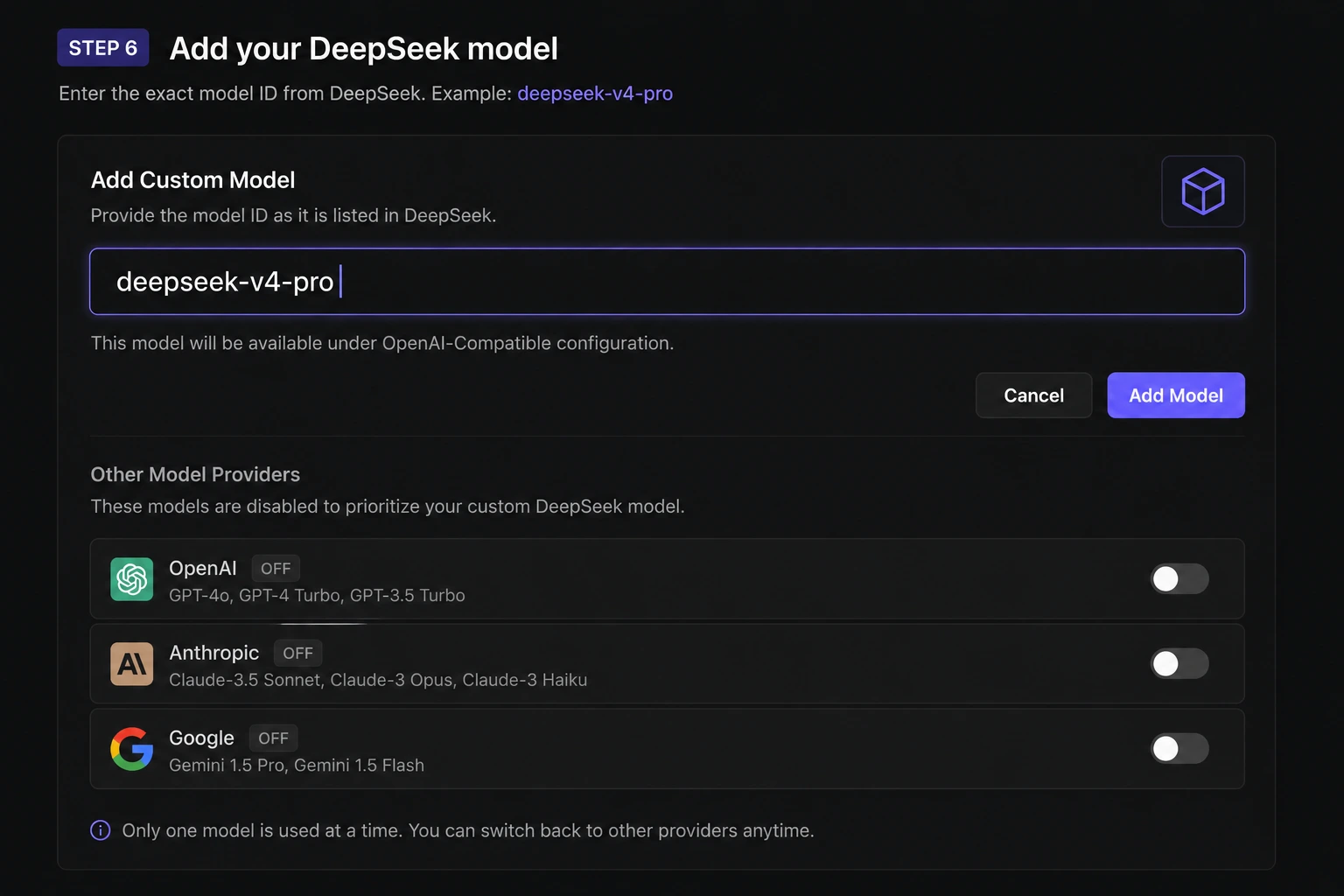
Step 6 — Disable Other Models (Important!)
Several users in the Cursor forum discovered this the hard way: you need to disable or deselect the other active models before Cursor will correctly route requests to your custom provider. If multiple models are enabled simultaneously, Cursor may ignore your custom setup entirely.
Go through Settings → Models and toggle off the built-in models you don't want active while testing DeepSeek.
Step 7 — Verify and Test
Click the Verify button next to your API configuration.
Watch for a green checkmark — this means Cursor successfully reached api.deepseek.com with your key.
Open a new Chat panel (Ctrl+L / Cmd+L), select your DeepSeek model from the dropdown, and type a test prompt.
Advanced Troubleshooting Methods
Fix: The reasoning_content 400 Error — Full Technical Explanation
This is the most technically interesting failure mode, and understanding it helps you choose the right fix.
What's actually happening: DeepSeek V4 Pro operates in "thinking mode" — it generates an internal reasoning trace before its final answer. This trace is stored in a field called reasoning_content. According to DeepSeek's API spec for thinking-mode tool calls, this reasoning_content from previous turns must be passed back in subsequent requests to maintain the reasoning chain.
Cursor does not include the reasoning_content field when it sends follow-up requests. DeepSeek's API sees a broken reasoning chain and throws:
{
  "error": {
    "message": "The reasoning_content in the thinking mode must be passed back to the API.",
    "type": "invalid_request_error",
    "code": "invalid_request_error"
  }
}
Solutions in order of completeness:
Use deepseek-v4-flash — Flash uses less thinking by default and this error is far less frequent
Update Cursor to the latest version (Help → Check for Updates) — newer builds handle this better
Use the deepseek-cursor-proxy (most complete fix — see next section)
Use Cline extension — it handles reasoning_content natively
Fix: deepseek-cursor-proxy — The Complete Solution (Updated)
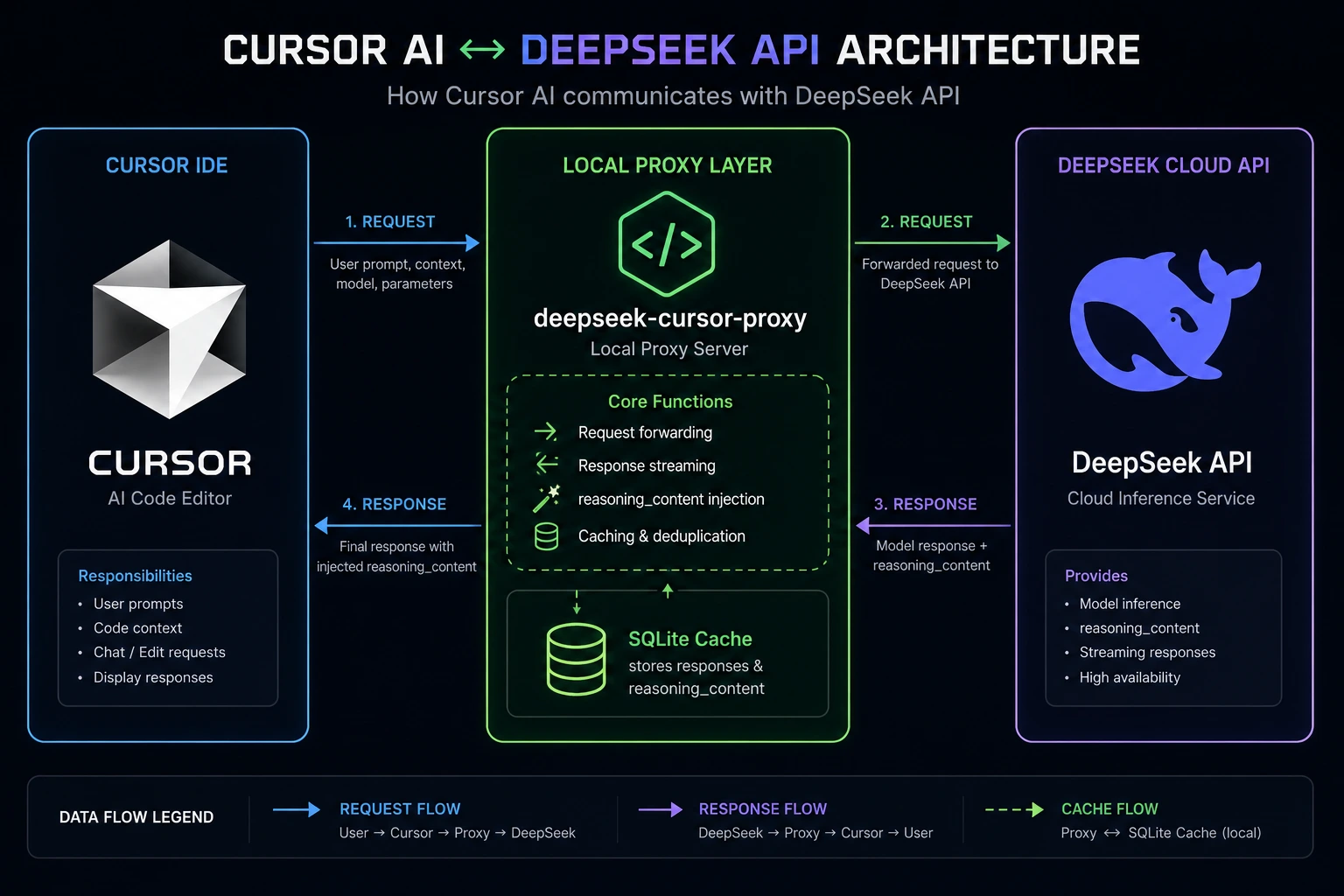
The yxlao/deepseek-cursor-proxy is a Python-based local proxy that sits between Cursor and the DeepSeek API. It is the most complete technical solution for both the reasoning_content error and Composer/agent mode compatibility.
What it actually does (from the GitHub source):
Stores DeepSeek's reasoning_content responses in a local SQLite cache
Patches the cached reasoning_content back into outgoing tool-call requests that Cursor sends without it
Displays DeepSeek's thinking tokens in Cursor as collapsible <details><summary>Thinking</summary>...</details> Markdown blocks — so you can actually see V4 Pro's reasoning in the Cursor UI
Converts legacy functions/function_call fields to the modern tools/tool_choice format
Flattens multi-part content arrays to plain text for compatibility
Uses SHA-256 hashing to isolate different conversations' reasoning caches so concurrent sessions don't collide
Setup (two options: UV or Conda):
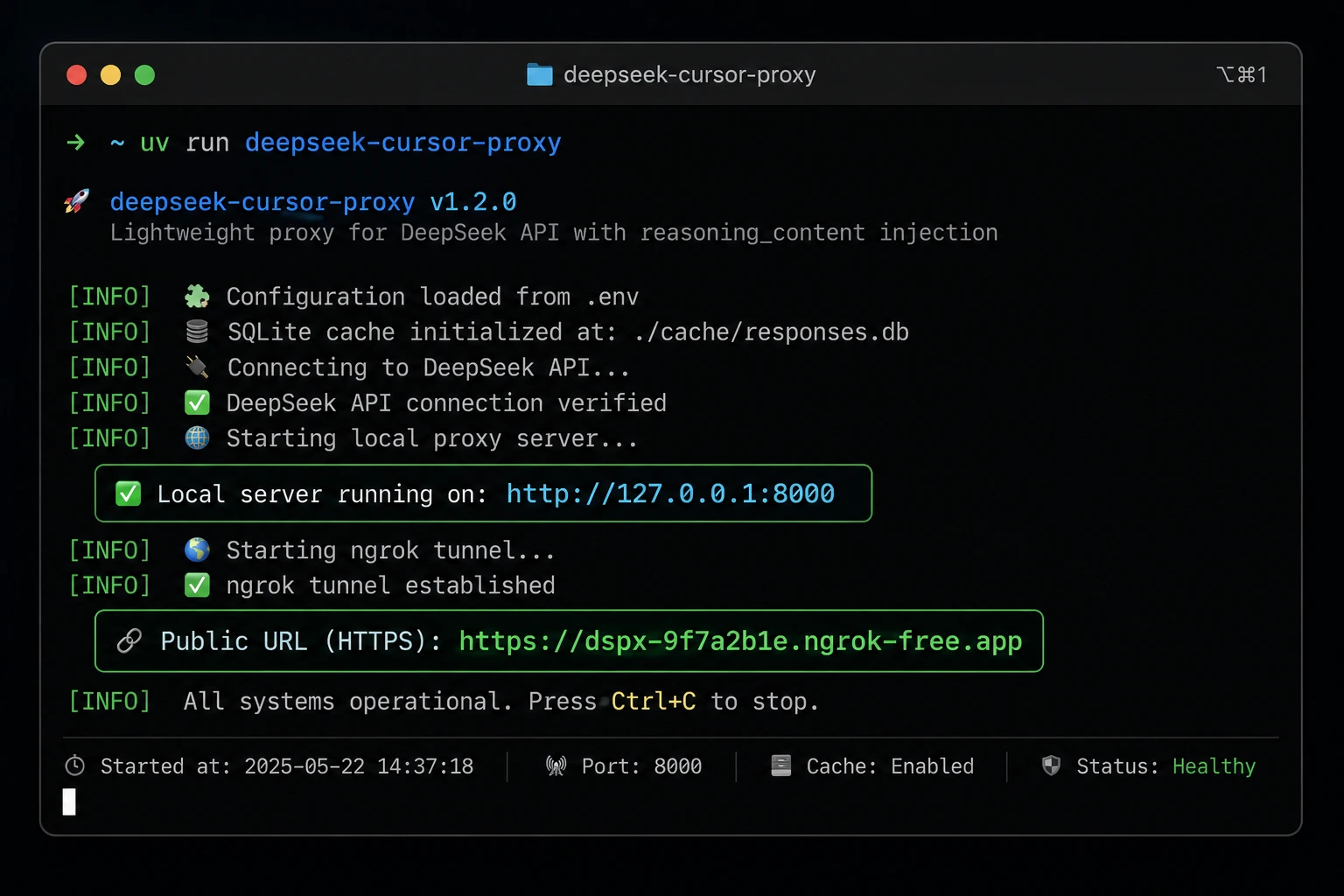
Option A — Using UV (faster):
# Install uv if needed
curl -LsSf https://astral.sh/uv/install.sh | sh

# Clone and start
git clone https://github.com/yxlao/deepseek-cursor-proxy.git
cd deepseek-cursor-proxy
uv run deepseek-cursor-proxy
Option B — Using Conda:
conda create -n dcp python=3.10 -y
conda activate dcp
git clone https://github.com/yxlao/deepseek-cursor-proxy.git
cd deepseek-cursor-proxy
pip install -e .
deepseek-cursor-proxy
Step 2 — Set up ngrok (required for Cursor):
Cursor blocks non-public URLs like localhost, so you need a public HTTPS tunnel. The proxy handles this automatically if you set up ngrok:
brew install ngrok
ngrok config add-authtoken <your-ngrok-token>
Once running, deepseek-cursor-proxy prints your ngrok public URL in the terminal.
Alternatively, use Cloudflare Tunnel if you prefer not to use ngrok — both are supported.
Step 3 — Configure Cursor:
Model: deepseek-v4-pro or deepseek-v4-flash
API Key: your DeepSeek API key
Base URL: https://your-ngrok-url.ngrok-free.app/v1 (note: /v1 IS required here, unlike the direct API)
Useful proxy flags:
# Hide thinking tokens from Cursor UI
deepseek-cursor-proxy --no-display-reasoning

# Run without ngrok (for apps that allow localhost)
deepseek-cursor-proxy --no-ngrok

# Use a custom ngrok domain (reserved endpoint)
deepseek-cursor-proxy --ngrok-url https://your-subdomain.ngrok.dev

# Use a different port
deepseek-cursor-proxy --port 9000

# Debug mode — see all requests/responses
deepseek-cursor-proxy --verbose

# Save full request traces for debugging
deepseek-cursor-proxy --verbose --trace-dir ./trace-dumps

# Clear the reasoning cache if something seems stuck
deepseek-cursor-proxy --clear-reasoning-cache
Team use case: If you run the proxy on a shared internal server, all team members can point their Cursor Base URL to the internal endpoint. One proxy instance serves the whole team's DeepSeek traffic with full reasoning_content support.
Fix: Use Cline for Full Agent Mode
Cursor's Composer panel doesn't support custom API models. If you need multi-file agent workflows (the core of Composer), the community-recommended solution is the Cline extension:
In Cursor, open Extensions (Ctrl+Shift+X).
Search Cline (publisher: saoudrizwan) and install.
Open Cline settings → Provider: OpenAI Compatible.
Set Base URL: https://api.deepseek.com
Paste your DeepSeek API key.
Model: deepseek-v4-pro or deepseek-v4-flash.
Cline handles DeepSeek V4's reasoning_content field correctly and provides full Plan-mode + Act-mode agent workflows at DeepSeek's API rates. As of May 18, 2026, Cline explicitly added V4 reasoning_content handling to its codebase — making this one of the smoothest paths for agent workflows.
Fix: Run DeepSeek Locally with Ollama + Tunnel
If you want zero API cost and complete privacy — no tokens, no billing, no data leaving your machine — you can run DeepSeek locally via Ollama and connect it to Cursor.
Step 1: Install Ollama and pull DeepSeek
brew install ollama          # macOS (use apt on Linux)
ollama pull deepseek-r1      # ~4.7 GB download
ollama list                  # confirm it's there
Step 2: Test the local API
curl http://localhost:11434/v1/chat/completions \
  -H "Content-Type: application/json" \
  -d '{
    "messages": [{"role":"user","content":"Say hi"}],
    "model": "deepseek-r1"
  }'
Step 3: Create a tunnel (required because Cursor can't reach localhost)
Using Cloudflare Tunnel:
brew install cloudflared
cloudflared tunnel --url http://localhost:11434 \
  --http-host-header="localhost:11434"
The --http-host-header flag is critical — without it, Ollama blocks the request with a 403.
Or using ngrok (same tool as the proxy method):
ngrok http 11434
Step 4: Configure Cursor
- Base URL: https://[your-tunnel-id].trycloudflare.com (or ngrok URL)
- API Key: any string (Ollama doesn't validate keys)
- Model name: deepseek-r1
Trade-off: Local models are significantly smaller than the full DeepSeek V4 Pro (4.7 GB vs 1.6 trillion parameters). Quality will be noticeably lower for complex tasks. For learning, personal projects, or when privacy matters most, this is a great option. For production coding work, the cloud API is more capable.
Fix: Route Through OpenRouter as a Reliability Layer
If DeepSeek's direct API is experiencing outages or rate limit issues — which has happened during high-traffic periods — OpenRouter is an excellent fallback. It hosts DeepSeek V4 at the same per-token pricing, with better uptime SLAs and a single dashboard for billing across multiple models.
Base URL: https://openrouter.ai/api/v1
API Key: [your OpenRouter key]
Model: deepseek/deepseek-v4-pro
One developer who tested every available solution reported that after three direct DeepSeek API outages in one month, switching to OpenRouter resulted in zero outages over the following two weeks.
Fix: Corporate Proxy / VPN Blocking
If the Verify button never turns green and you're on a corporate network:
# Test if you can reach the endpoint at all
curl https://api.deepseek.com/v1/models \
  -H "Authorization: Bearer YOUR_API_KEY"
If this times out, the issue is network-level. Options:
- Add api.deepseek.com to your VPN split tunnel
- Ask IT to whitelist the domain
- Route through OpenRouter (may already be allowed)
- Use the local Ollama approach (no external network calls)
Troubleshooting Checklist
Run through this before spending more than five minutes on any issue:
- API key starts with sk- and has not expired
- API account has a positive credit balance (check platform.deepseek.com → Billing)
- Base URL is exactly https://api.deepseek.com — no trailing /v1, no /beta (exception: proxy users use /v1)
- Model name is deepseek-v4-pro or deepseek-v4-flash (not old deprecated names)
- You are NOT trying to paste a DeepSeek key into the API Keys section (that's for OpenAI/Anthropic only)
- Other models have been disabled/deselected while testing
- Cursor has been updated to the latest version
- No VPN or firewall blocking api.deepseek.com
- For agent/Composer workflows: using Cline extension or deepseek-cursor-proxy, not native Composer
- For reasoning_content errors: using deepseek-cursor-proxy, V4 Flash, or latest Cursor build
Real-World Examples from Developers
Example 1 — Freelancer Cutting Cursor Pro Costs by 95%+
A freelance developer documented their experience. After three months of Cursor Pro at $20/month ($60 total), they wired in DeepSeek's API. Result: their first month's API spend was approximately ¥3 (roughly $0.40). For 100–150 AI conversations involving a few hundred lines of code each, the total monthly bill stayed under ¥5 (~$0.70).
The developer noted: "Quality was fine next to Claude 3.5 for everyday work — with a few surprises in its favor." They specifically called out DeepSeek-R1's reasoning ability for algorithm design problems as occasionally exceeding expectations.
Example 2 — Team Using the Proxy for Full Agent Mode
A small dev team wanted Composer-style multi-file agent workflows without paying Claude Opus prices. They deployed the deepseek-cursor-proxy on a shared internal server. All team members pointed their Cursor Base URL to the internal proxy endpoint. The proxy:
- Translates Cursor's request format to DeepSeek's API format
- Handles the reasoning_content chain automatically
- Shows V4 Pro's thinking process as collapsible blocks in Cursor
This gave them full agent-compatible workflows against DeepSeek V4 Pro at $0.435/$0.870 per million tokens — versus ~$15/$75 for Claude Opus 4.6.
Example 3 — Developer Learning New Components with DeepSeek + Cursor
A developer used Cursor + DeepSeek together for quickly getting up to speed with unfamiliar codebases and components. The workflow: open the unfamiliar component's source in Cursor, feed DeepSeek V4 the full file (using its 1M token context window), and ask targeted questions. The 1M context window meant the model always had full visibility into the code rather than a trimmed excerpt.
This use case highlighted one of V4's practical strengths: long-context coherence. When the model can see your entire module rather than a snippet, its explanations and suggestions are significantly more accurate.
Example 4 — Student Using DeepSeek Locally for Zero Cost
A computer science student set up the full Ollama + Cloudflare Tunnel stack on a MacBook. They pulled deepseek-r1 (4.7 GB) and connected it to Cursor's free tier. Total cost: $0. The local model handled Python data structures coursework and a web project comfortably.
Trade-off acknowledged: complex architectural questions occasionally produced weaker answers than the cloud API, but for learning exercises and structured assignments, the local model was more than sufficient.
How to Use DeepSeek API for Coding: Best Practices
Choose the right model tier. V4 Flash handles the majority of day-to-day coding tasks — autocomplete context, quick bug fixes, function documentation, explaining short snippets. V4 Pro is where you spend more when you need it: complex multi-file refactors, architectural decisions, writing non-trivial algorithms from scratch, or diagnosing subtle bugs.
Use the 1M context window deliberately. Don't feed DeepSeek snippets when you can give it whole files. The model's coherence on longer tasks improves significantly with full context. If you're working on a bug, paste the entire relevant module — not just the 20 lines around the error.
Be specific in your prompts. DeepSeek V4 has been noted to over-explain when given vague prompts. Instead of "fix this function," say "this function returns the wrong value when the input list is empty — fix only the condition check on line 12." Specificity saves tokens and gets better answers faster.
Combine with Cursor's Tab completion. Cursor's built-in Tab completion (powered by a separate model) still works regardless of which custom API model you're using for Chat. You get fast inline completions from Cursor's native system plus deep, high-quality responses from DeepSeek in the Chat panel.
Monitor usage from the DeepSeek dashboard. Go to platform.deepseek.com → Billing → Usage to see a daily breakdown of token consumption. This helps you optimize which model you're using for which task types.
Use --no-display-reasoning for cleaner output. If you're using the proxy but find V4 Pro's thinking blocks visually cluttered, run deepseek-cursor-proxy --no-display-reasoning to hide them. The reasoning still happens and improves output quality — you just don't see the internal trace.
DeepSeek Coder V2 Review vs. V4: What's Changed?
If you followed DeepSeek from the Coder V2 era, V4 is a fundamentally different product:
DeepSeek Coder V2 (2024) was a purpose-built coding model, approximately 236B total parameters. Excellent for its time — competitive with GPT-4 on code benchmarks at a fraction of the cost. But it was narrow: a single-purpose coding tool without strong general reasoning.
DeepSeek V4 (April 2026) is a general-purpose frontier model that's also excellent at coding. The architecture shift to Mixture-of-Experts (MoE) at 1.6 trillion total parameters means it draws on far broader knowledge:
| Benchmark | DeepSeek V4 Pro | Claude Opus 4.6 | GPT-5.5 |
|---|---|---|---|
| SWE-bench Verified | 80.6% | 80.8% | ~78% |
| LiveCodeBench | 93.5% | 88.8% | — |
| Terminal-Bench 2.0 | 67.9% | 65.4% | — |
| Context Window | 1M tokens | 200K tokens | 128K tokens |
| Output cost / 1M tokens | $0.87 | ~$75 | ~$20 |
The numbers tell the story: near-identical coding benchmark performance, 1M context window, and ~86x cheaper output than Claude Opus 4.6.
Cheapest AI Coding Model 2026: Full Cost Comparison
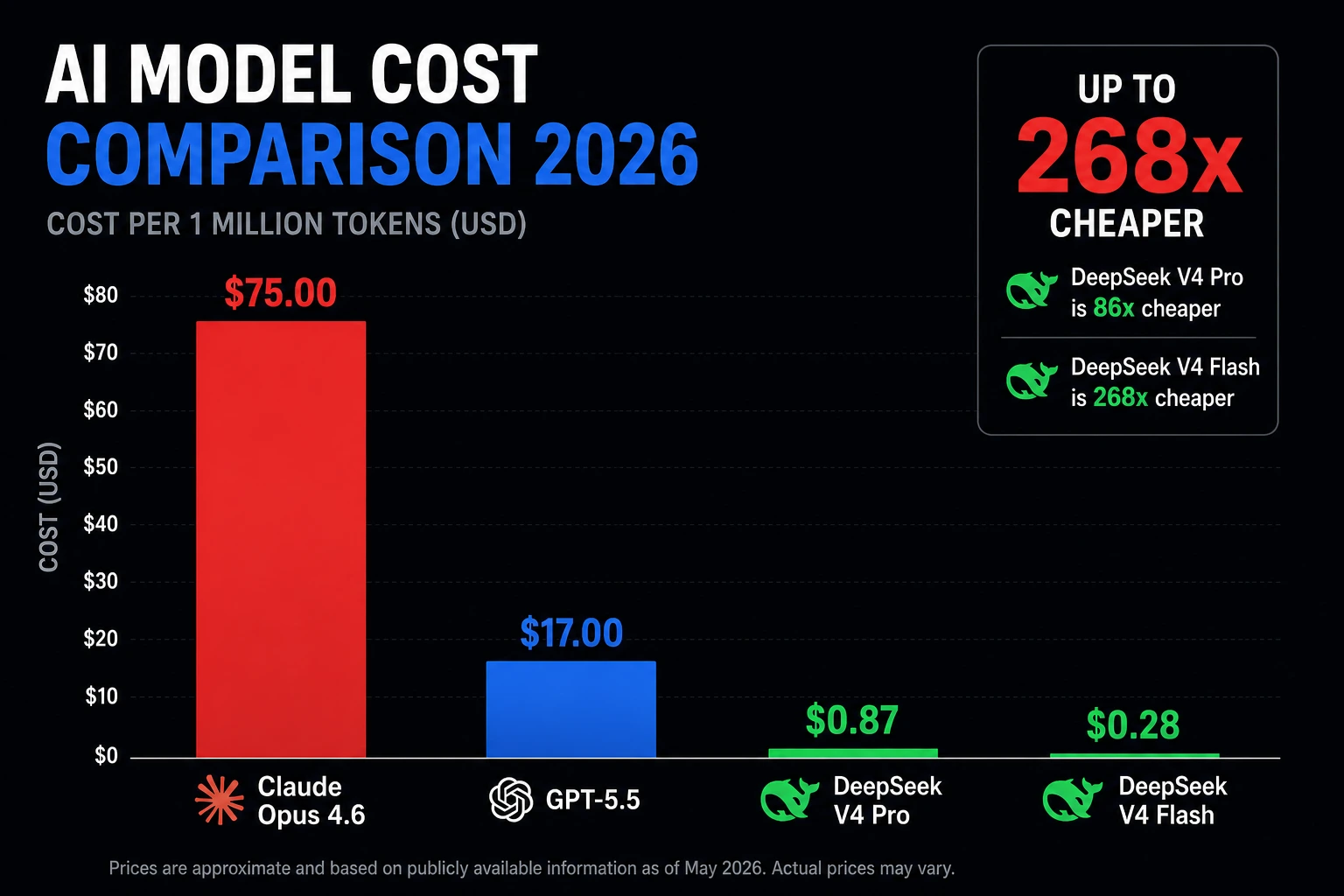
| Model | Input / 1M tokens | Output / 1M tokens | SWE-bench |
|---|---|---|---|
| DeepSeek V4 Flash | $0.14 | $0.28 | ~70% |
| DeepSeek V4 Pro | $0.435 | $0.870 | 80.6% |
| Gemini 3.1 Pro | ~$3.50 | ~$10.50 | 80.6% |
| Claude Sonnet 4.6 | ~$3.00 | ~$15.00 | ~82% |
| GPT-5.5 | ~$5.00 | ~$20.00 | ~78% |
| Claude Opus 4.6 | ~$15.00 | ~$75.00 | 80.8% |
Practical cost example: A developer doing 150 AI coding conversations/month, each involving ~50K input tokens and ~2K output tokens:
- With DeepSeek V4 Flash: approximately $1.11/month
- With DeepSeek V4 Pro: approximately $3.53/month
- With Claude Sonnet 4.6: approximately $45/month
- With Cursor Pro built-in (Claude): $20/month flat (with usage limits)
DeepSeek V4 Flash, for routine coding work, is the single cheapest frontier-capable option available in 2026 — by a significant margin.
Latest Updates (2026)
April 24, 2026 — DeepSeek V4 Released
DeepSeek launched V4 Pro (1.6T param MoE, 49B active) and V4 Flash (284B, 13B active), both with 1M-token context windows. Both support JSON mode, tool calls, function calling, and a new reasoning_effort parameter. This made the old DeepSeek Coder V2 model names obsolete for Cursor users.
May 18, 2026 — Cline Extension Updated for DeepSeek V4
The Cline extension (publisher: saoudrizwan) released updates explicitly handling DeepSeek V4's reasoning_content field. This resolved the most common agent-mode error and made Cline + DeepSeek the community's recommended path for multi-file agent workflows inside Cursor.
May 22, 2026 — Permanent Pricing Discount Confirmed
DeepSeek made its 75% V4 Pro discount permanent. $0.435 input / $0.870 output per million tokens, no expiry. This removes the pricing uncertainty that had been making teams hesitant to commit V4 Pro to production.
June 3–8, 2026 — Cursor Documentation Updated
Cursor updated their official docs to explicitly document the custom OpenAI-compatible provider flow, including the note that the Base URL should not include /v1 for DeepSeek. A community-contributed guide on the Cursor forum (published February 2026 and updated multiple times since) has become the most-referenced resource for this setup.
⚠️ July 24, 2026 — Legacy API Aliases Retire (Action Required)
If you are currently using deepseek-chat or deepseek-reasoner as model names in Cursor, update them before this date. These aliases will be permanently retired on July 24, 2026 at 15:59 UTC.
Migration map:
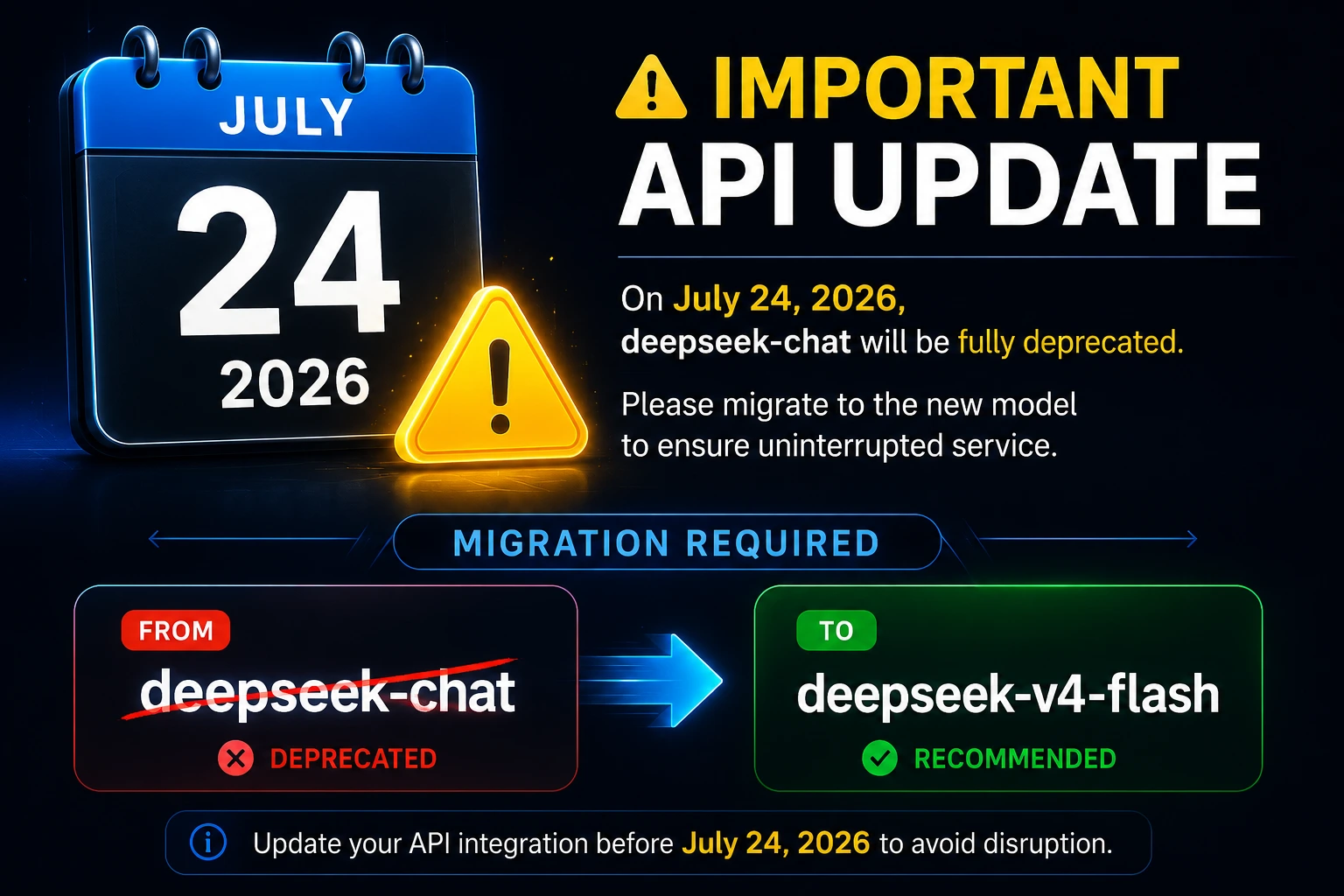
| Old Name (Retiring July 24) | Replace With |
|---|---|
| deepseek-chat | deepseek-v4-flash |
| deepseek-reasoner | deepseek-v4-flash (with thinking mode) |
| deepseek-coder | deepseek-v4-flash |
| deepseek-coder-v2 | deepseek-v4-pro |
When to Contact Support
DeepSeek API issues (persistent 401 after correct setup, billing errors, rate limits):
- Email: support@deepseek.com
- Help center: platform.deepseek.com → Support
Cursor-specific issues (Verify button broken, model dropdown not saving):
- Forum: forum.cursor.com (most active support channel)
- Email: hi@cursor.so
OpenRouter issues:
- Discord: discord.gg/openrouter
Do not file a support ticket for the Composer/custom-API limitation — it's a known documented constraint on Cursor's side, not a bug. The workaround is Cline or deepseek-cursor-proxy.
FAQ
No. You can add DeepSeek as a custom model using your own API key on Cursor's free plan. Cursor Pro is needed for Tab completion and the built-in model quota, but the Chat panel with custom API models works on the free tier.
Because the API Keys section in Cursor Settings only supports OpenAI, Anthropic, Google, Azure OpenAI, and AWS Bedrock. DeepSeek keys entered there will always fail. Use the Add Model / OpenAI-compatible Base URL method instead.
Not directly via the custom API method — Cursor's Composer only works with natively supported models. The recommended workarounds are: (a) the Cline extension for an in-Cursor agent experience, or (b) deepseek-cursor-proxy which provides the most complete compatibility layer including reasoning_content handling.
V4 Pro (1.6T parameters, 49B active) is more capable for complex problems — architectural decisions, tricky bugs, writing algorithms. V4 Flash (284B params, 13B active) is faster and cheaper for routine work. For most developers, Flash handles 70–80% of daily tasks. Use Pro when you need to "think harder."
DeepSeek V4 Pro generates internal "thinking tokens" before its final answer — a chain of reasoning that improves output quality. This is stored in a field called reasoning_content. DeepSeek's API requires this field to be passed back in multi-turn tool-call conversations. Cursor omits it, causing a 400 error. The deepseek-cursor-proxy solves this by caching and re-injecting the field automatically.
DeepSeek's API sends your prompts to servers operated by a Chinese company. For open-source projects and personal work, this is a widely accepted trade-off. For enterprise teams with data residency requirements, consider: (a) self-hosting the weights (MIT license, available on Hugging Face), (b) routing through OpenRouter with appropriate agreements, or (c) the local Ollama setup which keeps all data on your machine.
Several reasons: you may be using V4 Flash when the website uses V4 Pro by default; Cursor's context trimming may be cutting important parts of your code before sending the prompt; or you may be using a deprecated model name mapped to an older version. Try explicitly selecting deepseek-v4-pro and including more file context.
Yes. Use Ollama to run a distilled DeepSeek model locally, then create a Cloudflare Tunnel or ngrok tunnel to expose the local endpoint to Cursor. Full setup is in the Advanced Troubleshooting section. The local models are much smaller than V4 Pro, so quality is lower for complex tasks — but it's completely free and private.
The deepseek-chat and deepseek-reasoner API aliases are permanently retired. If you're using either of these as model names in Cursor, your setup will break. Replace deepseek-chat with deepseek-v4-flash and deepseek-reasoner with deepseek-v4-flash (thinking mode) before this date.
DeepSeek direct is better for: lowest latency, guaranteed latest models, direct billing visibility.
OpenRouter is better for: reliability/uptime (multiple backend providers), single API key for many models, easier corporate network access.
For individual developers on reliable connections: direct. For teams or production use: OpenRouter.
The deepseek-cursor-proxy runs its own local HTTP server that expects requests at the /v1 path. It then forwards those requests to DeepSeek's API, adding the reasoning_content corrections in transit. The direct DeepSeek API has its own routing that works without the suffix in Cursor's implementation. These are two separate systems with different URL conventions.
Log in to platform.deepseek.com → Billing → Usage. You'll see a daily breakdown by model and token type. You can also set a monthly spend cap in the billing settings to prevent surprise bills — useful when first setting things up.
Conclusion
Getting a DeepSeek Coder setup in Cursor comes down to a handful of specific details that most tutorials get wrong: the exact Base URL format, current model names (not the deprecated ones), and understanding which Cursor features support custom API models.
The core setup takes about five minutes once you have your API key. The common errors: wrong Base URL, old model names, API key in the wrong field, missing reasoning_content each have clear, documented fixes covered above.
For the reasoning_content issue specifically, the deepseek-cursor-proxy GitHub project is now the most complete solution: it caches reasoning chains in a local SQLite database, re-injects them into outgoing requests, and even displays V4 Pro's thinking process as readable blocks inside Cursor.
Your immediate next steps:
Set up using the 6-step guide in this article.
Before July 24, 2026: update any deepseek-chat or deepseek-reasoner model names to V4 equivalents.
If you hit reasoning_content errors: set up the deepseek-cursor-proxy with ngrok.
If you need Composer-style agent workflows: install Cline and connect it to DeepSeek.
If you want zero API cost and full privacy: follow the Ollama + tunnel setup.
Consider OpenRouter as a drop-in reliability upgrade for team or production use.