Note on accuracy: Cursor updates its model lineup, names, and pricing often this article was last refreshed with figures circulating as of May 2026. Always check Cursor's official pricing page before you make a budget decision. The strategy and reasoning will stay useful even when the specific numbers shift again.
Quick-Fix Summary Box
Goal | Quick Action |
|---|---|
Lower your monthly Cursor bill fast | Switch your default model from Claude Opus to Cursor's own Composer model for everyday tasks |
Keep quality high on hard problems | Use Opus only for complex refactors, architecture decisions, or debugging deep bugs |
Avoid surprise charges | Turn on usage alerts and check your token dashboard weekly |
Stop burning tokens on small edits | Use Tab/autocomplete and inline edits instead of full chat requests for tiny changes |
Find the cheapest reliable setup | Set Composer as default, set Opus as a manual override, and review usage every two weeks |
Introduction
If you use Cursor every day, you've probably watched your monthly bill creep up without really knowing why. This is one of the most common frustrations developers run into with AI coding tools in 2026. Frontier models like Claude Opus are excellent at reasoning through hard problems, but they're expensive per token. Use one for every task including a typo fix and costs climb fast.
This is where the Composer vs Opus decision matters. Composer is Cursor's own in-house model, priced to work efficiently inside the Cursor environment. For most everyday coding tasks, it can do the job without Opus-level cost. Used correctly, switching your default model can meaningfully lower your bill while still letting you call in a stronger model when you actually need it.

What the Numbers Actually Say (2026 Pricing & Benchmarks)
Pulling together public pricing pages and independent write-ups gives a clearer picture than guesswork.
Per-token pricing
Cursor's in-house Composer line has gotten dramatically cheaper with each release. According to a cost breakdown from cloud-cost tracking firm Vantage, Cursor's Composer 1.5 launched at $3.50 per million input tokens, and the newer Composer 2 cut that to $0.50 — an 86% drop, while also outperforming Claude Opus on coding benchmarks. The same analysis lays out the comparison directly:
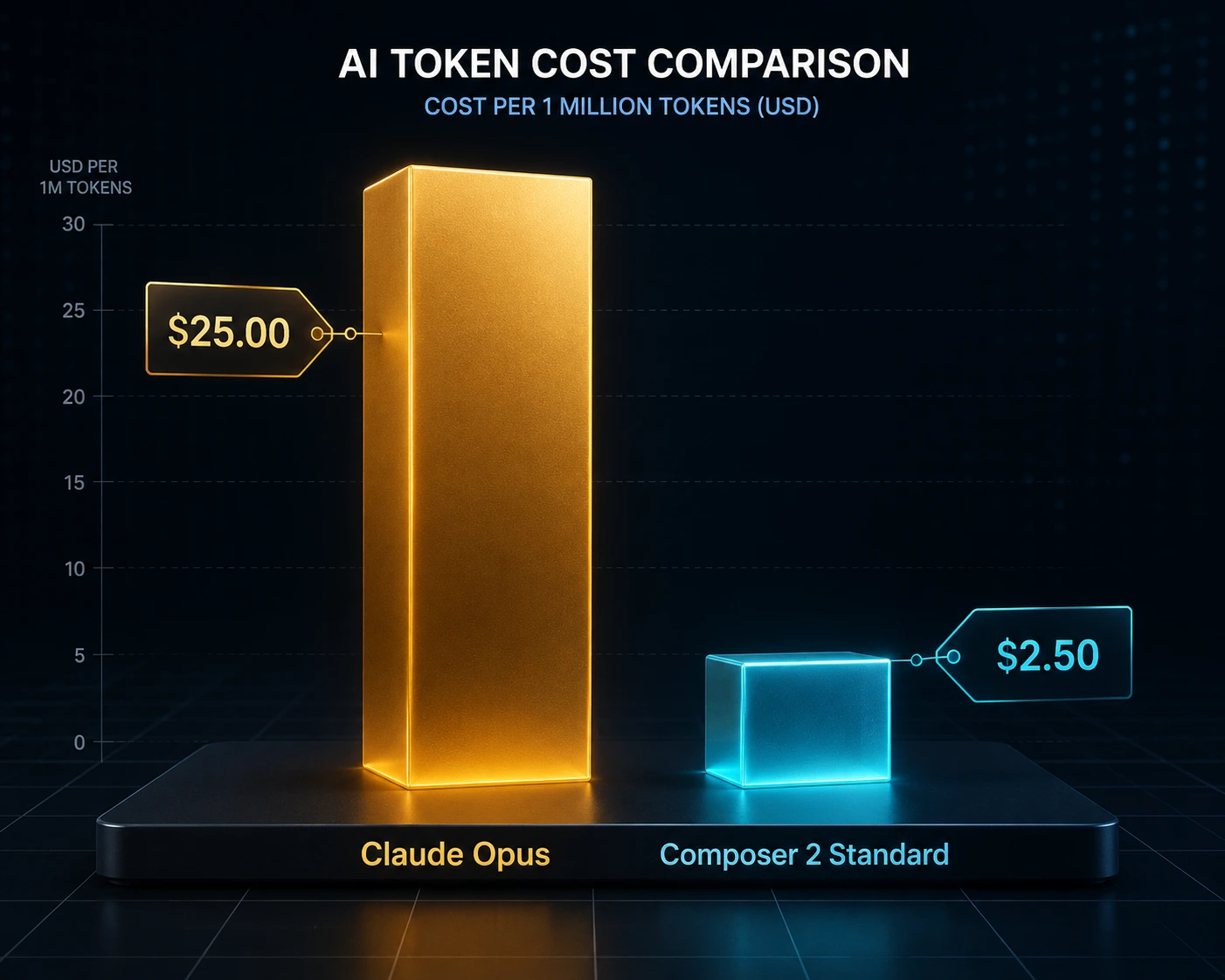
Model | Input ($/1M tokens) | Output ($/1M tokens) |
|---|---|---|
Composer 2 Standard | $0.50 | $2.50 |
Composer 2 Fast | $1.50 | $7.50 |
Composer 1.5 | $3.50 | $17.50 |
Claude Opus 4.6 | $5.00 | $25.00 |
GPT-5.4 | $2.50 | $15.00 |
For a 20–30 person team generating around 10 million output tokens a month, that's roughly $250 on Opus versus $75 on Composer 2 Fast or $25 on Composer 2 Standard — a difference that can add up to thousands of dollars a year for a single team.
A separate write-up tracking the May 2026 Composer 2.5 launch (built on a Kimi K2.5 base model) puts the per-task cost gap even more starkly: roughly $0.50 per task on Composer 2.5 versus roughly $7 per task on Claude Opus 4.7 for comparable benchmark workloads — about a 14x difference, based on figures the piece attributes to Cursor's own published benchmark data. The same source flags an important nuance worth remembering: Composer's "Fast" tier is not the cheap option — it's a latency upgrade that costs more than Standard, so picking "Fast" by default narrows your savings considerably.
Quality isn't far behind on most tasks
The cost gap would matter less if Composer were noticeably worse. On the benchmarks that have been published, that doesn't appear to be the case. Composer 2's jump over Composer 1.5 was its largest single-generation improvement yet on Cursor's internal CursorBench, on Terminal-Bench 2.0 (a measure of how well an agent completes real terminal tasks), and on SWE-bench Multilingual (real GitHub issues across languages) — with Composer 2 reportedly landing ahead of Opus 4.6 on Terminal-Bench 2.0, even though OpenAI's GPT-5.4 still led both at a much higher price.
For the newer Composer 2.5 vs Opus 4.7 comparison, independent coverage cited by Digital Applied shows the two essentially tying on SWE-Bench Multilingual (79.8% vs 80.5%) and Terminal-Bench 2.0 (69.3% vs 69.4%). Composer edges ahead on Cursor's own CursorBench, but that benchmark is built and run by Cursor itself, so it's worth treating as directional rather than independent. One real quality gap remains:
Cursor doesn't publish a Composer score on SWE-Bench Verified, where Opus 4.7 holds a strong 87.6% — so don't assume parity on the hardest, most rigorously checked coding tasks.
What's actually driving Composer's cost advantage
Part of it is simply that Composer only runs inside Cursor, which changes the economics versus a general-purpose API. But a real technical factor matters too: Cursor's newer Composer models use a training technique sometimes called self-summarization, where the model is trained to compress its own long action history (file reads, edits, terminal commands) down to a fraction of the tokens that a traditional sliding-window or external summary would use — which directly reduces the input tokens billed on long agentic sessions and avoids the model re-doing work it already completed.
Composer vs Claude Code (Not the Same Comparison as Cursor vs Opus-in-Cursor)
It's worth separating two different questions developers often blur together:
Composer vs Opus inside Cursor — which model do I pick from Cursor's dropdown?
Cursor vs Claude Code — do I stay in Cursor's IDE at all, or use Anthropic's own coding agent (which can run Sonnet or Opus) in the terminal, VS Code, JetBrains, or via Bedrock/Vertex/Foundry?
These get conflated a lot in community discussion, but the trade-offs are different. A routing analysis comparing Composer 2.5 to Claude Code frames the real decision less as "which is smarter" and more as a lock-in question: Composer is IDE-locked to Cursor, while Claude Code's configuration — instruction files, reusable workflow "skills," and automation hooks — lives in your git repository and travels with the codebase.
For regulated teams that need an auditable record of how an AI tool was configured, that structural difference can outweigh the raw per-token savings. The same piece also notes that Claude Code can spin up multiple coordinated sub-agents across a task, something Composer doesn't currently do — which matters for multi-repo or large-scope orchestration work.
The practical takeaway many writers land on: route by task type rather than picking one tool permanently. Use the cheaper, IDE-native model for high-volume, repetitive work (scaffolding, boilerplate, simple refactors), and reach for Claude Code or Opus for multi-file orchestration, compliance-sensitive work, or genuinely hard debugging.
What Actual Cursor Users Say (Forum & Community Patterns)
Beyond the published pricing, it's worth weighing in real developer experience, since published benchmarks don't always match day-to-day usage. A long community discussion on the official Cursor forum about whether to stick with Cursor or move to Claude Code surfaced some recurring, practical patterns:
Plan with a strong model, execute with a cheap one. Several users described splitting work into a planning phase done with Opus or another frontier model, followed by an execution phase handed to Composer. One user noted this combination stretched their usage noticeably further than using one model throughout.
"Try all three before committing." More than one commenter suggested paying for smaller plans across Cursor, Claude Code, and Codex in parallel for a month rather than locking into one $200 tier, specifically to see which tool's limits and quality fit a given workflow.
Claude Code can burn tokens faster in interactive use. Several users reported that Claude Code tends to send more of a project's file tree to the model for analysis, while Cursor uses retrieval techniques to send only the code that's actually relevant — meaning interactive, back-and-forth sessions in Cursor can use noticeably fewer tokens, even when running the same underlying Opus model. The same users noted this advantage can flip for heavily agentic, autonomous workflows, where Claude Code's approach can have an edge.
Server reliability and rate limits factor into real cost. Multiple users pointed out that during periods of high demand, Anthropic's own infrastructure (used by Claude Code and the Opus model inside Cursor) can become a bottleneck — failed or retried requests still consume usage, and time-zone-dependent congestion was mentioned as a recurring frustration.
Session-based limits vs monthly pooled usage. A few commenters preferred Cursor's model, where usage isn't divided into hard per-session windows, compared to per-session limits some described hitting on Claude-based plans even on paid tiers.
Token-saving tools and habits matter as much as model choice. Recommendations from the thread included leaning on Cursor's dedicated debugging mode to cut wasted tokens, building a personal library of reusable prompts/skills for testing and code-quality checks, and in one case using a third-party CLI proxy aimed at trimming routine token use on both Cursor and Claude Code.
The overall thread leaned toward "it depends on your workflow" rather than a clear winner — several experienced users run two or three tools side by side and route tasks deliberately, which lines up with the planning-vs-execution split this guide already recommends.
Why Does This Problem Happen?
Most developers don't intentionally overspend. The high bills usually come from a mismatch between task complexity and model choice.
1. Default Settings Favor the "Best" Model
Editors often default to the most capable model, because it gives the best first impression — but "most capable" usually means "most expensive per token."
2. Token Costs Are Invisible in the Moment
When you're fixing bugs back-to-back, you don't feel the running total until the invoice arrives.
3. Long Context Windows Multiply Cost
Pasting in a huge file, or letting the assistant read across many files, multiplies both input tokens and the model's reasoning tokens.
4. Chat-Style Requests Cost More Than Inline Edits
A full chat request ("refactor this whole file and explain your reasoning") uses far more tokens than a quick inline edit or autocomplete suggestion.
5. No Visibility Into Usage Patterns
Without checking a usage dashboard, it's impossible to know which tasks are actually driving the bill.
Common Causes (At a Glance)
Cause | Why It Increases Cost | Simple Fix |
|---|---|---|
Using Opus as the default for all tasks | Premium pricing applies to every request, even trivial ones | Set a cheaper model as default |
Pasting entire large files for small fixes | More input tokens = more cost | Share only the relevant function or section |
Using chat for tiny edits | Chat requests use more tokens than inline edits | Use Tab completion or inline edit for small changes |
Not reviewing usage data | You can't fix what you can't see | Check your dashboard weekly |
Re-running the same prompt repeatedly | Each attempt is billed again | Refine your prompt before re-sending |
Defaulting to the "Fast" tier assuming it's cheaper | Fast tiers are latency upgrades, often pricier than Standard | Confirm pricing per tier before assuming "Fast = cheap" |
Step-by-Step Solutions
Step 1: Audit Your Current Usage
Open Cursor's usage/billing dashboard, sort recent usage by model, and note which model is consuming the most.
Step 2: Set Composer as Your Default Model
Default to Composer for routine work — boilerplate, obvious bug fixes, tests, simple refactors. Manually switch to Opus (or Claude Code) only when a task is genuinely hard.
Step 3: Build a Personal "When to Use Opus" Checklist
Reach for Opus/Claude Code when:
The bug spans multiple files and quick fixes haven't worked
You need a structured plan before touching code (architecture, migrations)
The task needs reasoning across a large, unfamiliar codebase
The work has compliance/audit requirements where a git-tracked workflow record matters
Step 4: Use Inline Edits Instead of Chat for Small Tasks
Highlight just the relevant function, use inline edit, and type a short instruction instead of opening a full chat thread.
Step 5: Trim Your Context Before Sending
Close unused files, reference specific functions instead of whole files, and summarize background yourself rather than pasting an entire spec.
Step 6: Batch Similar Requests
Describe a repeated pattern once and ask for all similar changes in a single request instead of several back-and-forth chats.
Step 7: Set Usage Alerts
Turn on spend/usage thresholds so you get a warning at 50% and 80% of budget.
Step 8: Split Planning and Execution Across Models
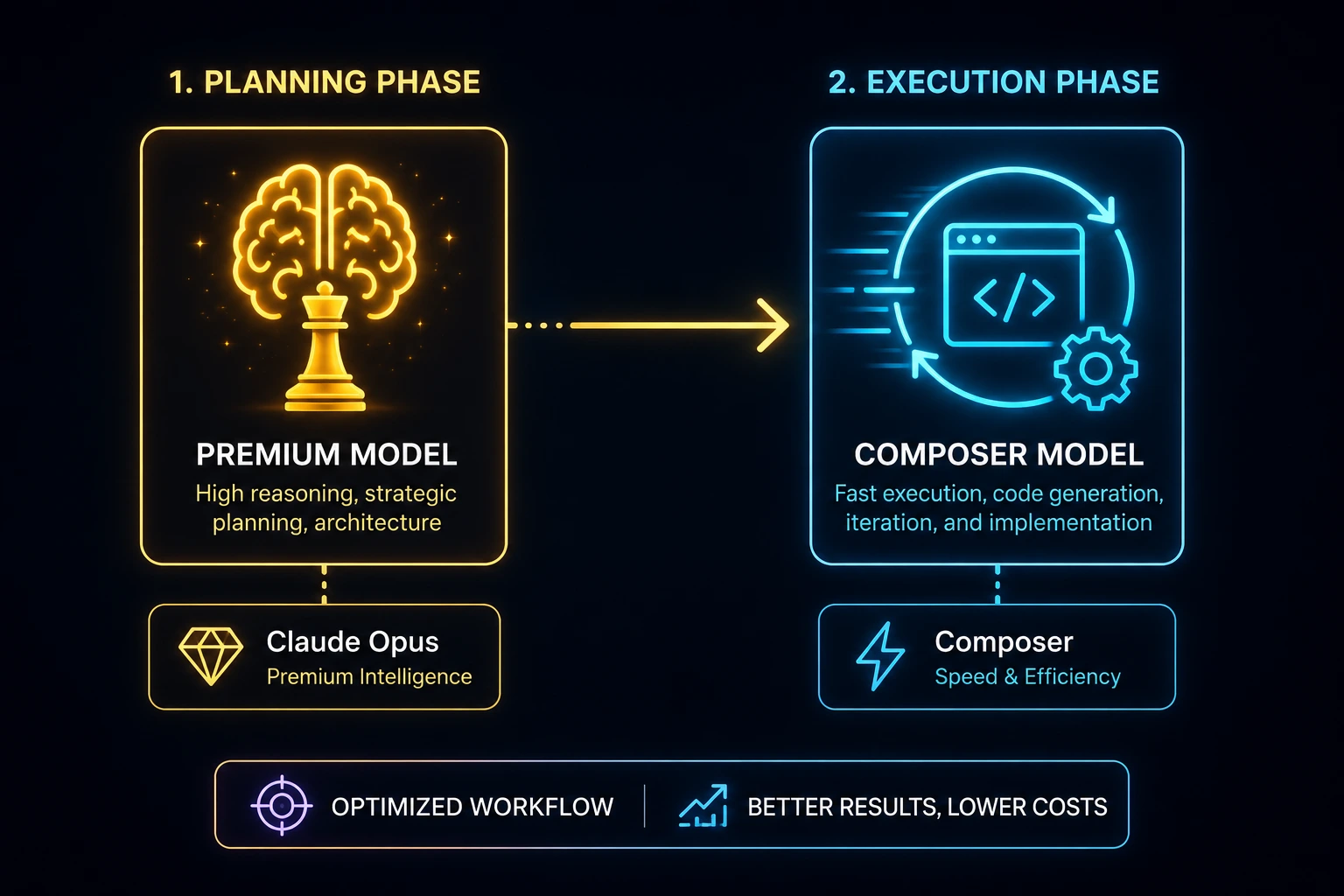
As several experienced Cursor users describe, plan with a stronger model (Opus or GPT-5.4) in one pass, then hand the implementation to Composer. This concentrates the expensive reasoning at the one point where it adds the most value.
Step 9: Review and Adjust Monthly
Check which model you used most, compare total spend to last month, and ask whether you reached for Opus when Composer would have worked.
Advanced Troubleshooting
Watch for "Silent" High-Cost Habits
Re-running failed prompts repeatedly instead of rewriting them clearly.
Asking for long explanations on every answer when you only need code.
Leaving long conversation threads open, since some tools carry full prior history as context on every new message.
Use the Right Model for the Right Phase
Planning phase: A stronger reasoning model briefly maps out the approach.
Execution phase: A cheaper, faster model (Composer) writes the bulk of the code.
Review phase: Cheaper model does a first pass; escalate only if something looks wrong.
Consider Where Lock-In Costs You Later
If you're weighing Cursor's Composer against Claude Code for a team, remember that Composer's routing and configuration live inside your Cursor account, while Claude Code's instruction files and workflow automations can live in your repository's version control. That's not a pricing difference, but it can become a real cost if your team ever needs to migrate or audit how the AI was configured.
Check for Team-Level Waste
Is everyone using the same default model, or has each person set their own?
Are junior developers defaulting to the most powerful model because no one told them otherwise?
Would a short internal guideline standardize behavior and cut waste?
Real-World Examples
Example 1: The Solo Indie Developer
A solo developer using Opus by default for everything including simple CRUD endpoints and lint fixes found that roughly 70% of their requests didn't need deep reasoning. Switching the default to Composer while keeping Opus for genuinely hard debugging noticeably lowered monthly spend with no real quality drop on routine tasks.
Example 2: A Small Startup Team
A four-person team's bill kept growing because everyone pasted whole files into chat for small changes. Adopting a rule that shares only the relevant function, use inline edits for small fixes cut average tokens per request significantly without changing which model they used at all.
Example 3: A Freelancer on a Legacy Codebase
A freelancer initially used Opus for everything on a messy legacy codebase, assuming the mess required the strongest model throughout. They later realized that diagnosing bugs was the hard part writing the fix once the diagnosis was clear usually wasn't. Splitting the work that way (Opus to diagnose, Composer to implement) kept quality where it mattered and saved cost everywhere else.
Example 4: A Team Running Cursor and Claude Code in Parallel
Forum discussion repeatedly described teams paying for smaller plans on multiple tools (e.g., Cursor plus Claude Code) rather than a single large plan, specifically to test which tool's limits and quality matched their actual workflow before committing and several settled into doing planning in one tool and execution in another rather than picking a single "winner."
Latest Updates (2026)
Composer pricing keeps dropping while quality climbs. Each Composer generation released in recent months has come in cheaper per token than the last while closing or matching the benchmark gap with Opus on several published tests — though Cursor's own benchmark (CursorBench) should be read as directional since Cursor both builds and runs it.
"Fast" tiers are not the budget option. Across Composer's newer releases, the Fast tier trades a higher price for lower latency — it is not a cheaper alternative to Standard, despite how it's sometimes assumed to work.
Claude Code keeps growing as a separate option, not just a Cursor alternative inside the model dropdown. It's increasingly discussed as a distinct tool — running in the terminal, IDEs, browser, and via cloud providers — with its own pricing, rate limits, and audit-trail characteristics that are separate from the Composer vs Opus choice inside Cursor itself.
Community sentiment is split and workflow-dependent. Real users on Cursor's own forum don't agree on a single "best" setup — some find Cursor's interactive token usage more efficient, others find Claude Code's agentic capabilities worth the higher per-token cost. The recurring theme is splitting planning and execution across models rather than using one model for everything.
Best practice trend: task-based model switching. The broader shift in the developer community has moved from "pick one model and stick with it" toward deliberately switching models — and sometimes tools entirely — based on task type, complexity, and whether the work needs to be auditable.
Action step: Before making cost decisions based on specific numbers, check Cursor's current pricing/changelog pages and Anthropic's official pricing for Claude Code, since both have changed multiple times within 2026 alone.
Troubleshooting Checklist
Is my default model set to something other than the most expensive option?
Have I checked my usage dashboard in the last two weeks?
Am I using inline edits/Tab for small changes instead of full chat?
Am I sending whole files when only a function is needed?
Am I assuming the "Fast" tier means "cheap" tier without checking?
Are my chat threads getting too long, dragging old context into new requests?
Have I set usage alerts or spending thresholds?
If I'm on a team, does everyone follow the same default-model habits?
Have I checked current pricing pages recently, in case plans changed?
FAQ Section
"Better" depends on the task. Composer is generally faster and cheaper for routine work; published benchmarks show it closing the gap with Opus on several tests, though not all. Opus still holds a clear edge on the hardest, most rigorously verified coding benchmarks.
For everyday tasks — simple bug fixes, boilerplate, tests — most developers don't notice a meaningful drop. For genuinely complex, multi-file problems, switching to Opus (or Claude Code) temporarily still makes sense.
No. Across recent Composer releases, Fast is a latency upgrade priced above Standard, not a budget tier.
They solve different problems. Composer is the cheaper, IDE-native option for high-volume routine work inside Cursor. Claude Code runs in more places, supports git-tracked configuration, and can coordinate multiple sub-agents — useful for larger or compliance-sensitive work, at a higher per-token cost.
Community discussion is split. Some report Cursor's interactive sessions use fewer tokens than Claude Code for the same work; others lean on Claude Code for heavier agentic tasks despite the cost. A common pattern is paying for smaller plans on more than one tool to compare before committing to one.
Open your Cursor account's usage or billing dashboard, which typically breaks usage down by model.
Yes, for the right tasks. The goal isn't to avoid Opus entirely — it's to use it deliberately, often in a planning phase before handing execution to a cheaper model.
Monthly is usually enough for individuals; teams may benefit from a biweekly check, especially after onboarding new members.
Conclusion
The Composer vs Opus decision isn't about picking a permanent winner — it's about matching the right model (and sometimes the right tool entirely) to the task in front of you. Published pricing shows Composer can cost a fraction of Opus per token while closing much of the benchmark gap on common coding tasks, and real community discussion backs up that splitting planning and execution across models can meaningfully stretch a budget further than defaulting to one model for everything.
Next step: Open your usage dashboard, sort by model, and identify one task type you can move off Opus this week.