Claude Code gives developers several ways to customize how an AI coding assistant behaves. Skills, Hooks, CLAUDE.md, Subagents, MCP servers, and custom commands may appear similar because they all extend Claude Code, but each serves a different purpose.
Claude Code Skills provide reusable knowledge and procedures, while Hooks run configured actions in response to lifecycle events. Skills help Claude understand how to complete a task; Hooks help automate what should happen when a particular event occurs.
Anthropic's June 2026 guidance on customizing Claude Code makes an important distinction: choosing the right feature is not only about functionality. It is also about when instructions enter the context window, how long they remain available, and how reliably an action needs to occur.
For example, a developer can use a Skill to guide Claude through a security review, a Subagent to investigate a large codebase independently, and a Hook to run a validation command after a matching edit. Each feature handles a separate part of the workflow.
Claude Code Skills vs Hooks: Quick Comparison
Feature | Skills | Hooks |
|---|---|---|
Primary purpose | Reusable knowledge and task procedures | Event-driven automation |
Main function | Guides Claude through a workflow | Runs configured handlers |
Activation | Automatic matching or manual invocation | Matching lifecycle event |
Configuration | SKILL.md and supporting files | Settings, managed configuration, or supported frontmatter |
Context usage | Full Skill loads when invoked | Configuration generally stays outside main context |
Model judgment | Used to apply instructions | Depends on Hook handler type |
Typical examples | Code reviews, debugging, deployment checklists | Formatting, validation, notifications, command restrictions |
Reusability | Across matching tasks and projects | Across configured events and projects |
Main limitation | Instructions are not guaranteed enforcement | Requires correct event, matcher, and handler setup |
Can work together? | Yes | Yes |
The most important difference is the responsibility each feature takes on. A Skill can tell Claude to run a test as part of a procedure, while a Hook can be configured to run a test automatically after a matching event.
What Are Claude Code Skills?

Claude Code Skills are reusable folders of instructions, scripts, and resources that teach Claude how to handle specialized tasks. Rather than repeatedly pasting the same instructions into a prompt, developers can create a Skill once and use it across relevant tasks.
According to Anthropic's documentation, Skills use progressive disclosure. Claude initially has access to the Skill's name and description, then loads its detailed instructions when the Skill is invoked or matched to a request. This helps avoid placing every procedure into the context window at the beginning of each session.
How Skills Work
Imagine you regularly ask Claude to review code. Every time, you provide a long checklist covering security, performance, error handling, and testing.
Instead, you can create a code-review Skill that contains those instructions. When you ask Claude to review a pull request, it can identify and activate the relevant Skill, then follow its procedure.
A Skill can contain:
SKILL.md with instructions and metadata.
Reference documents for additional technical information.
Scripts that perform repeatable operations.
Templates, examples, and other supporting resources.
Supported configuration options, including on-demand Hooks.
Anthropic's engineering team has also described using Skills as more than simple Markdown prompts. Their folders can contain executable code, persistent data, and resources that support more involved workflows.
How to Create a Claude Code Skill
You can create a custom Skill inside your project or in your personal Claude Code configuration.
A typical project-level structure looks like this:
my-project/
└── .claude/
    └── skills/
        └── code-review/
            └── SKILL.md
Create a SKILL.md file with a name, description, and instructions:
---
name: code-review
description: Review code for bugs, security issues,
  performance problems, and missing tests.
---

# Code Review

When reviewing code:

1. Inspect the changed files.
2. Identify potential bugs.
3. Check security and error handling.
4. Review performance concerns.
5. Check test coverage.
6. Report findings with file references.

Do not modify files unless explicitly asked.
The description helps Claude decide when the Skill is relevant. The body explains how to perform the task.
For personal Skills, use ~/.claude/skills/. For project-level Skills, use .claude/skills/ inside the repository.
When to Use Skills
Skills are particularly useful when the task requires a reusable procedure, detailed instructions, or domain-specific knowledge.
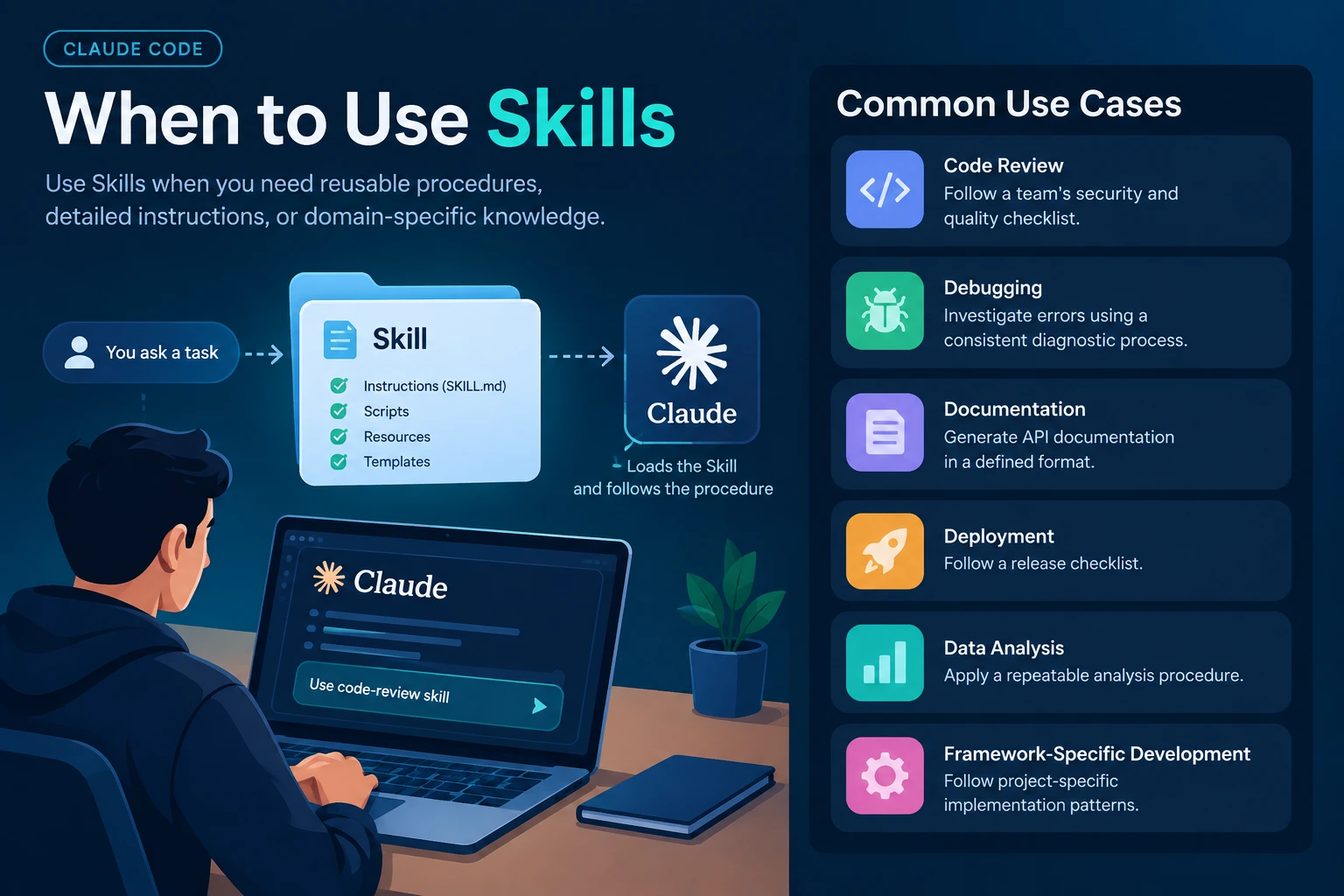
Use case | Example |
|---|---|
Code review | Follow a team's security and quality checklist |
Debugging | Investigate errors using a consistent diagnostic process |
Documentation | Generate API documentation in a defined format |
Deployment | Follow a release checklist |
Data analysis | Apply a repeatable analysis procedure |
Framework-specific development | Follow project-specific implementation patterns |
Anthropic's own guidance recommends Skills for procedural workflows such as deployment and release checklists, especially when those instructions do not need to occupy the main context during unrelated tasks.
What Are Claude Code Hooks?

Claude Code Hooks are mechanisms for running configured handlers when specific events occur during a Claude Code session. They can execute commands, communicate with supported endpoints, or invoke other supported handler types.
For example, you can configure a PostToolUse Hook to run a formatter after Claude uses a matching file-editing tool. This means the formatting action is triggered by the event rather than depending on Claude to remember an instruction.
Anthropic describes Hooks as a way to provide more deterministic control over behavior, including validation, notifications, and blocking certain tool actions. However, the exact behavior depends on the Hook's handler: command, HTTP, and MCP tool handlers execute configured operations, while prompt and agent handlers can involve model judgment.
How Hooks Work
A typical Hook workflow contains four elements:
1. An event occurs
Claude edits a file or attempts to use a tool.
2. The Hook matches
The event and configured matcher determine whether the handler runs.
3. The configured handler executes
A command, endpoint, MCP tool, prompt, or agent handler performs its configured work.
4. Claude Code handles the result
The workflow continues, receives relevant output, or is blocked according to the event and handler result.
Common Claude Code Hook Events
Hook event | Purpose | Example |
|---|---|---|
SessionStart | Responds when a session starts or resumes | Load relevant context |
UserPromptSubmit | Responds when the user submits a prompt | Validate or add prompt context |
PreToolUse | Runs before a matching tool is used | Check or block a command |
PostToolUse | Runs after a matching tool has been used | Format or validate changed code |
PermissionRequest | Handles a permission request | Apply a configured review workflow |
Stop | Runs when Claude is about to stop a response | Perform a configured completion check |
PreCompact | Runs before context compaction | Preserve selected session information |
PostCompact | Runs after context compaction | Restore relevant context |
SessionEnd | Responds when a session ends | Record or summarize activity |
The exact event behavior, available matchers, and supported handler configuration should be verified in the current official Hooks guide.
Example: Automatically Format Code With a Hook
If you want to run a formatter after Claude uses the Write or Edit tools, you can configure a PostToolUse Hook.
{
  "hooks": {
    "PostToolUse": [
      {
        "matcher": "Write|Edit",
        "hooks": [
          {
            "type": "command",
            "command": "npm run format"
          }
        ]
      }
    ]
  }
}
This example matches the named tools and executes the configured formatting command after a matching tool use. The formatter must be installed and correctly configured in the project.
Hooks can also be used for command restrictions. For example, a PreToolUse Hook can inspect a matching Bash command and return a blocking result when it violates a configured policy. For critical restrictions, combine Hooks with Claude Code's permission controls rather than relying on a Skill's instructions alone.
When to Use Hooks
Hooks are suitable when you need an action to be associated with a particular event.
Automatically format code after matching edits.
Run tests or validation commands at defined points.
Block selected commands or tool actions.
Send notifications when Claude needs input or finishes a task.
Record activity for auditing.
Perform session-start or context-compaction actions.
The important factor is that the Hook is connected to a defined event. A Hook is not necessarily a complete workflow or a replacement for Claude's task-specific reasoning.
Skills vs Hooks: The Real Difference in Practical Development
The official Anthropic guidance and the technical comparisons in your source list point to a useful way of understanding these features: think about who is responsible for the next action.
With a Skill, Claude uses instructions to decide how to approach a task. With a command Hook, Claude Code's execution environment runs a configured command when the relevant event occurs. This difference becomes especially important when the task involves automation, security, or repeated development operations.
1. Skills Are Procedure-Driven, Hooks Are Event-Driven
A Skill is generally activated because a task matches its description or because the user invokes it. A Hook is activated because a configured event occurs and matches its conditions.
For example, a developer can create a Skill for investigating database performance. Claude can use it when asked to diagnose a slow query. A Hook can separately run a configured check after a database-related file is edited.
The Skill determines the procedure Claude should follow. The Hook responds to the event that triggers its handler.
2. Skills Use Claude's Main Context, While Hooks Usually Do Not
Anthropic's June 2026 customization guide explains that the names and descriptions of Skills are available at session start, while their full bodies load when invoked. Invoked Skills may be re-injected after context compaction, subject to a shared budget.
Hook configuration generally remains outside the main conversation context. Some Hook results, such as blocking errors or explicitly returned information, can enter the conversation.
This distinction matters when building long-running sessions or complex projects with many specialized workflows.
3. Skills Help With Judgment, Hooks Help With Enforcement
Skills can guide Claude through tasks that require understanding, analysis, and decisions. But a natural-language instruction alone cannot guarantee that Claude will always perform an action.
A command Hook can provide more reliable event-based execution. For instance, a configured PreToolUse Hook can inspect a tool call and block it using the supported blocking response.
However, not all Hooks are fixed-rule enforcement mechanisms. Prompt and agent Hooks can rely on model judgment, so the handler type matters when deciding how much control a workflow needs.
4. Skills Can Contain More Than Instructions
One important detail from Anthropic's engineering guidance is that Skills are not limited to a single Markdown file. A Skill can include scripts, reference documents, resources, and configuration options.
Anthropic also documents on-demand Hooks within Skills. This allows a Skill to activate particular Hooks for a specific workflow, rather than making every automation run throughout every session.
For example, a /careful Skill could activate temporary restrictions for a production-related task, while a /freeze Skill could configure restrictions on which files may be edited during a debugging session. These examples illustrate how the two mechanisms can be combined without making every restriction globally active.
Claude Code Skills vs Hooks vs Subagents, MCP, and CLAUDE.md
Several of the articles you shared, including the MindStudio comparison, Claude Academy course, and Anthropic's customization guide, place Skills and Hooks within a broader set of Claude Code customization features.
Understanding these related features helps prevent choosing a Skill or Hook for a task that another feature is designed to handle.
The key questions are:
CLAUDE.md: What information should Claude know throughout the project?
Skills: What procedure should Claude follow for a particular task?
Subagents: What work should be delegated to a separate context?
Hooks: What action should occur when a specific event happens?
MCP: What external tools or data should Claude be able to access?
Plugins: How should a set of customizations be packaged and distributed?
These distinctions align with Anthropic's official feature guidance and its Claude Academy training materials.
Feature | Main responsibility | Example |
|---|---|---|
CLAUDE.md | Persistent project context | Project coding conventions |
Skills | Reusable procedures | Code-review checklist |
Subagents | Isolated delegated work | Independent security review |
Hooks | Event-driven automation | Run a linter after edits |
MCP | External tool and data access | Connect to GitHub or a database |
Plugins | Package and distribute extensions | Share a team's Skills and Hooks |
Skills vs CLAUDE.md
CLAUDE.md is designed for project information and instructions that Claude needs regularly, such as build commands, directory structure, coding conventions, and team standards.
Skills are better suited to procedures that are only relevant to particular tasks.
For example, a project's CLAUDE.md could state that all API routes must validate incoming data. A code-review Skill could explain how to examine a route for validation problems, identify security issues, and report findings.
Putting every specialized workflow into CLAUDE.md can increase the amount of context loaded into unrelated tasks.
Skills vs Subagents
A Skill adds reusable instructions to the context in which the task is performed. A Subagent works in a separate context window and returns its findings to the main session.
For example, Claude could use a Skill to follow a detailed code-review process directly in the main conversation. If the review requires an extensive scan of thousands of files, a Subagent may be useful to investigate independently and return a concise summary.
Subagents can also have their own instructions and tool access. The main session does not automatically receive all their intermediate reasoning or activity; it receives the returned result.
Skills vs MCP
MCP, or Model Context Protocol, connects Claude Code to external tools, services, and data sources. Skills provide procedural knowledge about how to complete tasks.
For example, an MCP server can provide access to a project's issue tracker. A Skill can tell Claude how to review an issue, inspect related code, and prepare a structured fix.
MCP provides access, while the Skill provides instructions for using that access effectively. Both can be used in the same workflow.
Skills vs Plugins
A Skill is a reusable set of instructions and resources. A Plugin is a distribution mechanism that can package different Claude Code extensions, including Skills, Hooks, agents, and other supported components.
For example, a development team could distribute a Plugin that contains a code-review Skill, a specialized Subagent, and Hooks for formatting and validation. Team members can then install the package rather than individually recreating each component.
This makes Plugins relevant when the goal is sharing a complete development setup, rather than creating a single procedure.
What About Slash Commands?
Custom slash commands and Skills are closely related in current Claude Code. The legacy .claude/commands/ format continues to be supported, while the Skill format provides a folder structure that can include supporting files and scripts.
For example, a custom Skill named code-review can be invoked with /code-review when configured for manual invocation. The name of the Skill becomes its command name in this workflow.
Real-World Workflow: Combining Skills, Hooks, and Subagents
Consider a developer building a web application who needs to add a new API endpoint, validate its security, and run tests.
Example: Building a secure API endpoint
1. CLAUDE.md defines project standards
Claude receives the project's framework, coding conventions, build commands, and security requirements.
2. A Skill guides implementation
The new-api-route Skill provides a reusable procedure for creating the route, validating input, handling errors, and writing tests.
3. A Subagent performs an independent review
A separate code-review Subagent inspects the changes and returns findings without filling the main conversation with every exploratory step.
4. A Hook runs automatic checks
A PostToolUse Hook runs a configured formatter or validation command after a matching edit.
5. MCP provides external access if needed
An MCP connection can give Claude access to an issue tracker or relevant external development resources.
6. A Plugin distributes the setup
If the team wants to reuse this configuration in other projects, supported extensions can be packaged and distributed through a Plugin.
This arrangement keeps the responsibilities separate. The project file contains persistent context, the Skill guides implementation, the Subagent handles isolated review, and the Hook performs configured automation.
It is not necessary to introduce all these features into every repository. A small project may only need CLAUDE.md and one or two Skills, while a larger team may benefit from Subagents, Hooks, MCP, and Plugins as the workflow grows.
When Should You Use Skills, Hooks, or Both?
The right choice depends on whether the task needs instructions, automation, or both.
Select your development requirement to see which feature matches it.
Claude needs to follow a detailed procedure.
A command must run after every matching edit.
A large codebase needs an independent investigation.
Claude needs access to GitHub or an external database.
A team needs consistent project-wide instructions.
A complete setup needs to be shared across repositories.
Claude needs a procedure and automatic checks.
SUGGESTED FEATURE
Skill
Use a Skill for reusable instructions, checklists, and specialized workflows.
Common Mistakes When Using Claude Code Skills and Hooks
1. Using Skills for Actions That Must Always Happen
A Skill can instruct Claude to run tests, but that does not provide the same event-based assurance as a properly configured Hook.
If a validation command must run after every matching edit, configure a Hook and verify that it triggers as intended.
2. Putting Every Instruction in CLAUDE.md
A large CLAUDE.md file can add unnecessary context to unrelated tasks. Keep persistent project facts and conventions there, and move detailed procedures into Skills that load when needed.
3. Treating Every Hook as Fully Deterministic
A command Hook can execute a specific configured command, but prompt and agent Hooks involve model judgment. Developers should distinguish deterministic event triggering from the decision-making behavior of the handler.
4. Creating Too Many Overlapping Skills
Skills with vague or similar descriptions may be difficult for Claude to distinguish. Give each Skill a clearly defined purpose, describe when it should activate, and avoid combining unrelated workflows in one Skill.
Anthropic's internal experience with hundreds of Skills emphasizes that focused Skills with a clear responsibility are easier to use and maintain than those that try to cover too many different tasks.
5. Installing Unreviewed Hooks and Skills
Both features can execute code or influence how Claude works. Review third-party Skills and Hook configurations before using them, particularly if they have access to production files, credentials, or external services.
Use least-privilege permissions, test changes in a safe environment, and avoid giving an extension access to information it does not need.
Advantages and Limitations
Area | Skills | Hooks |
|---|---|---|
Main strength | Flexible task-specific guidance | Event-based execution |
Reusability | Procedures and resources can be reused | Commands and event handlers can be reused |
Context management | Progressive disclosure | Generally low main-context overhead |
Complex reasoning | Useful for guiding Claude's decisions | Available through prompt and agent handlers, with additional model involvement |
Enforcement | Not sufficient on their own for strict controls | Can enforce selected restrictions when correctly configured |
Setup complexity | Requires clear instructions and organization | Requires reliable event and handler configuration |
Main risk | Misactivation or inconsistent application | Incorrect matching, command failures, or unintended side effects |
Neither feature removes the need for testing, permissions, and human review. A Skill can make a process more consistent, and a Hook can automate a check, but neither automatically proves that the resulting code is correct or secure.
Frequently Asked Questions
Are Claude Code Skills better than Hooks?
Skills and Hooks serve different purposes, so the choice depends on the task. Skills are designed for reusable procedures and instructions. Hooks are designed for event-driven actions, such as running a formatter or blocking a matching tool call.
Can Claude Code Skills and Hooks work together?
Yes. Skills can provide detailed instructions while Hooks perform automatic actions at configured lifecycle events. Anthropic also supports on-demand Hooks associated with Skills, allowing certain automations to be active only when a particular Skill is used.
Do Skills use more context than Hooks?
The full body of a Skill is loaded when it is invoked, so its size can affect context usage. Hook configurations generally remain outside the main conversation context, although some Hook output can be returned to Claude.
Can a Hook prevent Claude from running a command?
A properly configured PreToolUse Hook can inspect a matching tool call and block it using the supported response mechanism. For important restrictions, use appropriate permission controls alongside Hooks.
Are custom slash commands still supported?
Yes. Legacy custom commands stored in .claude/commands/ continue to work, while Skills provide the newer, more extensible format for custom workflows. Skills can also include supporting scripts and resources.
Can a Skill include scripts?
Yes. Skills can include executable scripts, reference files, and other resources alongside SKILL.md. This lets Claude use existing code for repeatable operations instead of recreating every step in generated text.
Can Skills and Hooks be shared with a team?
Yes. Project-level Skills and Hook configurations can be shared through version control, while Plugins and supported managed settings provide additional distribution options. Review access permissions and project-specific dependencies before sharing.
Conclusion
Claude Code Skills and Hooks are complementary customization features rather than competing alternatives. Skills help Claude follow reusable procedures and apply specialized knowledge. Hooks let developers automate actions at defined points in the coding workflow.
The distinction becomes even more useful when you consider the rest of the Claude Code ecosystem. CLAUDE.md stores persistent project context, Subagents isolate delegated work, MCP connects external tools, and Plugins package extensions for distribution.
For a simple project, one or two Skills and a small number of Hooks may be enough. For a larger development team, combining these features can help organize instructions, separate complex work, automate checks, and standardize development processes.
The key is to give every feature a clear responsibility. Use a Skill when Claude needs to know how to perform a task, a Hook when a configured action should happen at a particular event, and both when your workflow needs guidance and automation.