You know the feeling. You're three files deep into a gnarly refactor, Claude Code is finally in flow state with you, and then bam "You've reached your usage limit for this session." Now you're staring at a countdown timer instead of shipping code.
Here's the good news: burning through your quota isn't random bad luck. It's almost always a workflow problem, not a plan problem. In this guide, you'll learn exactly how Claude Code's usage system works, the habits that quietly drain it, and how to build your own Claude Code quota tracker setup so you never get blindsided mid-task again.
Let's fix this.
Why Your Claude Code Quota Disappears So Fast
Before you can optimize anything, you need to understand what you're actually optimizing. Claude Code doesn't meter usage the way you'd expect from, say, a phone data plan.
It's Not One Quota It's Two, Stacked
Claude Code runs on a dual-layer limit system:
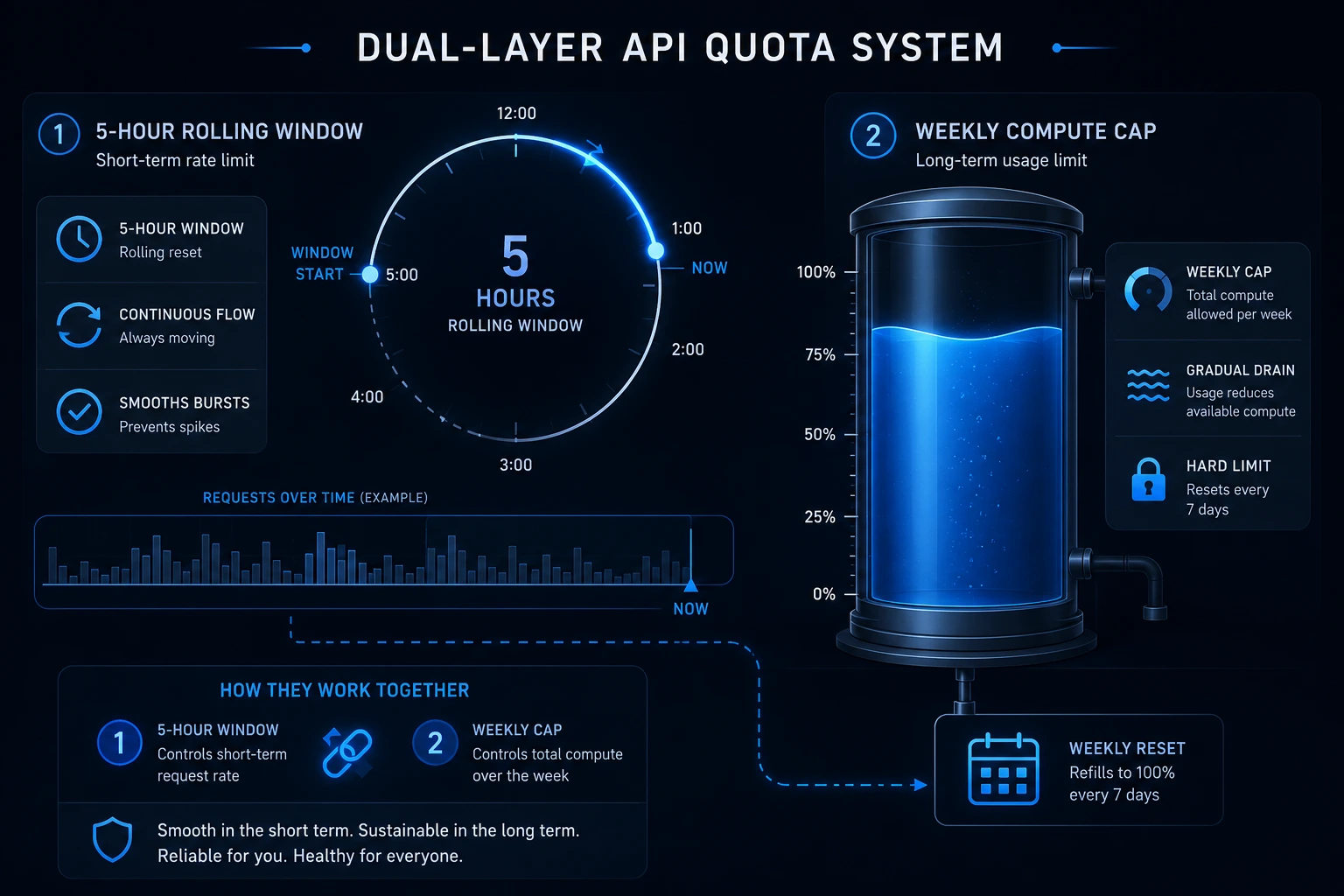
A rolling 5-hour session window that covers short bursts. The clock starts on your first prompt, not a fixed hour of the day. Send a message at 10:00 AM, and that window resets at 3:00 PM regardless of how much you packed into it.
A weekly cap on active compute this governs sustained usage across the week. Idle time doesn't count against it; only active processing and reasoning do.
Hit either ceiling and you're throttled until it resets. This is why you can feel totally fine at 2 PM and locked out by 2:15.
Your Chat Usage and Your Coding Usage Share a Bucket
This trips up almost everyone: Claude Code, Claude.ai chat, and Claude Cowork all draw from the same subscription pool. Spend the morning brainstorming a blog outline in the browser, and you've already dented the capacity you wanted for your afternoon coding session.
If you're subscribed purely to code, keep your chat usage on a separate account or be mindful that every browser tab is drawing from the same tank as your terminal.
What Anthropic's Own Numbers Say
Anthropic's official cost-management documentation gives a useful real-world baseline: across enterprise deployments, the average spend works out to roughly $13 per developer per active day, or $150–250 per developer per month, and 90% of users stay under $30 on any given active day. If your own usage looks nothing like that, it's a signal something in your workflow — not your plan tier — is the problem.
Anthropic recommends starting with a small pilot group and using the built-in tracking tools to set a baseline before rolling out to a wider team (source: Claude Code cost docs).
The Good News: Anthropic Loosened the Limits Twice This Year
If you read a "Claude Code will lock you out constantly" post, check the date a lot of that pain is outdated:
On May 6, 2026, Anthropic permanently doubled the 5-hour session limits for Pro, Max, Team, and seat-based Enterprise plans, and removed the old weekday peak-hour throttle (5–11 AM PT) that used to shrink your limits during busy mornings.
On May 13, 2026, weekly limits got a 50% boost, a promotion currently scheduled to run through July 13, 2026.
Starting June 15, 2026, non-interactive usage Agent SDK calls, claude -p scripting, GitHub Actions integrations, and third-party apps authenticating with your subscription moved to a separate monthly credit ($20 on Pro, $100 on Max 5x, $200 on Max 20x). That means your CI pipeline running Claude Code no longer eats into the session window you need for actual interactive coding. It does, however, have its own hard monthly ceiling, so watch that number separately.
Anthropic doesn't publish exact token counts per plan; it only gives multipliers (Pro is the baseline "1x," Max is "5x" or "20x") because burn rate depends on prompt length, model choice, context size, and features enabled. Any article quoting a precise "44,000 tokens per window" figure is guessing.
What's Actually Burning Through Your Quota
Here's the part most guides skip. It's rarely "using Claude Code" that costs you, it's a handful of specific habits.
1. A Bloated CLAUDE.md
Your CLAUDE.md file gets injected into every single request. A 5,000-token CLAUDE.md isn't documentation; it's a 5,000-token tax you pay on every message, whether Claude needs that context or not.
Fix: Keep it under roughly 200 lines. Document decisions and conventions Claude can't infer on its own not aspirational style guides or things obvious from the codebase. Anthropic's own guidance backs this up: if your CLAUDE.md holds workflow-specific instructions you only need occasionally (a PR-review checklist, a migration runbook), move that content into a skill that loads on demand instead, so it isn't sitting in every request's context (source: Claude Code cost docs).
2. Long, Never-Cleared Conversations
Claude resends your entire conversation history with every turn. Message 80 in a long session costs dramatically more than message 8, even if message 80 is a one-line question.
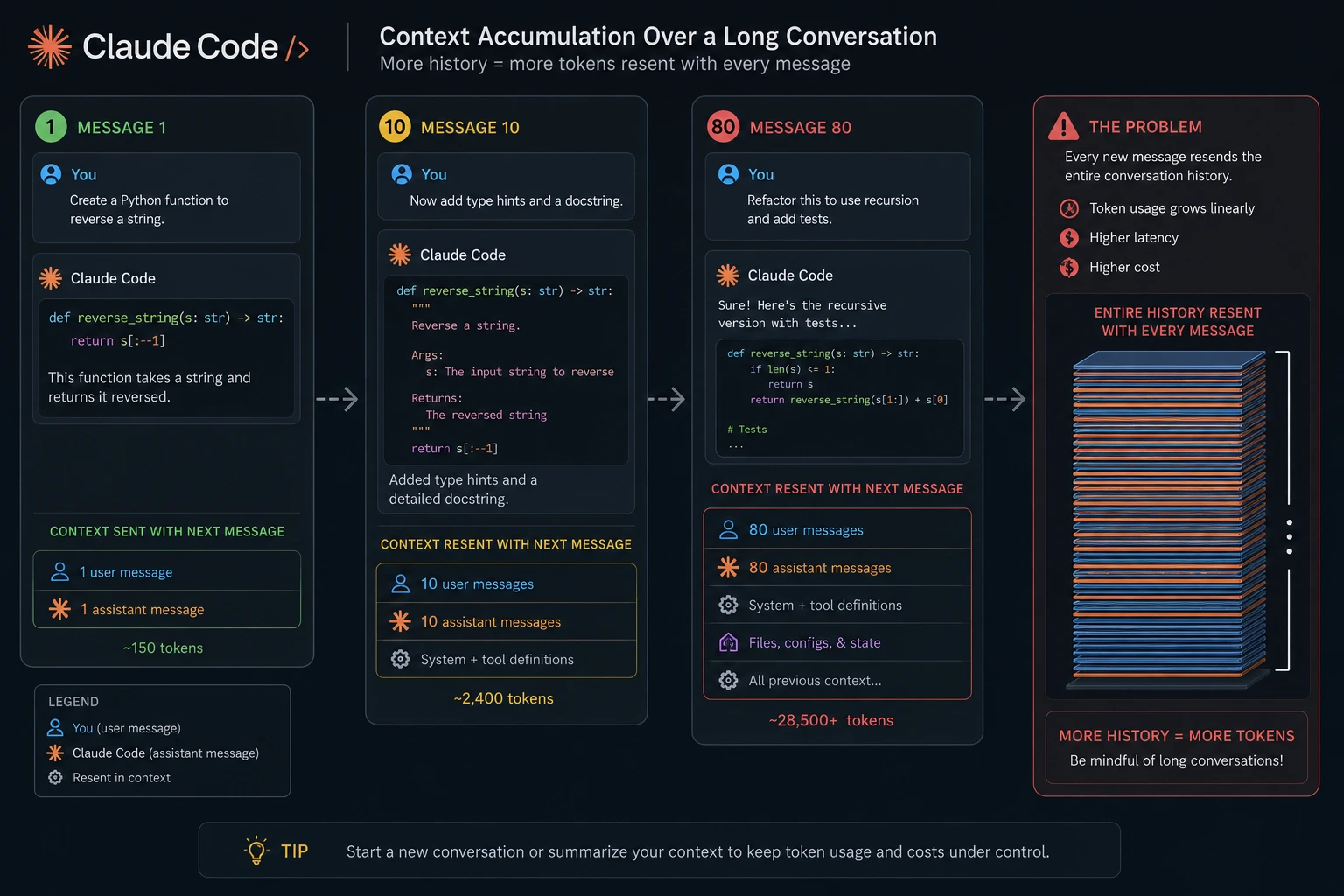
Fix:
/compact
Run this mid-task to summarize the conversation and free up room without losing context. And when you finish a discrete task:
/clear
Anthropic itself calls clearing between tasks the single most effective lever for stretching usage. A useful habit here: run /rename before you clear so the session is easy to find later, then /resume if you need to pick the thread back up.
3. File-by-File Search on Big Codebases
When Claude Code doesn't have a clean way to find something, it reads 10–20 files into context just to locate one function. Every byte of that search counts against your session — and it's pure overhead, not "real" work.
Fix: Add a .claudeignore file so Claude never wastes tokens indexing build artifacts, lockfiles, or generated code:
node_modules/
dist/
build/
*.lock
coverage/
.next/
*.min.js
vendor/
4. Opus on Tasks Sonnet Could Handle
Opus is the flagship model for genuinely hard, long-horizon agentic work. But it's noticeably more token-hungry than Sonnet for equivalent tasks; some developers report it drains a session 5–10x faster on routine work.
Fix: Default to Sonnet for day-to-day coding, refactors, and bug fixes. Reach for Opus specifically when you need deep multi-file reasoning, complex architecture decisions, or coordinating multiple subagents. You can switch models mid-session with:
/model
5. Agent Teams and Subagents Multiply Cost, Not Just Speed
Spinning up a multi-agent team to parallelize a task sounds efficient, but each teammate maintains its own separate context window. Anthropic's own documentation confirms agent teams run roughly 7x more tokens than a standard single-agent session when teammates operate in plan mode, since each teammate is really a separate Claude instance with its own context (source: Claude Code cost docs).
Fix: Reserve Agent Teams for genuinely parallelizable work (e.g., independent test suites across services), not for tasks a single focused session could handle sequentially. Keep spawn prompts short and shut teammates down as soon as their work is done each one keeps burning tokens until it exits.
6. Auto-Accept Mode on Open-Ended Prompts
Auto-accept lets Claude execute file edits without pausing for your approval. It's fast, but Claude also tends to take more actions per task when it isn't stopping to check in more tool calls, longer sessions, more tokens.
Fix: Use Plan Mode first for open-ended or ambiguous tasks, then let Claude execute against a plan you've already reviewed. Save pure auto-accept for well-scoped, low-risk work.
7. The Silent API Key Trap
This one has nothing to do with technique and everything to do with your shell config. If you have an ANTHROPIC_API_KEY environment variable set, Claude Code authenticates via the API not your subscription and bills you per token at standard rates, completely bypassing your Pro or Max plan. This is one of the most common ways developers get surprised by an unexpected bill.
Fix: Audit your shell startup files (.zshrc, .bashrc, .env) for a stray key, and explicitly lock your auth mode per environment — subscription-only for daily work, API key only when you deliberately want overflow billing.
8. Paying for "Certainly! I'd be happy to help!"
Here's a lever most guides never mention: output tokens cost 5x more than input tokens on every current Claude model, because generating text is a slower, sequential process than reading it. That means the conversational filler at the start and end of a response — the "Certainly! Here's the updated code..." and "I hope this helps!" — isn't free politeness. It's billed at the most expensive rate Claude charges, and it also eats into your rate-limit bucket faster than the code itself does.
Fix: You can nudge Claude toward terser output with an explicit instruction in your CLAUDE.md or system prompt — something like "skip introductions and sign-offs, return code and direct answers only." It sounds trivial, but shaving 50–100 tokens of pleasantries off every single response compounds fast across a full day of back-and-forth.
9. Cold-Cache Gaps
Anthropic's prompt cache holds your recent context for a 5-minute window (with a pricier 1-hour option available). Work in tight bursts and every follow-up reads from cache at roughly 10% of the input price. Walk away for a coffee and come back 15 minutes later, and that first message reprocesses your entire context from scratch at full price cache writes even cost more than a normal fresh read (1.25x for the 5-minute cache, 2x for the 1-hour one).
Fix: Batch your back-and-forth into tight bursts rather than a message every ten minutes. If you know you're stepping away for a while, that's actually a good moment to /clear and start fresh on return rather than paying the cold-cache tax on stale context.
10. Skipping the Meter With Local or Free Models
If you're comfortable going further, you don't have to pay per token at all for a meaningful chunk of your work. Claude Code only speaks Anthropic's API format, so pointing it at something else takes a small bridge but it's a well-trodden path:
Run a model locally with Ollama (some local runtimes now expose an Anthropic-compatible endpoint) — zero API bill, you're just spending your own compute and electricity.
Point at a free-tier provider through an Anthropic-compatible endpoint (some providers, like DeepSeek, expose one natively) or a lightweight proxy/LiteLLM setup that bridges Claude Code to other backends.
This won't match a frontier model on your hardest architecture decisions, but for routine edits, boilerplate, and lower-stakes work, it can remove the token meter entirely for a real slice of your daily coding. Most people who do this run a hybrid: local or free for the bulk of routine work, paid Sonnet or Opus reserved for the 10% of tasks that actually need it.
The Everyday Analogy: Your Quota Is a Phone's Mobile Data Plan (Not Unlimited Wi-Fi)
Think of your Claude Code plan like an old-school mobile data cap, not home Wi-Fi.
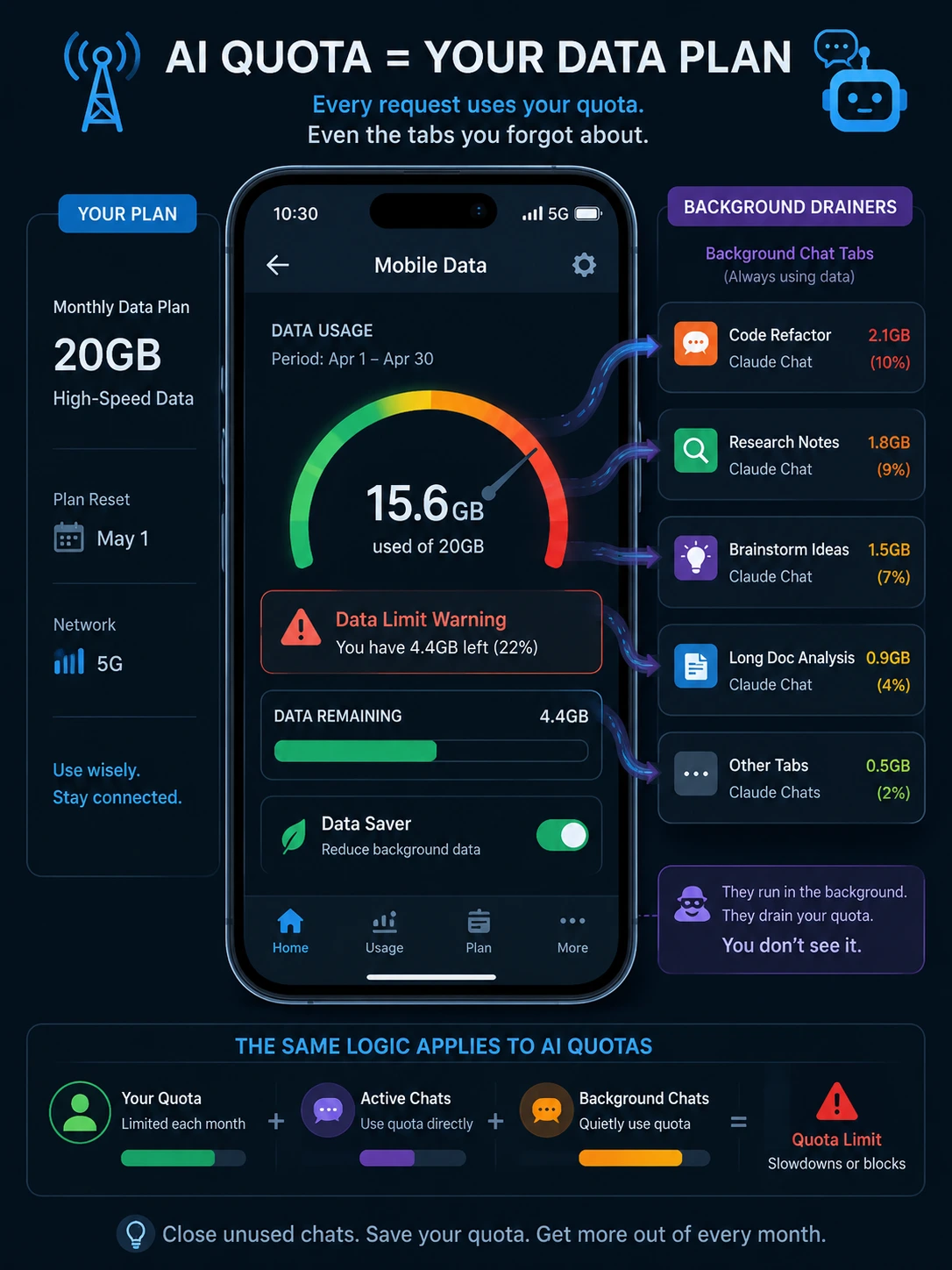
The 5-hour window is like your daily data allotment burn through it streaming video (a giant CLAUDE.md, an uncompacted 80-message thread) and you'll throttle before dinner.
The weekly cap is your monthly data cap even if you're careful day to day, enough heavy days in a row and you hit the wall regardless.
Background apps syncing on Wi-Fi are your Claude.ai chat sessions invisible, but drawing from the same total pool as your "real" usage.
Switching from LTE to a slower fallback network is exactly what happens when you hit a limit: you're not cut off, you're just waiting for the tower (session) to reset.
Once you see it that way, the fixes are obvious: close background apps you don't need (clear conversations you're done with), don't stream 4K video over cellular when Wi-Fi will do later (don't use Opus for a one-line fix), and check your data usage screen before you're throttled, not after.
Which brings us to the actual dashboard.
Building Real Visibility: Track Your Usage Like You Track Your AWS Bill
The official /usage, /status, and /context commands inside Claude Code give you a live read on where you stand:
/usage
/status
/context
/usage shows your session's token count and estimated cost, plus (on Pro, Max, Team, and Enterprise plans) a breakdown of what's consuming your plan limits by skill, subagent, plugin, and MCP server you can press d or w to toggle between the last 24 hours and the last 7 days. /context answers the "where did my window go" question directly it breaks usage down by system prompt, CLAUDE.md, MCP servers, subagents, and skills, so you're not guessing which of the fixes above will actually move the needle for you.
If you want a hard ceiling instead of just visibility, /usage-credits lets Pro and Max users set a monthly spend limit that Claude Code will warn you about before you blow through it (source: Claude Code cost docs).
Two more official levers worth knowing about: installing a code intelligence plugin for typed languages (TypeScript, Python, Go, Rust) gives Claude precise "go to definition" navigation instead of grepping and reading several candidate files to find one symbol, fewer speculative file reads, lower cost. And for genuinely verbose operations running a full test suite, fetching long documentation, parsing a huge log file delegating to a subagent keeps the noisy output contained in that subagent's own context, so only a short summary comes back into your main conversation instead of thousands of extra tokens.
A well-placed hook can do similar work automatically: instead of Claude reading a 10,000-line log file, a PreToolUse hook can grep for ERROR first and hand Claude only the matches.
But if you want always-visible, glanceable tracking the equivalent of a battery icon for your AI, spend a small ecosystem of free Claude Code menu bar apps has grown specifically to solve this. They read either your local session data or Anthropic's usage endpoint and surface it without you ever opening a terminal.
Worth knowing: Claude Code already logs everything you need. Every conversation gets written as append-only JSONL to ~/.claude/projects/, organized by project folder:
~/.claude/projects/
├── -Users-yourname-project-a/
│   ├── abc123-def456.jsonl
│   └── ghi789-jkl012.jsonl
└── -Users-yourname-project-b/
    └── ...
That's the raw data source behind most community tools no proxy, no interception, just reading files you already own.
A few free, open-source options worth trying (all macOS menu bar apps, several cross-platform in spirit):
Native usage-gauge apps that show your 5-hour window and weekly cap as color-coded rings, with threshold notifications (say, at 50%, 75%, and 90%) so you get warned before you hit the wall instead of after.
Multi-provider trackers that watch Claude and Codex and Gemini CLI quotas side by side — handy if you're one of the growing number of developers running a hybrid workflow across tools.
Local JSONL analyzers that skip the menu bar entirely and give you CLI reports — daily, weekly, monthly, or per-session cost breakdowns — by parsing the same ~/.claude/projects/ logs, so you can pipe the output into your own dashboards or Slack alerts.
Whichever you pick, look for two things before installing anything that touches your credentials: it should be genuinely open source (so you can read the code), and it should make zero unnecessary network calls beyond Anthropic's own endpoints. You can verify the latter yourself with a tool like Little Snitch or nettop.
How to Reduce Claude Code API Cost If You're on Pay-Per-Token
If you've moved past the subscription and you're running Claude Code (or the Agent SDK) against your own API key, the cost levers are different and more powerful:
Model | Input | Output | Best for |
|---|---|---|---|
Claude Haiku 4.5 | $1 / MTok | $5 / MTok | Classification, extraction, routing, high-volume simple tasks |
Claude Sonnet 4.6 | $3 / MTok | $15 / MTok | The daily-driver: balanced cost and coding capability |
Claude Opus 4.8 | $5 / MTok | $25 / MTok | Deep agentic coding, long-horizon reasoning, complex refactors |
(MTok = per million tokens, official Anthropic API rates.)
Five things that meaningfully cut your bill:
Prompt caching cached input reads cost roughly 90% less than fresh input. If your CLAUDE.md, system prompt, and tool definitions repeat across requests (they do), caching absorbs that fixed overhead instead of charging you full price every turn.
Batch processing if the task isn't interactive (bulk code review, test generation across a repo), the Batch API cuts standard rates by 50%.
Model routing sends simple, mechanical tasks to Haiku and reserves Opus for the 10% of work that actually needs it. The price spread between tiers is 5x on input alone.
Trim your context the same .claudeignore and CLAUDE.md discipline from the subscription section applies here, except now every unnecessary token has a literal, itemized dollar cost.
Skip the "global" premium tax when you don't need it requesting US-only inference routing and apply a 1.1x multiplier across every token category. Use it only when data residency actually requires it.
If you're building your own product on top of the API rather than just running Claude Code day to day, dedicated LLM gateway and observability platforms extend this further. Tools in this category Respan is one example sit in front of your model calls and add per-key spend caps, Slack or email alerts when cost or error rate crosses a threshold, request-level tracing, and automatic prompt caching, so you get the team-scale version of the personal quota tracker described above.
Claude Code vs Codex Quota: How They Actually Compare
Since this comes up in every "should I switch" conversation, here's the honest picture as of mid-2026.
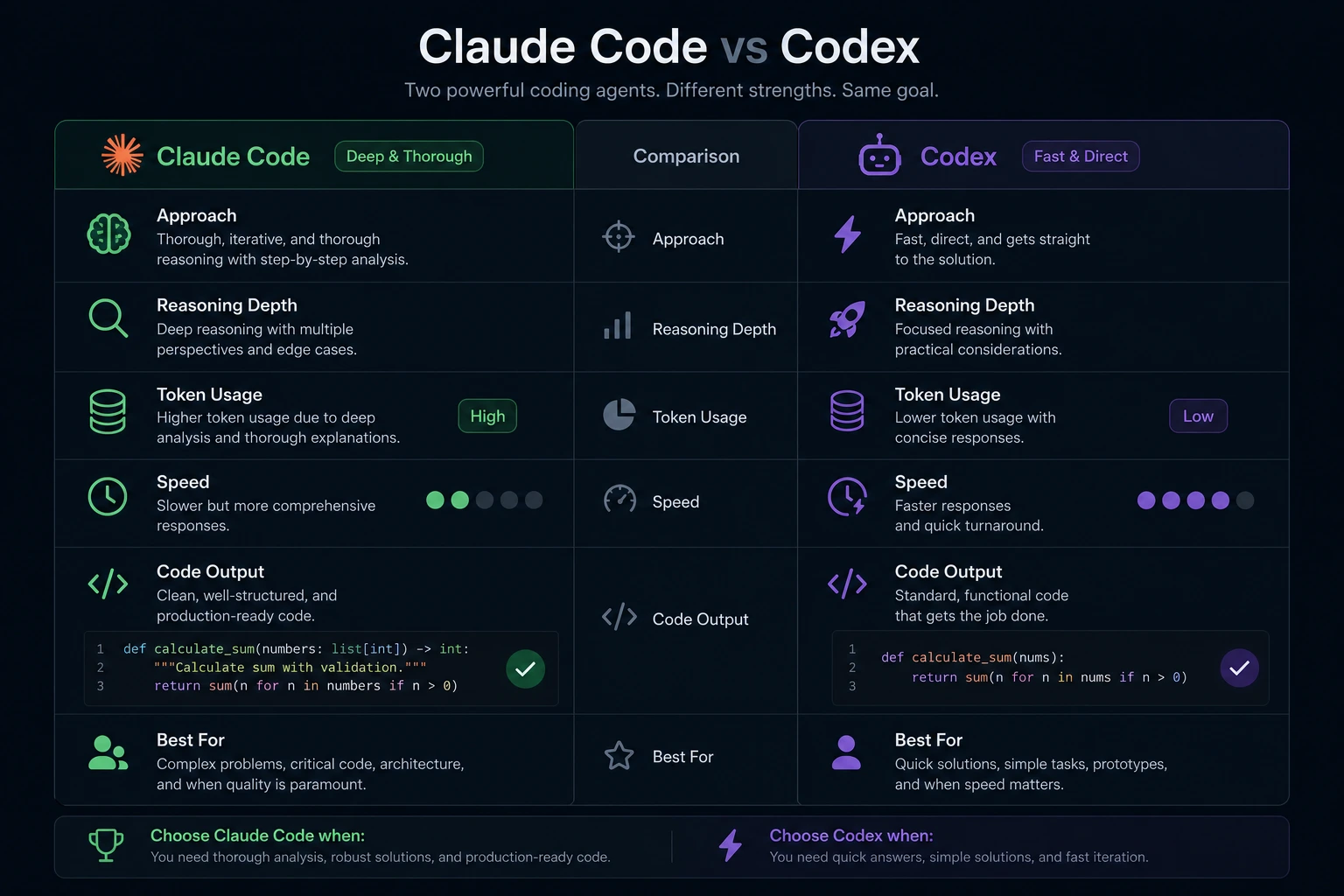
Both tools start at the same $20/month entry price (Claude Pro vs. ChatGPT Plus with Codex). But the quota experience diverges once you're actually working:
Codex is more token-efficient per task. In documented head-to-head benchmarks, Claude Code has been measured using roughly 4x more tokens than Codex to complete the same job — one widely cited Express.js refactor test showed Claude Code consuming around 6.2 million tokens versus Codex's 1.5 million for equivalent output.
That extra token spend isn't pure waste. It correlates with Claude's tendency to "think out loud," verify its own work, and produce more thorough, deterministic changes. In blind code-quality reviews, developers have rated Claude Code's output as cleaner and more idiomatic significantly more often than Codex's.
Practically, this means: if your work is mostly multi-file refactors where correctness matters more than speed, Claude Code's higher token burn often still nets out cheaper than the rework a faster-but-shallower tool can cause. If your work is routine, well-scoped, cost-sensitive automation, Codex's efficiency stretches a $20 plan noticeably further.
Neither answer is universally "right" — plenty of experienced developers now run both, using Claude Code for architecture and complex features, and a second tool for high-volume, cost-sensitive automation. The point isn't to pick a winner; it's to route work to whichever tool's quota model matches the task.
If You're Managing a Team: Org-Level Visibility
Everything above is aimed at an individual developer's quota. If you're the one answering to finance or engineering leadership about AI spend across a whole team, the personal menu-bar trackers won't cut it you need aggregate, per-user visibility instead.
A few starting points:
Claude Code's own analytics dashboard (claude.ai/analytics/claude-code, or the Console dashboard for API organizations) is built into Team and Enterprise plans. It shows daily active users and sessions, lines of code accepted, suggestion accept rate, and — once you connect your GitHub organization contribution metrics that link Claude Code sessions to actual merged pull requests.
Anthropic also publishes per-team-size rate-limit recommendations (token-per-minute and request-per-minute guidance scales down as headcount grows, since fewer people tend to be active concurrently on larger teams)
Third-party engineering analytics platforms minware is one option in this space to connect that usage data to your Git, ticketing, and CI/CD activity, so you can see whether AI adoption is actually moving delivery metrics cycle time, PR review time, change failure rate rather than just counting tokens. This matters because raw usage numbers (sessions, tokens, accepted lines) tell you activity happened, not whether it helped
If you're building your own product on the Claude API rather than just using Claude Code day-to-day, an LLM gateway/observability layer (Respan is one example) can add per-key spend caps, Slack/email alerts when cost or error rate crosses a threshold, and automatic prompt caching across your whole application the team equivalent of the personal quota tracker, but for a product serving many users at once .
The common thread: activity metrics (tokens, sessions, lines accepted) are easy to collect and easy to over-interpret. Pair them with an actual delivery or quality signal before you draw conclusions about ROI.
Your Quick-Reference Checklist
Before your next Claude Code session, run through this:
Is my CLAUDE.md under ~200 lines and free of aspirational fluff?
Do I have a .claudeignore excluding build artifacts and lockfiles?
Am I running /compact at the midpoint of long sessions, and /clear between tasks?
Am I defaulting to Sonnet and only reaching for Opus when the task actually needs it?
Do I know whether ANTHROPIC_API_KEY is set in my shell right now?
Do I have a live view of my usage — via /usage, /context, a menu bar tracker, or all three — instead of finding out I'm throttled mid-task?
Am I using Agent Teams only for genuinely parallel work, not as a default?
Am I working in tight bursts to keep the 5-minute prompt cache warm, instead of drip-feeding one message every 10 minutes?
Have I told Claude to skip the "Certainly! I'd be happy to help!" filler, given output tokens cost 5x more than input?
Am I using /effort or MAX_THINKING_TOKENS to turn down extended thinking on routine tasks?
Do I use Plan Mode (Shift+Tab) before ambiguous tasks, and /rewind instead of manually unwinding a bad session?
Am I staying on the standard 200K context tier unless a task genuinely needs the 1M-token window?
Get those habits right and you'll likely stretch your existing plan further than upgrading tiers ever would.
Wrap-Up: Visibility Beats Willpower
The developers who never seem to hit their limit aren't secretly on some unlimited plan; they've just made their Claude Code quota tracker setup a permanent fixture, the same way you'd never ship without watching your cloud bill. Once usage is visible at a glance, the wasteful habits (bloated context, uncleared threads, Opus-for-everything) become obvious and easy to fix.
What's actually eating your quota right now a giant CLAUDE.md, long uncompacted sessions, or an Agent Team you forgot was running? Drop it in the comments I'll help you troubleshoot it.
Bonus: Two More Levers Worth Knowing About
11. Turn Down Extended Thinking for Routine Work
Extended thinking is on by default in Claude Code because it genuinely helps with hard reasoning but those thinking tokens are billed as output tokens, and the default budget can run to tens of thousands per request. For a simple rename or a one-line fix, you're paying premium output rates for deliberation the task never needed.
Fix: Lower the effort level for routine work with /effort, or cap thinking with the MAX_THINKING_TOKENS environment variable (e.g. MAX_THINKING_TOKENS=8000). On models that support it, you can disable thinking entirely in /config for genuinely mechanical tasks. Save deep thinking for architecture decisions and gnarly bugs, not lint fixes.
12. Plan First, Roll Back Fast
A lot of wasted spend doesn't come from the fix itself, it comes from exploration, wrong turns, and redoing work after Claude heads down the wrong path. Two built-in habits prevent most of that:
Hit Shift+Tab to enter Plan Mode before a complex or ambiguous task. Claude proposes an approach for your approval before touching any files, which avoids paying to explore, edit, then re-edit when the first attempt misses the mark.
If a session starts heading the wrong way, don't let it keep digging, press Escape immediately, or use /rewind to roll back to an earlier checkpoint instead of paying to manually unwind a mess.
The Hidden Cost of "Certainly! I'd be happy to help!" Confirmed by Independent Testing
This isn't just theoretical. One independent write-up ran a side-by-side test: the same coding prompt answered normally versus answered with an explicit instruction to drop all conversational filler, introductions, and sign-offs. The "no filler" version cut output tokens by roughly 70% with identical code output; the standard reply carried over 100 tokens of pure politeness that added zero utility.
On Anthropic's rate-limit accounting, output tokens are weighted more heavily than input tokens in your per-minute quota, so filler doesn't just cost money, it burns through your session limit faster than the actual code does. This is one of the cheapest fixes in this whole guide: one line in your CLAUDE.md or system prompt ("skip preambles and sign-offs, return only the answer") costs nothing to add and compounds across every response for the rest of the session.
Offloading Verbose Output With Hooks, Not Just Subagents
Beyond delegating noisy jobs to subagents, Claude Code supports PreToolUse hooks that rewrite a command before it runs, rather than filtering its output after the fact. The canonical example: instead of letting a full test suite dump thousands of lines into context, a hook rewrites the test command to pipe through grep/head first, so a 10,000-line run returns only the handful of failure lines that actually matter. The same logic applies to log files and build output trim before it enters context, not after.
Related: prefer plain CLI tools over MCP servers where both exist (gh, aws, gcloud, etc.). MCP tool definitions add listing overhead to every request; Claude Code now defers most MCP tool definitions by default so only names load until one is actually invoked, but disabling MCP servers you never use via /mcp still trims the fat. And if you're on typed languages (TypeScript, Python, Go, Rust), a code-intelligence plugin gives Claude precise "go to definition" navigation instead of grepping and reading several candidate files to find one symbol fewer speculative reads, lower cost, and it can surface type errors after an edit without dumping a full compiler run into context.
The 1M-Token Context Tier Is a Premium Tier — Don't Default Into It
Claude's larger 1-million-token context window carries a price bump above the standard 200K tier. It's genuinely useful when you have one artifact that needs it: a huge log dump, a generated SQL file, a full monorepo read but it's not the default you want running for ordinary sessions. Sticking to the 200K tier unless a task specifically demands more is a quiet but real saving most guides don't mention.
How the Same Problem Shows Up in Codex, Cursor, Gemini CLI, OpenCode, and Aider
Every AI coding agent bills the same underlying way context in, tokens billed so the fixes above aren't Claude-specific, just named differently elsewhere:
Lever | Claude Code | Codex CLI | Gemini CLI | OpenCode | Aider |
|---|---|---|---|---|---|
Model routing | /model | model in config.toml | /model (Flash vs Pro) | any provider via API key | --model |
Memory/context file | CLAUDE.md (<200 lines) | AGENTS.md / Memories | /memory, GEMINI.md | AGENTS.md | conventions file |
Compact/clear | /compact, /clear | /compact + auto-compaction | /compress, /clear | /undo, /redo | /clear, /tokens |
Prompt caching | automatic (~90% off reads) | automatic (~90% off) | implicit, on by default (2.5+) | provider-dependent | --cache-prompts |
Reasoning control | /effort, MAX_THINKING_TOKENS | model_reasoning_effort | — | — | /reasoning-effort |
Local/free model | via bridge (proxy or Anthropic-compatible endpoint) | custom provider / --oss | — | any provider (agnostic) | Ollama / any |
Two honest nuances worth knowing: Codex's reasoning tokens (o-series) are hidden chain-of-thought you're billed for even though you never see them, a hard problem can quietly rack up cost through reasoning alone, the same way unthrottled extended thinking does in Claude Code. And Cursor's "fast requests" are a rate-limit concept, not a pricing one, falling into "slow mode" after you exhaust them doesn't save money, it just slows you down.
Bridging Claude Code to Local or Free Models The Concrete Options
Expanding on the "skip the meter" idea from earlier: since Claude Code only speaks Anthropic's API format (unlike OpenCode or Aider, which are provider-agnostic), routing it to a non-Anthropic backend takes one of a few specific bridges:
DeepSeek's native Anthropic-compatible endpoint just points ANTHROPIC_BASE_URL at it, no proxy required.
A lightweight open-source proxy built specifically to bridge Claude Code to other providers (several exist that fan out to 15–20+ backends including Ollama, Groq, and NVIDIA NIM's 120+ open-weight models).
Ollama's own Anthropic-compatible mode, for running a model entirely on your own hardware with zero API bill you're trading token cost for your own computer and electricity.
LiteLLM, configured by hand, if you want fine-grained control over routing across many providers.
The honest trade-off: none of these will match a frontier model on your hardest architecture decisions, and free tiers tend to rate-limit hard the moment you fire off parallel tool calls. The practical pattern most people land on is a hybrid local or free for routine, high-volume work, and paid Sonnet or Opus reserved for the tasks that actually need frontier reasoning.