Claude Code MCP Server Error: Quick Answer
A Claude Code MCP server error usually occurs because the MCP server crashes, authentication expires, environment variables are missing, or the configured transport type is incorrect. Running claude doctor and manually launching the server usually identifies the root cause within minutes.

Table of Contents
Fix 1: Run /doctor First
Fix 2: Launch the Server Manually
Fix 3: Use Absolute Paths
Fix 4: Fix stdout Logging Corruption
Fix 5: Windows npx Wrapper Fix
Fix 6: Fix Authentication Errors
Fix 7: Resolve Transport Mismatch
Fix 8: Fix Missing Environment Variables
Fix 9: Resolve Port Conflicts (HTTP/SSE)
Fix 10: Fix MCP -32001 Request Timeout
Fix 11: Fix SSL Certificate Errors
Fix 12: Clean Reinstall
What Is a Claude Code MCP Server Error?
If you are seeing MCP error -32000: Connection closed, Failed to connect, MCP error -32001: Request timed out, or a server listed as disconnected in claude mcp list, you are dealing with a Claude Code MCP server error one of the most common pain points developers hit when extending Claude Code with external tools.
The fastest single fix is to run claude doctor in your terminal. That command surfaces roughly 80% of misconfigurations in one pass. If the server still fails, copy the exact command and args from your MCP config and run them directly in a terminal. The real error missing dependency, wrong Node version, bad path will print immediately.
Model Context Protocol (MCP) is an open standard from Anthropic that lets Claude clients talk to external tools and data sources through a controlled, standardized interface. When that interface breaks, Claude Code loses all tool access for that server. This guide walks through every error variation, every cause, and every fix in order of likelihood. These fixes apply equally to the CLI, the Desktop app, and Claude Code on the web, since all three wrap the same underlying Claude Code CLI.
Quick Fix Checklist
Work through this list top to bottom before diving into individual fixes:
Run claude doctor — check all lines for red status
Run claude mcp list — confirm the server appears and note its status
Copy the server's command + args and run them manually in your terminal
Check that Node.js 18 or later (ideally Node 22 LTS) is installed: node --version
Verify all required environment variables are set in the MCP config env block, not just your shell profile
Replace any relative binary names (e.g. node, npx) with absolute paths (e.g. /usr/local/bin/node)
Confirm your OAuth token is fresh: run /logout then /login in Claude Code
On Windows, wrap npx commands in cmd /c (see Fix 5)
Check that the server is not writing to stdout — all logging must go to stderr
If using HTTP/SSE transport, confirm the server's URL and port are correct and not blocked by a firewall or VPN
Validate your JSON config: cat ~/.claude.json | python3 -m json.tool
If running Claude Code as an MCP server via claude mcp serve, run claude --dangerously-skip-permissions once first to accept permissions interactively
Error Messages Reference Table
Error Message | Meaning | Severity | Recommended Fix |
|---|---|---|---|
MCP error -32000: Connection closed | Server process crashed on startup or mid-handshake | High | Run server manually; check deps and Node version |
MCP error -32001: Request timed out | Server started but did not respond within the timeout window | High | Check network/proxy; verify SSE endpoint is reachable; increase API_TIMEOUT_MS |
MCP error -32601: Method not found | Server received a method call it doesn't implement | Medium | Check MCP SDK version; server may not implement resources/list or prompts/list |
Failed to connect | Transport could not be established | High | Check config, transport type, and command path |
Client Closed | Child process exited before first tools/list response | High | Check binary exists; add process.stdin.resume() on Node |
spawn npx ENOENT | npx not found in PATH for the MCP environment | High | Use absolute path to npx or node |
MODULE_NOT_FOUND | A Node.js dependency is missing | High | Run npm install inside the server directory |
Authentication failed (401) / OAuth token revoked | OAuth token expired or revoked | High | Run /logout then /login |
does not meet scope requirement user:profile | Token missing required OAuth scope | Medium | Run /logout then /login to re-mint with correct scopes |
403 Forbidden | Missing API key or insufficient scope | Medium | Set API key in env block; re-authenticate |
Invalid API key | API key is wrong or revoked | High | Check ANTHROPIC_API_KEY value; regenerate if needed |
Not logged in · Please run /login | No auth token present | High | Run /login |
Tools do not appear | Server connected but declared no tools | Medium | Check server-side tool registration; run /mcp to force reconnect |
Server shows "failed" in /doctor | Could be a false positive from stderr output | Low | Test server functionality directly — may still work |
tools.N.custom.name: String should match pattern | Tool name contains illegal characters | Medium | Rename tool to match ^[a-zA-Z0-9_-]{1,64}$ |
API Error: 500 Internal server error | Unexpected failure inside Anthropic's API | Variable | Check status.claude.com; wait and retry; run /feedback |
API Error: Repeated 529 Overloaded errors | Anthropic API at capacity | Variable | Check status.claude.com; switch model with /model |
Request rejected (429) | Rate limit exceeded | Medium | Claude Code retries automatically; do not add your own retry loop |
You've hit your session limit | Plan usage cap reached | High | Wait for reset or upgrade plan |
Credit balance is too low | API credit exhausted | High | Top up credits in the billing console |
Unable to connect to API | Network or DNS failure | High | curl -I https://api.anthropic.com; disable VPN |
SSL certificate verification failed | TLS certificate issue, often from a corporate proxy | High | Set ANTHROPIC_CA_BUNDLE to your org's CA bundle path |
Error during compaction: Conversation too long | Context window too large for compaction | Medium | Use /compact with a focus; move work to a subagent |
Autocompact is thrashing | A file or tool output is immediately refilling context | Medium | Read files in chunks; run /compact with a focus; use subagent |
Connection refused (HTTP transport) | Server not running on the configured port | High | Start the remote server; check port and URL |
Claude Code MCP Error Types Comparison
Error | Cause | Difficulty |
-32000 | Server crash | Easy |
-32001 | Timeout | Medium |
401 | Auth issue | Easy |
429 | Rate limit | Easy |
SSL | Certificate issue | Hard |
Root Causes Explained
Understanding why MCP server errors happen makes fixing them much faster.
The server process never starts. This is behind the majority of -32000 and "Client Closed" errors. Claude Code tries to launch the server as a child process, but the binary doesn't exist, a dependency is missing, or Node.js exits immediately because there's nothing keeping the event loop alive.
Path resolution. Claude Code runs MCP servers in a stripped environment; your .bashrc, .zshrc, and shell $PATH are not loaded. A command that works perfectly in your terminal can fail silently when invoked by Claude Code if it relies on a PATH entry that only exists in your shell config.
stdout corruption. The stdio transport uses stdout as its JSON-RPC channel. Any console.log() call in a Node.js MCP server writes to stdout and corrupts the message stream. This looks like a transport error but is actually a logging problem.
Transport mismatch. A server configured as a studio when it expects HTTP or vice versa will fail immediately. The config tells Claude Code how to connect; if the server speaks a different protocol, no handshake is possible.
Timeout on SSE connections. MCP error -32001: Request timed out is distinct from -32000. It means the server process started and accepted the connection, but didn't respond to the initialize request within the timeout window. This often points to a network proxy, a self-hosted SSE server behind nginx, or a firewall stripping keep-alive headers from long-lived SSE connections.
Expired authentication. Claude Code uses OAuth tokens with a finite lifetime. Sessions running for hours, or overnight autonomous runs, will hit token expiration mid-session, causing every subsequent tool call to fail with a 401 until you re-authenticate.
False positive "failed" status. Some MCP servers print startup confirmation messages to stderr. Claude Code captures stderr and can misinterpret these as errors, showing a "failed" status even when the server is fully operational. This is a confirmed open issue in the Claude Code GitHub repository (issue #17653). Always verify by testing tool functionality directly, not just by reading the status.
Anthropic infrastructure issues. Not every Claude Code error originates locally. A documented March 2026 incident caused slow or failed requests for some users between 14:17–17:11 UTC. A separate daylight-saving-time bug once made Claude Desktop unresponsive. Always check status.claude.com before assuming the problem is on your machine.
SSL/TLS interception. Corporate proxies that perform TLS inspection replace the server's certificate with their own. Claude Code uses its own certificate bundle and will reject the proxy's certificate, producing SSL certificate verification failed. This is a network environment issue, not an MCP config problem.
Step-by-Step Fixes
Fix 1: Run /doctor First
What it fixes: Configuration issues, Node.js version problems, auth failures, and server connection status. When to use it: Every time, before anything else. Difficulty: Easy.
Inside a Claude Code session, type /doctor. Outside a session, run claude doctor in your terminal. Read every line. Red items are actionable failures; yellow items are warnings worth reviewing.
After /doctor, run claude mcp list to see the connection status of each configured server. "Active" means a successful connection. "Failed to connect" or "disconnected" confirms the problem exists at the server process level. /doctor also checks context usage — if you are near the context window limit, that can contribute to instability.
Why it works: /doctor is Claude Code's built-in diagnostic that checks API reachability, auth validity, Node version, and server process status in one pass.
Expected outcome: A clear list of what is failing, and often a direct pointer to the fix.
Fix 2: Launch the Server Manually
What it fixes: Any server process error — missing dependencies, wrong paths, bad Node version, broken server code. When to use it: When Fix 1 shows a server as failed but doesn't tell you why. Difficulty: Easy.
Open your MCP config (~/.claude.json for global, or .claude/settings.json in your project). Find the failing server's command and args. Run them together in your terminal:
# Example for a filesystem server npx -y @modelcontextprotocol/server-filesystem /path/to/folder # Example for a custom Node server node /absolute/path/to/my-server/index.js |
Read the output. The error that Claude Code was silently swallowing will print directly to your terminal.
If the server starts manually but not through Claude Code, the problem is in your configuration comparing the exact binary path in your terminal with the one declared in your JSON. If the server crashes manually too, fix that crash first before touching the Claude Code config.
Why it works: Claude Code captures but does not surface the server's full stderr output. Running manually lets you see the raw error.
Expected outcome: You will see the actual error a missing module, a syntax error, a bad argument and can fix it directly.
Fix 3: Use Absolute Paths in Your MCP Config
What it fixes: spawn ENOENT, "command not found", and server silently not starting. When to use it: When the server command works in your terminal but not through Claude Code. Difficulty: Easy.
which node # e.g. /usr/local/bin/node which npx # e.g. /usr/local/bin/npx which python3 # e.g. /usr/bin/python3 |
Update your MCP config to use these absolute paths:
{ "mcpServers": { "my-server": { "command": "/usr/local/bin/node", "args": ["/absolute/path/to/server/index.js"], "env": { "MY_API_KEY": "your-key-here" } } } } |
Why it works: MCP servers run in a minimal environment without your shell's PATH. Absolute paths remove the dependency on PATH resolution entirely.
Expected outcome: The server starts consistently regardless of how Claude Code is launched.
Fix 4: Move All Logging to stderr
What it fixes: MCP error -32000 errors caused by stdout corruption in Node.js servers. When to use it: When you are building or have modified a custom MCP server. Difficulty: Easy — code change.
Replace every console.log() in your MCP server with console.error():
// Before — corrupts the JSON-RPC stream console.log("Server started"); // After — safe, goes to stderr console.error("Server started"); |

For Python MCP servers:
# Before print("Server started") # After — safe print("Server started", file=sys.stderr) |
The MCP protocol specification itself states that if you are developing a server you should add output to stderr (console.error() in JavaScript, print('...', file=sys.stderr) in Python) and it will appear in the server log — not on the transport channel.
Why it works: The stdio transport multiplexes all JSON-RPC messages over stdout. Anything else written to stdout — including log messages — is treated as malformed JSON-RPC data, which causes the -32000 generic error.
Expected outcome: The -32000 error disappears; the server connects cleanly.
Fix 5: Windows — Wrap npx in cmd /c
What it fixes: "Client Closed" errors on Windows when using npx-based MCP servers. When to use it: Any time you configure an npx MCP server on Windows. Difficulty: Easy — config change.
Update your MCP config on Windows:
{ "mcpServers": { "filesystem": { "command": "cmd", "args": ["/c", "npx", "-y", "@modelcontextprotocol/server-filesystem", "C:\\your\\path"], "env": {} } } } |
Why it works: On Windows, directly invoking npx as a child process fails because Windows cannot execute .cmd files (which npx is) without the shell. Wrapping the call in cmd /c provides that shell layer.
Expected outcome: Servers that previously exited immediately will connect successfully.
Fix 6: Fix Authentication Errors (401 / OAuth Errors)
What it fixes:Authentication failed (401), OAuth token revoked, OAuth token has expired, does not meet scope requirement user:profile. When to use it: When Claude Code suddenly stops working mid-session, or after a long break. Difficulty: Easy.
# Step 1 — log out to clear the stale cached token /logout # Step 2 — re-authenticate with fresh token /login # If /login itself returns 401, clear the credentials cache first rm -rf ~/.claude/auth # Then restart Claude Code and run /login again |
The does not meet scope requirement user:profile error specifically means your existing token was minted before a new OAuth scope was required. The fix is the same — /logout then /login to re-mint the token with updated scopes.
Why it works: Claude Code caches your OAuth token. When the token expires, the cache still holds the old token and poisons every new request. The /logout step clears the cache; /login mints a fresh token with current scopes.
Expected outcome: API calls succeed immediately after re-authentication.
Fix 7: Fix Transport Mismatch (stdio vs HTTP/SSE)
What it fixes: Servers that never connect because the configured transport doesn't match how the server actually communicates. When to use it: When adding a new server from documentation, it immediately fails. Difficulty: Medium requires reading server documentation.
Check the server's documentation or README to confirm whether it uses stdio (local process) or http://sse (remote HTTP endpoint). Update your config accordingly:
// stdio server (local process) { "mcpServers": { "local-tool": { "type": "stdio", "command": "/usr/local/bin/node", "args": ["/path/to/server.js"] } } } |
// HTTP/SSE server (remote endpoint) { "mcpServers": { "remote-tool": { "type": "sse", } } } |
For remote servers behind a reverse proxy (e.g. nginx), ensure the proxy does not buffer SSE responses. SSE requires chunked transfer with headers flushed immediately. Nginx buffering is a common cause of SSE-based MCP connections timing out.
Expected outcome: The server connects cleanly once transport is correctly specified.
Fix 8: Add Missing Environment Variables
What it fixes: Silent 401/403 failures, tool calls that fail with "missing credentials", servers that start but cannot authenticate to the services they wrap. When to use it: When a server starts but tool calls fail, or when a server wraps an authenticated API (GitHub, Slack, etc.). Difficulty: Easy.
Add all required secrets to the env block in your MCP config — do not rely on shell environment variables:
{ "mcpServers": { "github": { "command": "/usr/local/bin/npx", "args": ["-y", "@modelcontextprotocol/server-github"], "env": { "GITHUB_TOKEN": "ghp_your_token_here" } } } } |
Why it works: MCP servers run in a stripped environment. Environment variables set in your terminal session, .env files, or shell config are not inherited by the server process unless explicitly passed through the env block. This is the single most frequent cause of "server starts but tools fail" reports.
Expected outcome: Tool calls that previously returned 401 or failed silently will authenticate and succeed.
Fix 9: Resolve Port Conflicts (HTTP/SSE Servers)
What it fixes: Connection refused errors when using HTTP or SSE transport. When to use it: When using remote MCP servers or locally-hosted HTTP servers. Difficulty: Medium.
Check whether the configured port is already in use:
# macOS/Linux lsof -i :PORT_NUMBER # Windows netstat -ano | findstr :PORT_NUMBER |
If the port is occupied, either stop the conflicting process or change the MCP server's port. For remote servers, verify the server is actually running and accessible:
curl -I https://your-mcp-server.example.com/sse |
If a VPN or firewall is blocking the connection, test from a different network (e.g. mobile hotspot) to isolate the issue. Corporate VPNs and zero-trust network agents (ZTNA) are the most common cause of connection failures for HTTP/SSE servers — they can selectively break long-lived HTTPS streams while appearing fine for normal web traffic.
Expected outcome: HTTP/SSE servers connect once the port is free and the server is reachable.
Fix 10: Fix MCP -32001 Request Timeout
What it fixes: MCP error -32001: Request timed out on SSE and HTTP-transport servers. When to use it: When the server process starts but never completes the initialization handshake. Difficulty: Medium.
Error -32001 is distinct from -32000. The connection opened successfully but the server didn't respond to the initial request before the timeout expired. This is most common with self-hosted SSE servers and n8n MCP integrations running behind a reverse proxy.
Step 1 — Test connectivity directly:
If this hangs or returns immediately without streaming, your server endpoint is the problem.
Step 2 — Check your nginx or reverse proxy config. For SSE endpoints, disable buffering:
location /mcp/ { proxy_pass http://your-backend; proxy_buffering off; proxy_cache off; proxy_set_header Connection ''; proxy_http_version 1.1; chunked_transfer_encoding on; } |
Step 3 — Increase the timeout. Claude Code's default per-request timeout is 600,000ms (10 minutes). For slow networks or high-latency proxies, raise it:
export API_TIMEOUT_MS=900000 |
Step 4 — Check if local n8n is the cause. If you are using n8n's MCP Server trigger and your instance is self-hosted, the timeout almost always means n8n is not reachable at the SSE URL. Switching to n8n.cloud typically confirms whether the issue is your nginx config or the n8n instance itself.
Expected outcome: After fixing the proxy config or increasing the timeout, the server completes initialization and tools become available.
Fix 11: Fix SSL Certificate Errors
What it fixes: SSL certificate verification failed errors, most common in corporate environments. When to use it: When Claude Code works at home but fails at the office, or behind a corporate network. Difficulty: Medium — requires knowing your org's CA certificate.
Corporate proxies that perform TLS inspection replace server certificates with their own. Claude Code rejects these because they're not in its certificate bundle.
# Get your corporate CA certificate path from your IT team, then set: export ANTHROPIC_CA_BUNDLE=/path/to/corporate-ca.pem # Or add it to your MCP config env block: # "env": { "ANTHROPIC_CA_BUNDLE": "/path/to/corporate-ca.pem" } |
If you are not in a corporate environment, SSL certificate verification failure can also mean your system clock is wrong (causing certificate expiry checks to fail) or that your Node.js installation has a stale root certificate bundle. Update Node.js to the latest LTS to pick up updated root certs.
Expected outcome: SSL handshake succeeds; Claude Code connects to the API normally.
Fix 12: Clean Reinstall
What it fixes: Corrupted local config, stale MCP settings after client updates, persistent failures that resist all other fixes. When to use it: As a last resort when all targeted fixes have failed. Difficulty: Medium — data loss risk; back up first.
# Back up your current config cp ~/.claude.json ~/.claude.json.backup # macOS — remove app data rm -rf ~/Library/Application\ Support/Claude # Windows — remove app data (run in PowerShell) Remove-Item -Recurse -Force $env:APPDATA\Claude # Reinstall Claude Code npm install -g @anthropic-ai/claude-code # Restore your config cp ~/.claude.json.backup ~/.claude.json |
After reinstalling, run claude doctor to confirm a clean baseline before re-adding MCP servers one at a time.
Why it works: Client updates can leave behind stale configuration cache or corrupt plugin data that new versions no longer understand. A clean reinstall removes all accumulated state.
Expected outcome: A fresh, working baseline. Re-add MCP servers incrementally and test after each addition to identify which one causes problems.
Advanced Troubleshooting
Reading MCP Server Logs

Claude Code captures MCP server stderr but does not display it inline. To see it:
# Enable verbose output when starting Claude Code claude --debug # Check the Claude Code log file (macOS) tail -f ~/Library/Logs/Claude/mcp.log tail -f ~/Library/Logs/Claude/mcp-server-SERVERNAME.log # Linux tail -f ~/.local/share/Claude/logs/main.log |
Each MCP server gets its own dedicated log file at ~/Library/Logs/Claude/mcp-server-<name>.log. This is where you'll find the full initialization exchange including any JSON-RPC errors. Look for lines containing Message from the server with an error field.
Interpreting the output:
# FALSE POSITIVE — server is actually working [DEBUG] MCP server error: serverName=memory, error=Server stderr: Memory MCP server started # REAL ERROR — server genuinely failed [DEBUG] MCP server error: serverName=filesystem, error=Connection failed: spawn npx ENOENT # TIMEOUT ERROR — server started but didn't respond in time Message from client: {"method":"notifications/cancelled","params":{"requestId":0,"reason":"Error: MCP error -32001: Request timed out"}} |
If the error message contains "Server stderr:" followed by a startup confirmation, the server is running fine. The "failed" status in /doctor is a confirmed open issue (GitHub #17653) where Claude Code misreads normal startup messages as errors.
Validating Your JSON Config
Malformed JSON is a surprisingly common cause of MCP failures. Validate before debugging further:
# Validate the global config cat ~/.claude.json | python3 -m json.tool # Or use node node -e "JSON.parse(require('fs').readFileSync(process.env.HOME + '/.claude.json', 'utf8'))" && echo "Valid JSON" |
A syntax error anywhere in the file can prevent all MCP servers from loading — you get no error message, and every server simply never appears.
Checking Node.js Version Compatibility
node --version |
Node.js 2.2 LTS is the recommended version for running MCP servers in 2026. Versions below Node.js 18 cause protocol incompatibilities. If your global Node is too old, use a version manager:
# Install nvm if not present # Install and use Node 22 LTS nvm install 22 nvm use 22 nvm alias default 22 |
After switching Node version, restart Claude Code entirely it won't pick up the new version from a running session.
Environment Variables That Control Retry and Timeout Behavior
Claude Code automatically retries transient failures (server errors, 529 overloads, request timeouts, temporary 429 throttles, dropped connections) up to 10 times with exponential backoff. When you see an error on screen, those retries have already been exhausted.
Two environment variables let you tune this:
Variable | Default | Effect |
|---|---|---|
CLAUDE_CODE_MAX_RETRIES | 10 | Number of retry attempts. Lower it to surface failures faster in scripts; raise it for flaky networks. |
API_TIMEOUT_MS | 600000 (10 min) | Per-request timeout in milliseconds. Raise it for slow networks, proxies, or self-hosted MCP servers with long initialization times. |
Fixing Garbled Text in VS Code / Cursor Integrated Terminal
If characters render as boxes or garbled glyphs when running Claude Code in the VS Code, Cursor, or Windsurf integrated terminal:
# Inside Claude Code session /terminal-setup |
This sets terminal.integrated.gpuAcceleration to "off". You can also set it manually in your editor settings and reload the window. This is a GPU rendering issue in the terminal emulator, not an MCP problem, but it can make error messages unreadable during debugging.
WSL-Specific Issues
If running Claude Code on WSL (Windows Subsystem for Linux), disk read performance penalties when working across file systems can cause incomplete search results and slower MCP responses. Solutions:
Move your project to the Linux filesystem (/home/) rather than the Windows filesystem (/mnt/c/)
Submit more specific searches to reduce the number of files scanned
Consider running Claude Code natively on Windows instead of through WSL
Testing Tool Availability After Fix
After applying a fix, force a reconnect without restarting:
# Inside a Claude Code session /mcp |
This triggers a reconnect for all configured servers. If tools still don't appear, run:
claude mcp get <server-name> |
An empty tool list means the server connected but declared no tools — this is a server-side configuration issue, not a transport problem.
Fixing Tool Name Validation Errors
If you see tools.N.custom.name: String should match pattern '^[a-zA-Z0-9_-]{1,64}$', a tool name in your MCP server contains characters the API rejects. MCP tool names must use only letters, numbers, underscores, and hyphens, and must be 64 characters or fewer. Rename the offending tool in your server code and redeploy.
Network Diagnostics
When Claude Code itself cannot reach the Anthropic API:
# Test basic API reachability curl -I https://api.anthropic.com/v1/messages # Check DNS resolution nslookup api.anthropic.com # Test with VPN disabled # Tether to a phone hotspot — if it works, your office network is the issue |
Memory and Context Issues
For long Claude Code sessions, high memory usage or context overflow can cause instability that looks like MCP errors. Use /compact regularly to reduce context size, or run /heapdump to write a heap snapshot to ~/Desktop for analysis. The Autocompact thrashing error specifically means a file or tool output is immediately refilling the context window — fix this by reading files in smaller chunks or delegating the work to a subagent.
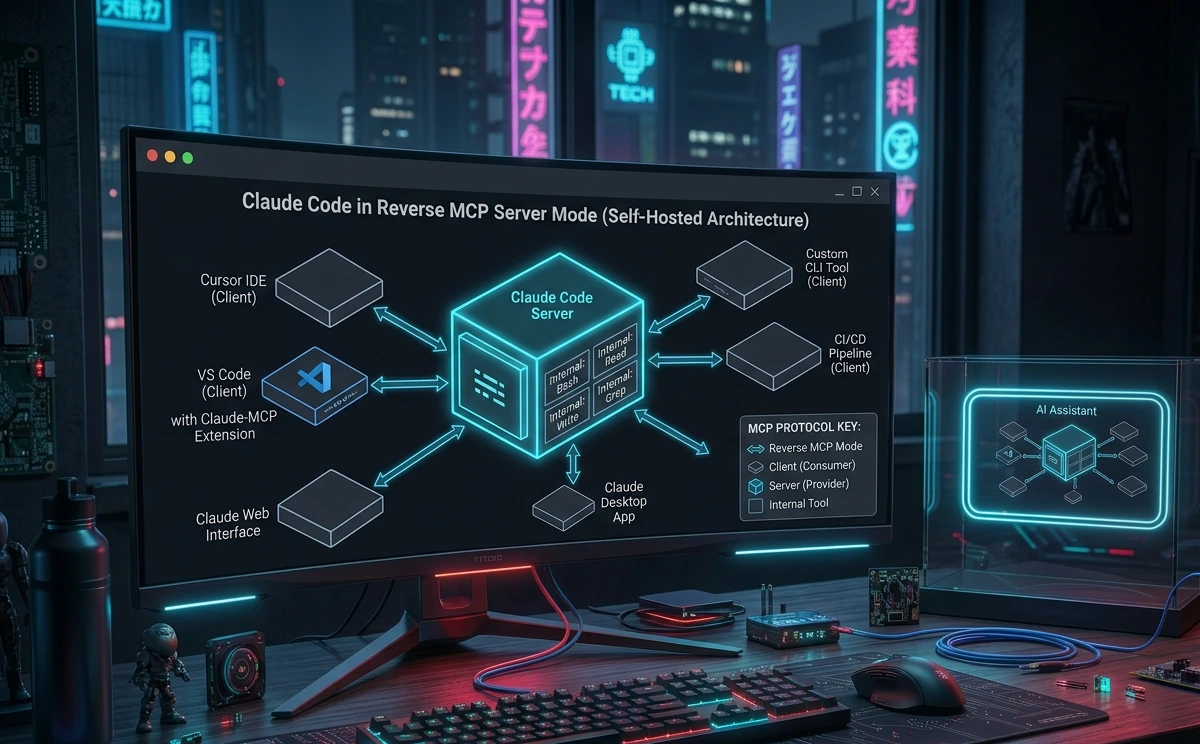
Claude Code as an MCP Server (Reverse Mode)
Most developers use Claude Code as an MCP client — consuming other MCP servers. But Claude Code can also run as an MCP server itself, exposing its tools to other MCP clients like Claude Desktop, Cursor, and Windsurf.
How It Works
claude mcp serve |
This runs Claude Code headlessly, listening for client connections via studio transport. The following tools get exposed as MCP tools: Bash, Read/View, Write/Edit, LS, GrepTool, GlobTool, Replace, and dispatch_agent (for sub-agent delegation).
Important caveat: There is no MCP passthrough. If Claude Code connects to a GitHub MCP server, clients that connect to Claude Code cannot access those GitHub tools directly. Each layer is separate; it's not a proxy.
Required First Step
Before Claude Code works as an MCP server, you must run it once interactively to accept permissions:
claude --dangerously-skip-permissions |
This is a one-time requirement. MCP server mode is headless and cannot prompt for permissions interactively — if you skip this step, the server will fail silently or reject tool calls.
Common Setup Issues in Reverse Mode
"command not found: claude" after installation:
# Find where npm installs global packages npm config get prefix # Add /bin to PATH, or use the full path in your MCP config |
macOS folder access prompts: The first run will likely fail while macOS prompts for folder access permissions. Grant them and subsequent runs work fine.
No network exposure: Security comes through process isolation. Only processes that launch the server can connect to it there is no HTTP port, no authentication token required for the stdio transport itself.
Real-World Scenarios
Scenario 1: Everything worked yesterday, fails today. Cause: OAuth token expired overnight. The session from yesterday cached a token that has since expired. Fix: Run /logout then /login. If that fails, run rm -rf ~/.claude/auth and re-authenticate from scratch.
Scenario 2: Server shows "failed" in /doctor but tools work fine. Cause: False positive (confirmed GitHub issue #17653). The server is printing startup messages to stderr, which Claude Code misreads as an error. Fix: Ignore the status. Test tool functionality directly. If tools work, the server is working.
Scenario 3: Custom Node server connects on macOS but not on Windows. Cause: Windows cannot exec .cmd files (including npx) directly as child processes. Fix: Wrap the command in cmd /c as shown in Fix 5.
Scenario 4: Server starts manually but not through Claude Code. Cause: The command uses a relative binary name (node, npx) that resolves in your shell but not in Claude Code's stripped environment. Fix: Find the absolute path with which node and update your MCP config.
Scenario 5: GitHub server connects but every tool call returns 403. Cause: GITHUB_TOKEN is set in your shell but not in the MCP config env block. Fix: Add "GITHUB_TOKEN": "ghp_..." to the env block in your MCP config.
Scenario 6: Server never appears in claude mcp list. Cause: JSON syntax error in ~/.claude.json prevents the entire config from loading. Fix: Validate the JSON with cat ~/.claude.json | python3 -m json.tool. Fix the syntax error and restart.
Scenario 7: MCP server works for 2 hours then stops mid-task. Cause: Long-running autonomous sessions can hit token expiry mid-run. OAuth refresh during autonomous runs is unreliable. Fix: For long sessions, start from a fresh /login. Keep autonomous runs under the token lifetime.
Scenario 8: n8n MCP Server trigger not loading in Claude Desktop. Cause: The -32001: Request timed out error during initialization. Most commonly caused by the SSE connection not reaching the n8n instance — either a nginx proxy buffering the SSE stream, the local n8n instance being unreachable, or the SSE URL being incorrect. Fix: Test the SSE URL directly with curl -N <your-sse-url>. If using self-hosted n8n, check your nginx proxy buffering config. If using n8n.cloud, the connection typically works without proxy changes.
Scenario 9: Claude Code as MCP server fails with permission error on first run. Cause: You ran claude mcp serve without first running claude --dangerously-skip-permissions to accept terms interactively. Fix: Exit, run claude --dangerously-skip-permissions once in interactive mode, complete browser authentication, then restart claude mcp serve.
Scenario 10: Claude Code works at home but fails at the office. Cause: Corporate VPN or zero-trust agent intercepting HTTPS connections, or a TLS-inspecting proxy causing SSL certificate verification failed. Fix: Set ANTHROPIC_CA_BUNDLE to your org's CA certificate path. Contact IT for the certificate file.
Troubleshooting Decision Tree
Start here: Check status.claude.com │ ├── Incident posted → Wait for resolution, check again in 30 min │ └── Status green → Run claude doctor │ ├── Auth: failed (401) / OAuth errors │ └── /logout → /login │ └── Still failing? rm -rf ~/.claude/auth → restart → /login │ ├── MCP server: error -32000 or Failed to connect │ ├── Run server command manually in terminal │ │ ├── Crashes → fix the error shown (dep, path, Node version) │ │ └── Works fine → check stdout corruption; use absolute paths in config │ └── Status is "failed" but tools work → False positive (GitHub #17653) │ ├── MCP server: error -32001 Request timed out │ └── Test SSE endpoint directly with curl -N │ ├── Hangs/fails → fix server or proxy config │ └── Works → increase API_TIMEOUT_MS │ ├── SSL certificate verification failed │ └── Set ANTHROPIC_CA_BUNDLE to corporate CA path │ ├── API Error: 529 Overloaded │ └── Check status.claude.com → switch model with /model │ ├── HTTP 503 / Unable to connect to API │ └── curl -I api.anthropic.com → disable VPN → hotspot test │ ├── Client Closed (Windows) │ └── Wrap npx in cmd /c │ ├── Tools don't appear after connection │ └── /mcp to force reconnect → claude mcp get <name> │ └── Empty tools → server-side config issue │ ├── Autocompact thrashing / Context too long │ └── /compact with focus → subagent → /clear │ └── All fixes failed └── Validate JSON config → clean reinstall → add servers one at a time |
Common Mistakes
Mistake 1: Debugging Claude Code before testing the server directly. Consequence: Hours of config changes while the actual error (a missing npm package) would have been visible in 10 seconds by running the server manually. Better approach: Always run the server command in your terminal first. It is the fastest diagnostic available.
Mistake 2: Setting environment variables in your shell profile and assuming MCP servers inherit them. Consequence: Server starts but every authenticated tool call silently fails. Better approach: Set all required secrets explicitly in the env block of your MCP config.
Mistake 3: Using console.log() in Node.js MCP servers. Consequence: Corrupts the JSON-RPC stream and causes MCP error -32000. Better approach: Use console.error() for all logging. In Python, use print('...', file=sys.stderr).
Mistake 4: Assuming a "failed" status in /doctor means the server isn't working. Consequence: Unnecessary debugging time on a server that is actually functional. Better approach: Check logs for "Server stderr:" prefix — if it's followed by a startup message, the server is fine. Verified by GitHub issue #17653 as a known Claude Code bug.
Mistake 5: Retrying aggressively during a 529 overload. Consequence: Gets your account rate-limited as collateral damage and worsens the overload. Claude Code already retries automatically up to 10 times with exponential backoff — adding your own retry loop on top doubles the traffic. Better approach: Check status.claude.com, switch models with /model, and let Claude Code's built-in retry logic handle backoff.
Mistake 6: Forgetting to validate JSON after editing the config file. Consequence: A single misplaced comma disables all MCP servers with no clear error message. Better approach: Run python3 -m json.tool ~/.claude.json every time you edit the config manually.
Mistake 7: Running claude mcp serve without accepting permissions first. Consequence: Claude Code in reverse-server mode fails silently or rejects all tool calls because permissions were never accepted interactively. Better approach: Always run claude --dangerously-skip-permissions once to complete browser authentication before using claude mcp serve.
Mistake 8: Ignoring the Anthropic status page. Consequence: Spending an hour debugging a local configuration for an infrastructure outage that has nothing to do with your setup. Better approach: status.claude.com is the first stop for any Claude Code error that appears suddenly without a config change.
Best Practices & Prevention
Always use absolute paths. Never rely on PATH resolution for MCP server commands. Find absolute paths with which and hardcode them in your config. This single habit eliminates the most common category of startup failures.
Set a pinned Node.js version. MCP servers are sensitive to the Node version. Use nvm alias default 22 (or the current LTS) and check node --version after any system update.
Put all secrets in the env block. Every API key, token, and credential that a server needs must appear in its env block. Never depend on shell-level environment variables.
Log to stderr, never stdout. If you write custom MCP servers, enforce this as a coding standard. The MCP protocol spec is explicit about this. Add a linter rule if your team is large enough to warrant it.
Add servers incrementally. When setting up multiple MCP servers, add and test them one at a time. This makes it immediately obvious which server is causing problems.
Keep a working config backup. Before editing ~/.claude.json, copy it: cp ~/.claude.json ~/.claude.json.bak. MCP config errors are instant to introduce and can take time to diagnose.
Start long sessions with a fresh login. For autonomous runs expected to take more than an hour, run /logout then /login before starting. This maximizes token lifetime and reduces the chance of mid-session auth failure.
Use /compact proactively. For long coding sessions, run /compact before it becomes necessary. Context overflow can destabilize tool calls in ways that look like MCP errors.
Monitor the Anthropic status page for outages. Bookmark status.claude.com. Many apparent MCP errors are actually upstream API availability events that resolve on their own.
For SSE servers behind a proxy, disable proxy buffering. If you self-host MCP servers behind nginx or another reverse proxy, configure the proxy to pass SSE traffic without buffering. Buffering is the most common cause of -32001 timeout errors on self-hosted setups.
FAQ
-32000 is the JSON-RPC specification's generic server error code. In Claude Code, it almost always means the MCP server process crashed — either on startup or during the initial handshake. The server may have failed to find a dependency, encountered a Node version incompatibility, or exited because nothing was keeping its event loop alive (add process.stdin.resume() to fix this in custom Node servers). Run the server's command manually in your terminal to see the exact crash reason.
Error -32001: Request timed out is distinct from -32000. The connection opened successfully, but the server didn't respond to the initial request within the timeout window. This is most common with SSE-based servers and self-hosted setups behind a reverse proxy. Fix by checking your proxy's buffering configuration, testing the SSE endpoint directly with curl -N, or increasing API_TIMEOUT_MS.
Error -32601 means the server received a method call it doesn't implement. Claude Code may call resources/list or prompts/list as part of capability negotiation; servers that don't implement these return -32601. This is usually harmless and the server still functions for tool calls. If it causes problems, update the server's MCP SDK to a version that handles unsupported methods gracefully.
This message means Claude Code could not establish the transport connection to the server process. The most common causes are: the binary named in command doesn't exist (try absolute paths), the server exits immediately after launch (check deps and Node version), or on Windows, npx was invoked without the cmd /c wrapper. Run claude mcp list to confirm the failure, then run the server command manually to see what's actually going wrong.
This is a confirmed bug (GitHub issue #17653). Some MCP servers write startup confirmation messages to stderr. Claude Code captures stderr and misinterprets these as errors, showing a failed status even when the server is fully operational. The definitive test is functionality: run /mcp inside Claude Code and try calling a tool. If it works, your server is fine.
No. Error -32000 is generated locally — it reflects that your MCP server process crashed. It has nothing to do with Anthropic's API availability. For Anthropic infrastructure issues, check status.claude.com. For a -32000 error, the problem is with the MCP server process itself.
Auto-compaction in Claude Code can sometimes drop tool references when it compresses context. After /compact, run /mcp to force a reconnect and restore tool availability. If tools continue to disappear after compaction, split long sessions into shorter ones or use subagents for large-file work.
Yes, for remote (HTTP/SSE) MCP servers. Corporate VPNs and zero-trust network agents can selectively block long-lived HTTPS streams. If you are seeing connection failures only for HTTP/SSE servers, disable your VPN and test from a mobile hotspot. If the problem disappears, your network configuration is the cause. Local studio servers are not affected by VPN issues since they run as local processes.
Rarely. A reinstall is a last resort for persistent failures that survive all targeted fixes. Most MCP errors resolve through one of: running the server manually to find the real error, using absolute paths, fixing the env block, or re-authenticating. Back up ~/.claude.json before any reinstall.
Use the CLI: claude mcp add <name> <command> [args...]. For servers that need environment variables, use claude mcp add <name> -e KEY=value <command>. For HTTP/SSE servers, use claude mcp add <name> --transport sse <url>. After adding, run claude mcp list to confirm registration and /mcp inside a session to connect.
The most common Windows-specific issue is npx invocation. Windows cannot execute .cmd files directly as child processes. Wrap your npx command in cmd /c: {"command":"cmd","args":["/c","npx","-y","<package>"]}. Also check that paths use either forward slashes or escaped backslashes in your JSON config.
This error means a tool name in your MCP server contains illegal characters. MCP tool names must match ^[a-zA-Z0-9_-]{1,64}$ — only letters, numbers, underscores, and hyphens, maximum 64 characters. Rename the offending tool in your server code and redeploy.
Node.js 22 LTS is the recommended version. Versions below Node.js 18 cause protocol incompatibilities. Check your version with node --version and use nvm to manage versions if needed.
Yes. Run claude mcp serves to expose Claude Code's tools (Bash, Read, Write, Edit, LS, GrepTool, GlobTool, Replace, and dispatch_agent) to other MCP clients. You must first run claude --dangerously-skip-permissions once to accept permissions interactively — MCP server mode is headless and cannot prompt. Note there is no MCP passthrough: tools from servers that Claude Code itself connects to are not forwarded to connecting clients.
Check status.claude.com first. Anthropic infrastructure incidents can cause sudden failures with no local cause. Past incidents have included API capacity events and notably a daylight-saving-time bug that caused Claude Desktop to become unresponsive. If the status page is green, re-authenticate with /logout then /login, as token expiry is the next most common cause of sudden failures.