Introduction
Artificial intelligence is changing software development faster than most developers expected.

What started as AI chatbots and code autocomplete tools has evolved into something far more powerful: AI agents for developers. These systems are no longer limited to answering prompts or generating code snippets. In 2026, modern AI agents can make decisions, use external tools, access APIs, execute entire workflows, debug code, and automate complex multi-step tasks all with minimal human intervention.
For developers, this shift matters enormously. Whether you are building SaaS applications, automating internal workflows, or creating AI-powered products, understanding AI agents is no longer optional; it is becoming a foundational skill.
This guide explains everything you need to know: what AI agents actually are, how agentic AI works, the architecture behind them, the best frameworks developers are using in 2026, real-world examples, common mistakes, and how to start building your own agents today.
What Are AI Agents?
An AI agent is a software system that can perceive its environment, make decisions, take actions, observe outcomes, and adapt its behavior all in pursuit of a defined goal.
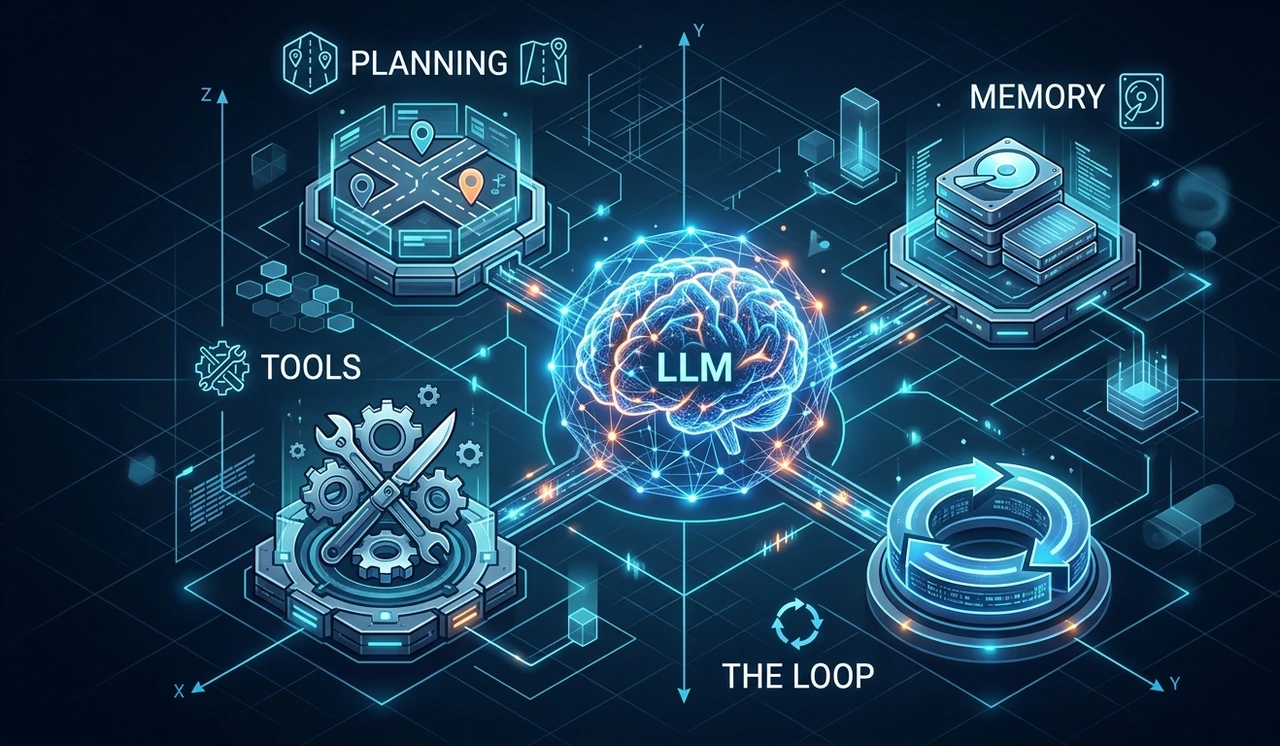
Unlike traditional software that follows explicit, predefined rules, AI agents reason dynamically based on context. The key insight from AI Builder Club (2026) describes agents as three things plus a loop:
🔑 The Core Agent Pattern 1. An LLM that supports tool use — Claude, GPT-4o, Gemini 2.0+. The model can return structured tool call instructions instead of just text. 2. A set of tools — Python functions, APIs, or MCP servers (read_file, search_web, query_db, send_email). 3. A loop — send a user message, receive text or tool calls, execute tool calls, feed results back, repeat until done. |
Traditional Automation vs. AI Agents
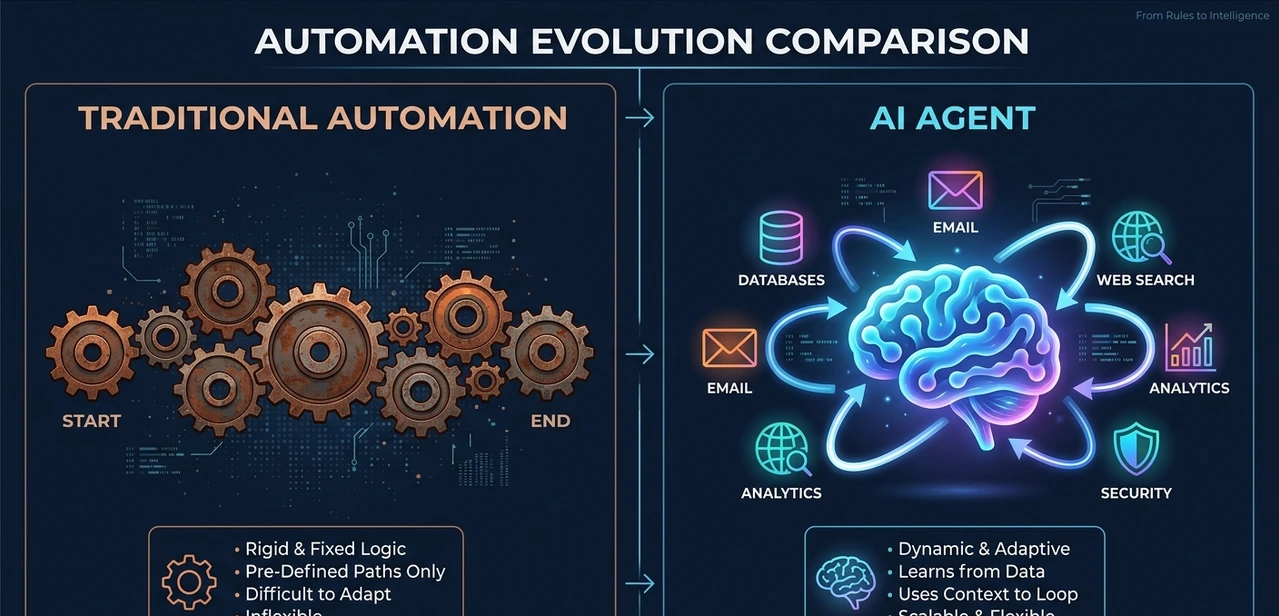
Traditional software automation:
"If the user submits a form → send a confirmation email."
An AI agent given the same goal:
Reads the form submission
Identifies the user's intent from the content
Searches the knowledge base for a relevant answer
Drafts a personalized response
Sends the email, logs the interaction, and updates the CRM
That second scenario requires reasoning, tool usage, planning, memory, and multi-step execution. That is agentic AI — not rigid rule-following but dynamic goal-pursuit.
Why AI Agents Matter for Developers in 2026
Traditional automation systems are brittle. A small UI change can destroy an RPA flow. Unexpected input causes fixed scripts to fail. Hardcoded rules struggle with real-world complexity.
AI agents solve this because they can reason around obstacles. If an API returns an unexpected error, a well-designed agent can retry with a different strategy, log the failure, or escalate without you writing a new rule for every edge case.
Industry Data 📊 McKinsey Survey (January 2026): 57% of organizations with active AI programs had implemented at least one agentic system in production — up from under 10% in 2023. |
For developers, this opens genuinely transformative possibilities:
Autonomous coding systems that write, test, and refactor entire features
AI-powered customer support handling 60-70% of tickets automatically
Research agents that scan the web, extract insights, and generate reports
Workflow automation agents connecting dozens of APIs without manual orchestration
AI-powered QA and DevOps monitoring systems
Core Components of an AI Agent
Every modern AI agent is built from five essential components. Understanding these is fundamental before you write a single line of agent code.
1. Large Language Model (LLM) — The Reasoning Engine
The LLM is the brain of the agent. It processes instructions, analyzes context, makes decisions, and plans next actions. Popular choices in 2026 include OpenAI GPT-4o, Anthropic Claude Sonnet/Opus, Google Gemini 2.0+, and Meta Llama 3. Without the LLM, there is no reasoning, just a script.
2. Tools — How Agents Interact With the World
Tools are what transform an LLM from a chatbot into an agent. They are Python functions (or MCP servers) that the LLM can call to take real actions. Common examples:
search_web(query) — look up current information
read_file(path) — access local files
query_database(sql) — run database queries
run_python(code) — execute code dynamically
send_email(to, body) — send communications
charge_card(amount) — process payments
The LLM decides which tool to call and with what arguments. Without tools, you have a chatbot. With tools, you have an agent.
3. Memory — Short-Term and Long-Term
AI agents need memory to maintain context across multi-step tasks.
Short-term memory: Lives in the active context window — the ongoing conversation and task state.
Long-term memory: Stored externally in vector databases (Pinecone, Chroma, Weaviate), allowing agents to recall previous interactions and domain knowledge across sessions.
4. Planning System
Planning enables agents to break large goals into smaller subtasks. A research agent given "Write a competitive analysis report" might plan: search competitors, extract pricing, analyze features, compare positioning, then generate a formatted report. Each step informs the next.
5. The Agent Loop (ReAct Cycle)
The agent loop is the core execution pattern — often called the ReAct Loop (Reason + Act):
Observe — What information do I have?
Think — What should I do next to achieve my goal?
Act — Call a tool or generate an output.
Observe again — What did the tool return? Did it succeed?
Repeat — Until the goal is reached or a stopping condition is met.
💡 Developer Tip from AI Builder Club The entire agent pattern can be implemented in approximately 60 lines of Python using raw API calls — no framework required. This is worth understanding before reaching for LangChain or CrewAI. Knowing the raw loop makes you a better agent engineer. |
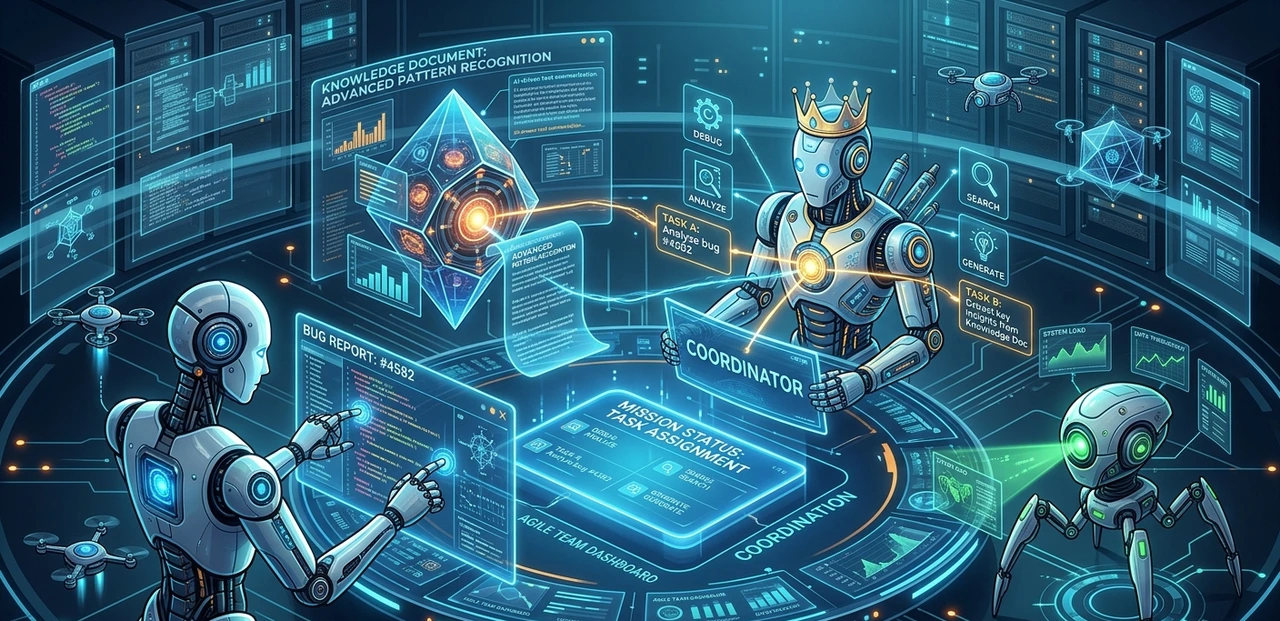
Single-Agent vs. Multi-Agent Architecture
One of the most important architectural decisions when building AI systems is choosing between a single-agent or multi-agent approach.
 x
x
Single-Agent System | Multi-Agent System |
One LLM handles all reasoning | Multiple specialized agents collaborate |
Best for: simple, focused tasks (3-5 tools) | Best for: complex workflows requiring specialization |
Lower cost, faster execution | Higher cost, more powerful reasoning |
Easier to debug | Requires orchestration logic |
Example: Customer support bot | Example: Research + Write + Review pipeline |
Reliability drops above 5 tools | Each agent stays focused on its role |
Key insight: A 20-step complex task in a multi-agent system can cost $1-$5 per execution depending on model choice. Developers often use cheaper models (GPT-4o mini, Claude Haiku) for intermediate steps and reserve powerful models for critical reasoning stages.
Best AI Agent Frameworks in 2026
Several frameworks dominate the AI agent ecosystem. Here is an honest comparison based on real production use cases:
Framework | Best For | Key Strength | Consideration |
LangChain / LangGraph | Complex stateful workflows | Huge ecosystem, flexible | Learning curve |
CrewAI | Role-based multi-agent systems | YAML-based config, fast setup | Less control than raw API |
AutoGen (Microsoft) | Role-based multi-agent systems | Debate & critique patterns | More complex setup |
LlamaIndex | Document-heavy RAG systems | Best retrieval pipelines | RAG-focused only |
Semantic Kernel | Enterprise .NET / TypeScript | C# & TS support | Less Python-native |
Raw API (Anthropic/OpenAI SDK) | Full control, production | 60-line loop, no lock-in | More code to write |
📌 Recommendation Summary For most developers starting out: LangGraph or CrewAI offer the best balance of power and approachability. For production systems where you need full control: Raw API with the Anthropic or OpenAI SDK is often the better long-term choice. Coursera's AI Agent Developer Specialization (Vanderbilt University, 4.8 stars from 10,045 reviews) is the top-rated structured learning path for developers new to building agents. |
Types of AI Agents Developers Build
1. Coding Agents
Coding agents can read codebases, write features, run tests, fix failing tests, refactor code, and submit pull requests. Notable examples: Anthropic Claude Code, Cognition AI Devin, SWE-agent. These systems are transforming software engineering workflows not replacing developers, but dramatically amplifying their output.
2. Customer Support Agents
Integrated with platforms like Zendesk, Intercom, and Slack, these agents read incoming tickets, search documentation using RAG, draft responses, and escalate only what requires human judgment. Real deployments achieve 60-70% automation rates with measurable response time improvements.
3. Research Agents
Research agents can search the web, extract information from multiple sources, synthesize findings, generate formatted reports, and export to Google Docs or Notion. They compress multi-hour research tasks into minutes.
4. Workflow Automation Agents
These agents handle CRM updates, lead qualification, email campaigns, scheduling, and internal operations. Unlike traditional Zapier-style automation, they can reason through conditional logic without every scenario being pre-programmed.
5. RAG-Enhanced Knowledge Agents
Using retrieval-augmented generation (RAG), these agents query internal knowledge bases dynamically rather than relying solely on what fits in a context window. AWS, along with major cloud providers, now offers native infrastructure for building production RAG pipelines supporting these agents.
How to Build Your First AI Agent: Step-by-Step
Step 1: Define a Clear, Specific Objective
Agents perform significantly better with precise instructions. The difference matters:
❌ Weak: "Help with customer support." ✓ Strong: "You are a support agent for AcmeSaaS. Read incoming Zendesk tickets, classify them as billing/technical/general, search the knowledge base for an answer, draft a response with confidence score, and escalate any ticket mentioning 'cancel' or 'data loss' to a human agent." |
Step 2: Choose Your Framework and LLM
For beginners: start with CrewAI or LangChain with GPT-4o mini or Claude Haiku to manage costs. Once you understand the loop, try building the same agent with the raw API — the 60-line version will teach you more than any tutorial.
Step 3: Define Small, Modular Tools
Each tool should do exactly one thing. Avoid building tools that combine multiple actions — they become debugging nightmares. Good tools are atomic, testable, and independently debuggable.
Step 4: Implement Memory Appropriately
Short-term memory is handled automatically by your context window. For long-term memory, start with a simple vector store like Chroma (local, no setup needed) and graduate to Pinecone when you need scalability.
Step 5: Add Observability from Day One
Do not wait until something breaks to add logging. Use LangSmith, Helicone, or Weights & Biases from the very start. Every tool call, reasoning step, and output should be logged so you can reconstruct exactly what happened when something goes wrong.
Step 6: Set Hard Limits and Safety Guardrails
Always implement a maximum step count (e.g., 25 iterations), a timeout per session, and a human-approval checkpoint for high-stakes actions. An agent that can run forever costs forever.
Common Mistakes Developers Make with AI Agents

❌ Mistake 1: Too Much Autonomy Too Fast Never give agents write access to production databases, financial systems, or email campaigns from day one. Start with read-only permissions and expand incrementally as the agent proves reliable. |
❌ Mistake 2: Vague or Ambiguous Prompts Bad instructions produce bad agents. Define goals, constraints, success conditions, and failure conditions explicitly. "Draft a response" and "Send a response" are very different instructions with very different risk profiles. |
❌ Mistake 3: No Error Handling in Tool Calls Agents will encounter API rate limits, timeouts, malformed responses, and missing data. Without robust fallback logic, your agent silently fails or gets stuck in loops. |
❌ Mistake 4: Skipping Observability If you cannot see what your agent is doing step-by-step, debugging becomes nearly impossible. Add tracing and logging from the very first version. |
❌ Mistake 5: Too Many Tools in a Single Agent Single-agent reliability drops noticeably above 5 tools. If your agent needs 10+ tools, split the work across multiple specialized agents with a coordinator. |
Pro Tips for Building Better AI Agents
✅ Tip 1: Use Structured JSON Outputs Instruct your LLM to return JSON when making tool decisions. Structured outputs dramatically reduce parsing errors and make agent behavior more predictable. |
✅ Tip 2: Separate Planning from Execution A two-layer architecture — a Planner agent that breaks goals into subtasks + Executor agents that carry out each subtask — is more scalable and easier to debug than a single monolithic agent. |
✅ Tip 3: Route Tasks to the Right Model Use cheap, fast models (Claude Haiku, GPT-4o mini) for simple classification and retrieval steps. Reserve powerful models for complex reasoning. This can reduce costs by 60-80% at scale. |
✅ Tip 4: Test With Adversarial Inputs Give your agent confusing, contradictory, or malicious inputs before deployment. Agents in production will encounter edge cases you never imagined. |
✅ Tip 5: Understand MCP (Model Context Protocol) MCP is the emerging protocol that lets AI models call your own APIs, databases, and tools natively — without custom integration code for each LLM. Claude, Cursor, and other modern tools support it. Learning MCP in 2026 is like learning REST APIs in 2010. |
Real Use Case: AI Agent System for Developer Support
Imagine a SaaS company with growing support volume. Instead of hiring more agents, they deploy an AI agent system:
Agent Role | Agent Role |
Intake Agent | Monitors Zendesk every 15 min, classifies tickets (billing / bug / feature / general), routes to the right sub-agent |
Docs Agent | Searches knowledge base via RAG, drafts a response, posts if confidence > 0.75, flags if below |
Bug Triage Agent | Checks GitHub Issues for duplicates, creates new issue if needed, tags the engineering team |
Escalation Agent | Any ticket mentioning 'cancel' or 'data loss' goes to a human with full context summary |
Stack: LangGraph for orchestration, Claude Sonnet for reasoning, Claude Haiku for classification, Pinecone for the knowledge base, Zendesk + GitHub APIs as tools, LangSmith for observability.
Result: ~65% of tickets were handled automatically. Human engineers spend their time on genuinely complex problems. Average response time drops from 4 hours to under 10 minutes for tier-1 issues.
FAQ: What Developers Ask About AI Agents
No. Chatbots are reactive; they respond to single prompts. AI agents are proactive — they take sequences of actions using tools to achieve multi-step goals. A chatbot tells you how to send an email. An agent actually sends it, logs it, and updates the CRM.
Not necessarily. Most frameworks abstract the ML layer. Coursera's AI Agent Developer Specialization (Vanderbilt University) is designed for developers with basic Python experience and no prior AI or ML knowledge. You will primarily work with Python, APIs, prompts, and tool definitions.
Zapier follows fixed rules you pre-define. Agentic AI reasons about what to do based on context. Zapier can trigger an email when a form is submitted. An agent can read the form content, identify the user's intent, check your CRM, and craft a personalized response — for scenarios you never anticipated.
A complex 20-step task using multi-agent systems can cost $1-$5 per execution depending on model choice. Cost optimization involves routing simple steps to cheaper models (GPT-4o mini, Claude Haiku) and using powerful models only where complex reasoning is required.
Model Context Protocol (MCP) is the standardized protocol that lets LLMs call external tools, databases, and APIs natively — without custom integration code for each model. Claude, Cursor, and major AI tools already support it. Building MCP servers means your tools work across all compatible AI systems, not just one.
Yes. Modern coding agents like Claude Code and Devin can read files, execute terminal commands, run tests, fix failing tests, and interact with Git repositories. This is how they write, debug, and refactor real code.
Pick one repetitive task in your own workflow. Build a small agent with two or three tools to handle it. Use LangChain or CrewAI as your framework, Claude Haiku or GPT-4o mini to keep costs manageable, and LangSmith for visibility. Get that working end-to-end before adding complexity.
Final Verdict
AI agents for developers are not a trend to monitor — they are a shift happening right now. The core pattern is simpler than most developers expect: an LLM, a set of tools, and a loop. Everything else — frameworks, multi-agent systems, MCP, RAG — is built on top of that foundation.
The developers building fluency with agent architectures in 2026 are positioning themselves to design the systems that every other developer will use tomorrow. The skills matter: prompt engineering, tool design, agent orchestration, observability, and cost optimization.
🚀 Your Action Plan Start here: Pick one repetitive workflow. Build one small agent. Learn how it fails. Iterate deliberately. The developer who ships 10 imperfect agents learns faster than the developer planning the perfect one. Resources: Coursera AI Agent Developer Specialization (Vanderbilt) | AI Builder Club | daily.dev AI Agents Guide | LangChain & CrewAI documentation |
Schema FAQ — Copy-Ready JSON-LD
{ "@context": "https://schema.org", "@type": "FAQPage", "mainEntity": [ { "@type": "Question", "name": "What are AI agents for developers?", "acceptedAnswer": { "@type": "Answer", "text": "AI agents for developers are autonomous software systems that combine a large language model with tools, memory, and a reasoning loop to complete multi-step tasks toward a defined goal with minimal human intervention." } }, { "@type": "Question", "name": "How is agentic AI different from chatbots?", "acceptedAnswer": { "@type": "Answer", "text": "Chatbots respond reactively to single prompts. Agentic AI proactively takes sequences of actions, uses tools, and pursues multi-step goals. Chatbots answer questions — agents complete tasks." } }, { "@type": "Question", "name": "What frameworks do developers use to build AI agents?", "acceptedAnswer": { "@type": "Answer", "text": "Popular frameworks in 2026 include LangChain/LangGraph, CrewAI, AutoGen, LlamaIndex, Semantic Kernel, and raw SDK implementations using the Anthropic or OpenAI APIs." } }, { "@type": "Question", "name": "What are the main components of an AI agent?", "acceptedAnswer": { "@type": "Answer", "text": "The five core components are: (1) a large language model as the reasoning engine, (2) tools for world interaction, (3) a planning mechanism, (4) memory (short-term and long-term), and (5) a goal or objective." } }, { "@type": "Question", "name": "How do I get started building AI agents?", "acceptedAnswer": { "@type": "Answer", "text": "Start with a single repetitive workflow, use LangChain or CrewAI with a cost-efficient model like GPT-4o mini or Claude Haiku, give the agent 2-3 focused tools, and add LangSmith observability from day one." } } ]}
Suggested Internal Links
Best AI Coding Tools for Developers — /best-ai-coding-tools
Devin AI vs Claude Code: Full Comparison — /devin-ai-vs-claude-code
Beginner Guide to LangChain — /langchain-beginner-guide
How Retrieval-Augmented Generation (RAG) Works — /what-is-rag
Best AI Agent Frameworks Compared (2026) — /best-ai-agent-frameworks
MCP Explained: The Protocol Connecting AI to Everything — /what-is-mcp
Featured Snippet Answer
🎯 Featured Snippet — For Google's Direct Answer Box What are AI agents for developers? AI agents for developers are autonomous software systems that combine a large language model (LLM) with tools, memory, and a planning loop to complete multi-step tasks toward a defined goal — with minimal human intervention. Unlike traditional automation or chatbots, AI agents can plan, execute actions using tools (APIs, databases, code executors), observe results, and adapt dynamically. Developers build them using frameworks like LangGraph, CrewAI, and AutoGen to automate workflows, assist with coding, handle support tickets, conduct research, and much more. The entire pattern can be implemented in approximately 60 lines of Python: an LLM receives a goal, selects tools, executes them, observes results, and repeats until the task is complete. |