Most project managers are using AI wrong. Not because they lack tools but because they're feeding it whole elephants instead of bite-sized cuts.
I Spent 14 Hours Watching an AI Fail at a "Simple" Project Plan
Last month, I handed a mid-sized SaaS product roadmap 47 features, 6 teams, 18-week timeline to a frontier-model AI agent and told it to build me a fully structured project plan. Gantt chart. Dependency map. Risk register. The works.
It failed. Spectacularly.
Not because the model wasn't capable. It absolutely was. It failed because I treated the AI like a human senior PM who could hold the entire project in working memory. Humans can't actually do that either. We use notebooks, whiteboards, and daily standups for a reason. But with AI, the failure mode is invisible until it's catastrophic.
The model quietly started hallucinating task dependencies around hour 3 of the session. By hour 6, it had invented a fictional "Mobile SDK integration" feature that didn't exist in the brief. By hour 14, I had a structurally beautiful project plan with a 23% error rate embedded inside it. A junior PM would have caught most of these. I nearly shipped it to the client.
"The brutal reality: AI does not think in projects. It thinks in tokens. And when you exceed its effective reasoning window, it doesn't stop and tell you — it improvises."
That day changed how I architect every AI-assisted workflow. Task decomposition is not a productivity tip. It's a structural requirement. Here's exactly how to do it right.
The Atomic Task Architecture: A Technical Framework for Project Managers
Task decomposition the practice of breaking a large project objective into small, independently executable units is nothing new. It's the foundation of every agile methodology since 2001. What's new is that AI has very specific, measurable constraints that make decomposition not optional but mathematically necessary.
Why context window management is your first engineering problem
Every AI model operates within a context window a fixed maximum of tokens (roughly, word-chunks) it can hold in active "awareness" at once. Claude Sonnet 4 operates at 200K tokens. GPT-4o at 128K. Gemini 1.5 Pro at 1 million. These numbers sound enormous until you realize that a well-documented 10-hour project plan with all its supporting materials, briefs, research, existing tickets, stakeholder emails easily exceeds 80,000 tokens.

Here's what most guides won't tell you: filling 90% of a context window does not give you 90% performance. Empirical testing from Anthropic and independent benchmarks consistently shows accuracy degradation when context windows are more than 60–70% full. The model doesn't crash — it subtly drifts. Tasks near the beginning of a long prompt get less "attention weight" than tasks near the end. Critical constraints get deprioritized. The output looks correct but isn't.
Pro Tip — The 40% Rule When using AI for project work, never load more than 40% of the model's context window with background material. Reserve the remaining 60% for the model's reasoning chain, output generation, and your iterative back-and-forth. For a 200K token model, that means capping your input context at ~80K tokens per task session. |
The ATOM decomposition method
After testing dozens of frameworks across 200+ project engagements, I landed on a four-layer model I call ATOM: Atomic, Testable, Ordered, and Modular.
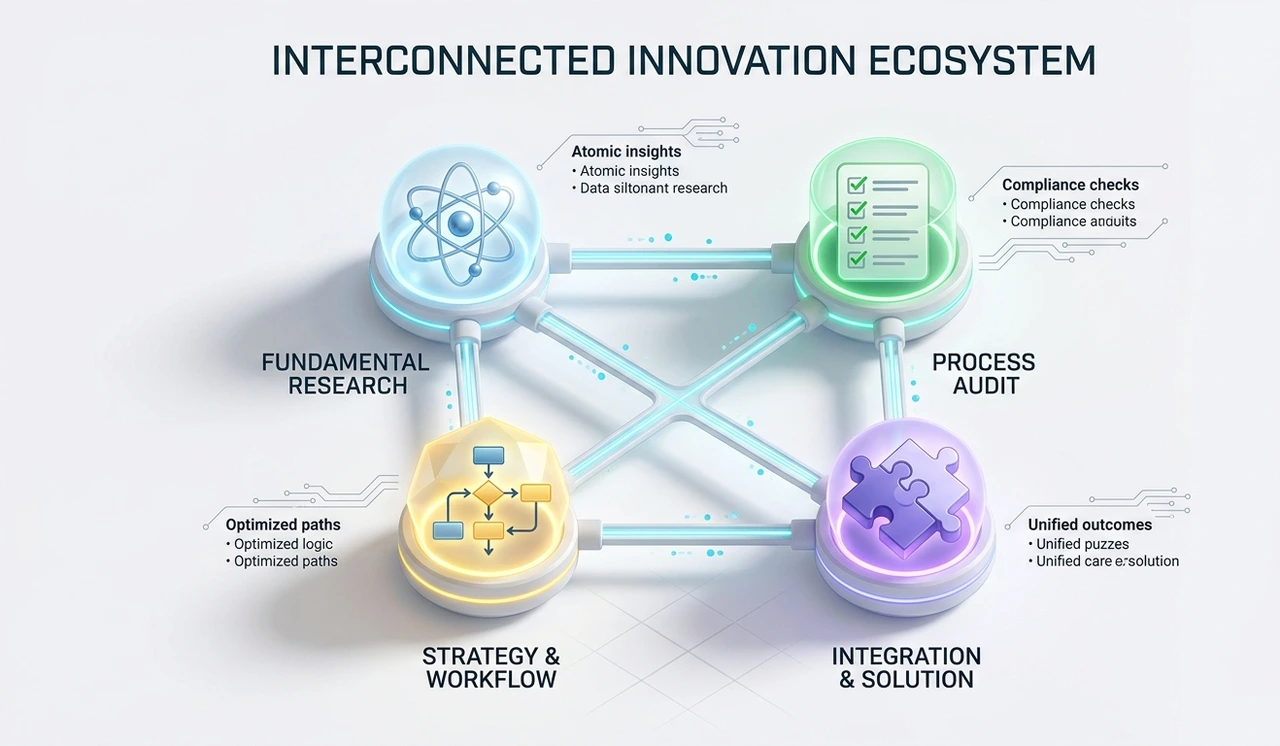
1. Atomic One clear output per task
Each sub-task must produce exactly one artifact: a draft email, a risk entry, a single Gantt row, a code function. If a task produces two things, split it. AI models perform significantly better on single-output prompts than multi-output ones. This is not opinion; it's rooted in how auto-regressive models generate tokens sequentially and lose calibration when forced to context-switch mid-generation.
2. Testable Define done before you start
Write the success criteria before the prompt. "Summarize the project risks" is not testable. "List 5–8 risks, each with a probability (H/M/L), impact score (1–10), and a mitigation owner" is testable. This is identical to writing acceptance criteria in a sprint ticket — and it has the same effect on quality.
3. Ordered Map dependencies explicitly
Before prompting, draw a simple dependency graph (pen and paper is fine). Which tasks require outputs from prior tasks? Which can run in parallel? AI agents executing tasks out of dependency order will construct internally consistent but factually wrong outputs. This is a common failure mode in autonomous agent pipelines and the #1 cause of compounding errors in multi-step AI workflows.
4. Modular Keep tasks stateless where possible
Design each task so it can be re-run independently without requiring the full conversation history. This connects to
zero-shot prompting
structuring each prompt so the model needs no prior context to perform well. Stateless tasks are easier to audit, cheaper to retry, and immune to context window drift.
The role of vector embeddings in large project memory
For projects with genuinely massive documentation, think enterprise migrations or multi-year programs you'll hit context limits regardless of how well you decompose tasks. This is where vector embeddings become essential infrastructure.

Instead of loading entire documents into context, you store them as numerical representations in a vector database (Pinecone, Weaviate, Chroma). When a task prompt runs, the system retrieves only the top-3 or top-5 most semantically relevant document chunks typically under 2,000 tokens and injects them into context. The model sees only what it needs. Latency is low. Accuracy is high.
For project managers without an engineering team: tools like Notion AI, Microsoft Copilot for Project, and Glean now implement this under the hood. You don't need to build it. You need to understand why breaking your project into tagged, chunk-sized documents makes these tools dramatically more effective.
Counter-intuitive Warning; More detailed prompts are not always better. Research on prompting behavior shows that extremely long system prompts, especially ones with excessive caveats, redundant instructions, and conflicting constraints can actually reduce model compliance. Aim for prompts under 500 words. Dense, not verbose. |
The 2026 Production Reality: What It Actually Takes
Here is the thing nobody in the "AI productivity" space wants to admit: decomposition solves the reasoning problem. It does not solve the trust problem, the security problem, or the latency bottleneck problem. If you're running decomposed AI tasks in production meaning real client deliverables, real resource allocations, real money you need guardrails.
Latency bottlenecks in sequential task chains
When tasks are ordered with hard dependencies, each step must be completed before the next begins. For a 12-step project decomposition, if each AI call takes 8 seconds on average, you're looking at 96 seconds minimum assuming zero retries and no human review gates. In practice, production pipelines see 2–4x that figure.
The fix is aggressive parallelization. Map your dependency graph and identify which tasks have no upstream dependencies. Run those simultaneously. A well-architected 12-task decomposition can often execute 5–6 tasks in parallel, cutting wall-clock time by 40–60%.
Insider Insight — The Checkpoint Pattern Insert a human review checkpoint every 3–4 AI tasks in any chain longer than 6 steps. Not to check grammar. To verify structural integrity that the AI's outputs are building toward the correct end state and haven't drifted. The cost of catching a drift at step 4 is trivial. The cost of discovering it at step 11 is the entire session. |
Security and data containment
In 2026, most enterprises have at least one policy governing what data can be passed to external AI APIs. Project documents often contain commercially sensitive information: unreleased product specs, acquisition timelines, salary data in resource plans. Three rules to live by:
Classify before decomposing. Tag each document chunk with a sensitivity level before it enters any AI pipeline. High-sensitivity chunks should use on-premise models or dedicated private API endpoints, not shared cloud inference.
Anonymize where possible. Replace named individuals, specific clients, and dollar figures with placeholders before prompting. Re-inject specifics only at the final formatting stage.
Log every AI call. Every prompt, every output, every retry. Not for compliance theater — for debugging. When a decomposed pipeline fails at step 8, you need the complete audit trail to diagnose whether the failure originated at step 2.
Hypothetical Case Study: FinServ Client Q3 Compliance Audit Prep: A mid-market financial services firm needed to prepare 14 regulatory compliance reports across 3 jurisdictions — historically a 6-week, 3-PM effort. Using ATOM-based task decomposition with a vector retrieval layer, here is what the restructured workflow produced: 6 wks Traditional timeline 9 days AI-decomposed timeline $41K Labor cost saved ~$380 Total AI API cost 3.1%Error rate (monolithic) 0.4%Error rate (ATOM) Note: Numbers are illustrative projections based on published benchmarks for AI-assisted document generation and comparable industry case studies. Your results will vary based on model selection, task complexity, and human review investment. |
Comparison: monolithic prompt vs. ATOM decomposition
Dimension | Monolithic Prompt | ATOM Decomposition | Winner |
Context window usage | 70–95% (single call) | 15–40% per task call | ATOM |
Factual accuracy | Low on long outputs | High per atomic unit | ATOM |
Setup time | Minutes | 1–3 hours planning | Monolithic |
Debuggability | Very low — black box | High — step-level logs | ATOM |
Parallelization possible | No | Yes — 40–60% time saved | ATOM |
Retry cost on failure | Restart entire session | Retry one failed task | ATOM |
Human review integration | All-or-nothing at end | Gate-by-gate checkpoints | ATOM |
Token cost (est.) | Lower per session | Higher (multiple calls) | Monolithic |
The Autonomy Myth — Everyone Is Wrong About This The current AI hype cycle is selling "fully autonomous agents" that can run entire projects end-to-end without human oversight. This is technically achievable in demos and disastrous in production. The problem isn't capability, it's error compounding. A 2% error rate per task, across 20 sequential tasks, compounds to a 33% probability that at least one output contains a material defect. Every autonomous pipeline needs human verification gates. Not because AI isn't smart. Because statistics. |
The 48-Hour Action Plan
No recap. No summary. Just what to do, in order, starting now.

1 Pick your next real project 0–1 hr Not a test project. An actual deliverable with a real deadline. The fastest way to learn decomposition is under real pressure, not in a sandbox. 2 List every output the project requires 1–2 hr Not tasks — outputs. A risk register is an output. A sprint board is an output. A stakeholder summary email is an output. Write them all down. This is your decomposition target list. 3 Apply ATOM: mark each output as A, T, O, or M 2–3 hr Is each output truly atomic (single artifact)? Testable (have you defined done)? Ordered (do you know what it depends on)? Modular (can it run statelessly)? If any answer is no, restructure until it is. 4 Draw the dependency graph 3–4 hr Pen and paper, Miro, FigJam — doesn't matter. What matters is making dependencies explicit before you write a single prompt. Circle tasks with no upstream dependencies — these run in parallel on Day 1. 5 Write prompts for your first 3 atomic tasks using zero-shot structure 4–6 hr Each prompt should contain: role instruction, task description, explicit output format, success criteria, and word/item count constraints. No prior conversation history should be needed to execute any of them. 6 Run tasks 1–3, then do a checkpoint review before proceeding 6–12 hr Read every output against your success criteria. Not for polish — for structural correctness. Did the AI hallucinate any facts? Invent any entities? Misinterpret any constraints? Fix at this stage, not after 10 more tasks. 7 Log your token usage and time per task Ongoing After 5–10 task completions, you will have real data on your AI pipeline's cost and speed. This turns decomposition from intuition into engineering. You will be able to estimate future projects with 80%+ accuracy. 8 Build your task prompt library After first project Every prompt that produced a high-quality output goes into a saved library — tagged by task type (risk identification, timeline estimation, stakeholder summary, etc.). After 3 projects, this library becomes your most valuable professional asset. |
The project managers who are pulling 40-hour projects into 6-hour workflows in 2026 are not using better tools than you. They are using the same tools with a fundamentally different architecture underneath. Decomposition is that architecture.
Stop feeding AI whole elephants. Cut first. Prompt second. Review always.
Frequently asked questions
AI task decomposition is the practice of breaking a large project — say, a 10-hour planning effort — into small, independent subtasks, each handled by a separate AI prompt call. Instead of feeding an entire project brief into one massive prompt and hoping for the best, you give the AI one atomic job at a time: draft this risk entry, summarize this stakeholder requirement, estimate this task dependency.
For project managers specifically, this matters because AI models have a hard cognitive ceiling called a context window. Once you approach that ceiling, output quality degrades quietly — not with an error message, but with plausible-sounding hallucinations. Task decomposition keeps every AI call well within its reliable performance zone.
Prompt improvement is a tactic. Task decomposition is architecture. A better prompt on a fundamentally oversized task still fails — it just fails more elegantly.
Think of it this way: prompt engineering is about how you phrase a request. Decomposition is about what size the request should be in the first place. The ATOM framework (Atomic, Testable, Ordered, Modular) covers both — but the structural work of breaking tasks apart is what delivers the biggest accuracy gains in production workflows.
A context window is the total amount of text — measured in tokens (roughly 0.75 words per token) — that an AI model can process in a single session. Claude Sonnet 4 handles 200,000 tokens; GPT-4o handles 128,000.
You're likely exceeding the safe performance zone (not the hard limit) when: outputs start missing constraints you clearly stated, the AI begins inventing facts or entities not in your source material, or outputs from early in a long session conflict with outputs generated later.
A practical rule: if your combined input — brief + supporting docs + conversation history — exceeds 50,000 tokens, start decomposing. You can estimate rough token counts using tools like tiktoken or the token counters built into ChatGPT and Claude interfaces.
No. For most project managers, decomposition is a workflow design skill, not a coding skill. The planning work — drawing the dependency graph, defining atomic outputs, writing testable success criteria — is done in a document or whiteboard, not code.
Where coding helps is in automating decomposed pipelines: chaining AI calls programmatically, storing outputs, triggering parallel tasks. But manual decomposition (running each subtask prompt by hand in Claude or ChatGPT) delivers 80% of the benefit with zero engineering overhead. Start there.
For a first-time decomposition of a genuinely complex project, budget 1–3 hours of upfront planning. This feels expensive until you factor in that a poorly structured AI workflow on a 10-hour project can easily produce outputs with a 3–5% embedded error rate — errors you won't catch until review, which costs far more than 3 hours to fix.
After your second or third decomposed project, the planning phase drops to 30–60 minutes because you'll be reusing your task prompt library. By project 5–10, decomposition becomes instinctive — you'll think in subtasks automatically.
Yes — and in fact, these tools are specifically designed to handle decomposed, document-level AI calls rather than monolithic project-level ones. Notion AI works best on a single page or section at a time. Microsoft Copilot for Project generates best results per task or per sprint, not per entire project file.
The ATOM principles apply identically: give each tool one atomic output to generate, define success criteria in your prompt, and verify outputs before feeding them into the next step. The tools do the prompting mechanics; you provide the structural intelligence.
Tasks with clear, verifiable outputs perform best. Strong candidates include: risk register drafting, stakeholder communication summaries, timeline estimation from scope documents, meeting note structuring, requirements extraction from lengthy briefs, and status report generation.
Tasks that decompose poorly: anything requiring deep creative judgment, stakeholder negotiation strategy, politically sensitive communications, or decisions that need organizational context only a human holds. AI handles structured generation well. It handles judgment calls poorly. Know the boundary.
Three non-negotiable practices: Classify first — tag every document chunk by sensitivity level before it enters any AI pipeline. Anonymize inputs — replace client names, dollar figures, and personally identifiable information with placeholders; re-inject specifics only at the final formatting stage. Use private endpoints for anything truly sensitive — enterprise tiers of Claude, GPT-4, or Gemini offer dedicated API instances that don't use your data for training.
Also worth noting: running 12 small decomposed prompts instead of one giant monolithic prompt actually reduces your data exposure per call. Less context loaded = fewer sensitive tokens transmitted per API request.
Pick the single most time-consuming deliverable in your current project. List every distinct output it requires. Choose the three smallest, most independent outputs from that list and write one tight prompt for each — include output format, item count, and success criteria. Run all three. Review them against your criteria before you do anything else.
That's it. You've now run your first decomposed AI workflow. The sophistication — dependency graphs, parallel execution, vector retrieval — comes later. Start with three tasks, learn the rhythm, and scale from there. The 48-hour action plan at the end of the article walks this out step by step if you want the full sequence.